Upgrade
176
e.g. www.mycompany.com:5688/fm/ Htek
e.g. 218.2.83.110
Instructions for firmware upgrade via HTTP:
(1) End users can choose to download the free HTTP server from http://httpd.apache.org/
or use
Microsoft IIS web server. Then setup HTTP server.
(2) Unzip the firmware file and put all of them under the root/fm directory of the HTTP
server.
(3) Visiting “http://192.168.0.254/fm/fw926E.rom on localhost by browser” to verify the
HTTP Server. If visiting “http://192.168.0.254/fm/fw926E.rom on another computer and it
not prompted to download fw926E.rom file on this computer, please check if the firewall is
on or off (Suggest you turn off the firewall).
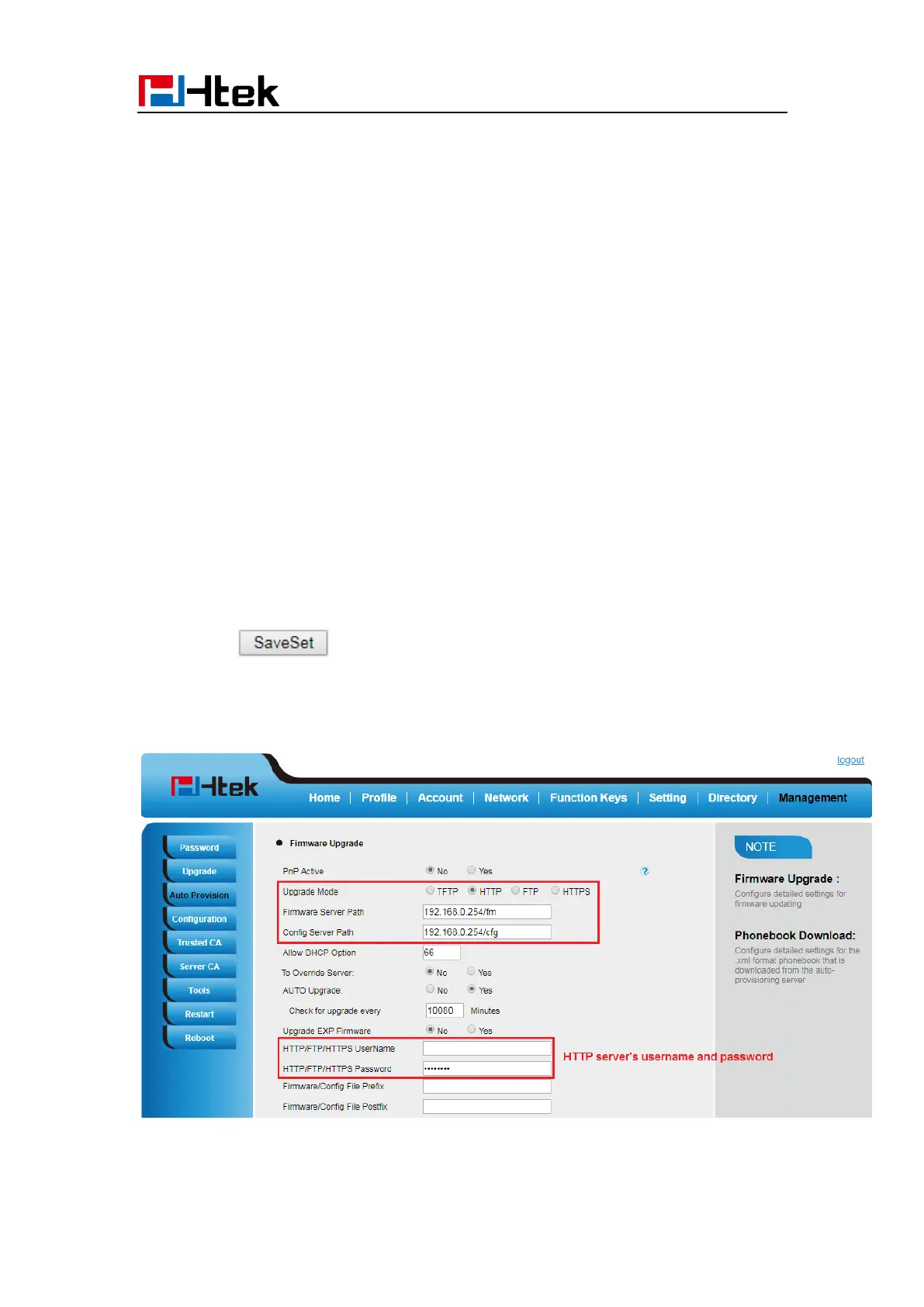
To configure the server path via Web interface:
1. Click Management→ Auto provision:
2. Select the upgrade mode in the Upgrade Mode field
3. Enter the Firmware Server Path and Config Server Path (192.168.0.254 is HTTP
server).
4. Enter the HTTP server’s username and password (optional).
5. Click the button to save the configuration.
6. Restart the UC926E, IP Phone will restart and auto-get firmware files from HTTP
server.
NOTES:



 To Next Page