Basic Setting Configuration
73
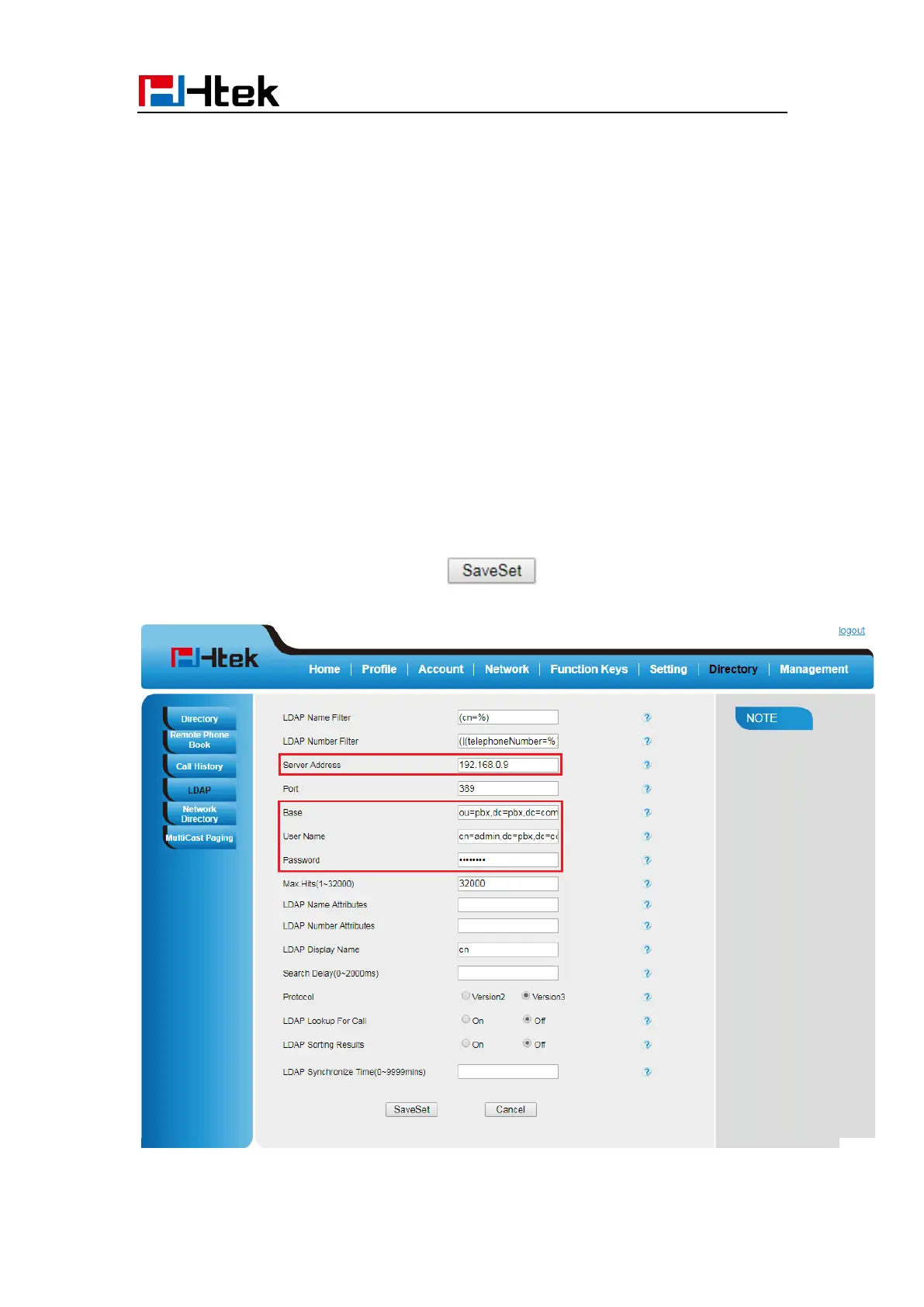
To configure LDAP via Web interface:
1. Login webpage and click Directory→ LDAP
2. Filled the LDAP Name Filter:
a) This parameter specifies the name attributes for LDAP searching. The “%”
symbol in the filter stands for the entering string used as the prefix of the filter
condition.
b) For example, (cn=%), when the name prefix of the cn of the contact record
matches the search criteria, the record will be displayed on the IP PHONE LCD.
3. Filled LDAP Number Filter:
This parameter specifies the number attributes for LDAP searching.
4. Filled Server Address: Fill the domain name or IP address of the LDAP Server.
For example: 192.168.0.9
5. Port (the port of the LDAP Serve) Base, User Name, Password
6. Max.Hits(1-32000): the maximum number of the search results to be returned by the
LDAP server.
7. LDAP Display Name: the display name of the contact record displayed on the LCD
screen.
8. Filled the relative value and then click to save the settings.
Following is the example screenshot for the configuration.



 To Next Page