9
UPDATING THE FIRMWARE
9-6
CAUTION: DO NOT turn OFF the receiver while updating the rmware.
If you turn OFF the receiver, or if a power failure occurs while updating, the rmware
may be damaged and you may have to send the receiver back to the nearest Icom
distributor for repair. This type of repair is out of warranty, even if the receiver warranty
period is still valid.
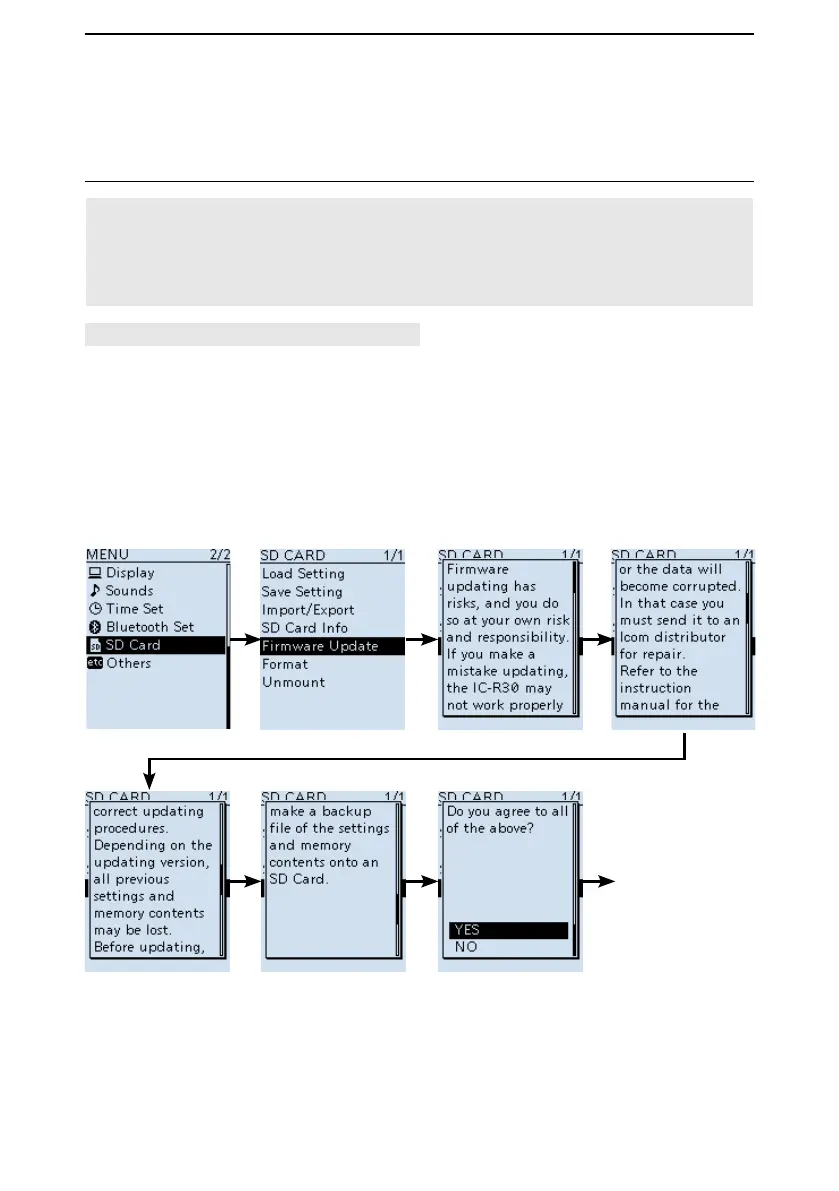
[MENU] > SD Card > Firmware Update
1. Push [MENU].
2. Select “Firmware Update.” in the “SD Card” menu.
(Rotate [DIAL] to select it, then push [ENTER].)
• The Firmware Update Agreement window appears.
3. Rotate [DIAL] to scroll the screen.
L Carefully read all the displayed precautions.
4. After you read and agree with all the precautions, select “YES.”
L If you want to cancel the updating, select “NO.”
■ Updating the rmware (Continued)
5. Updating the rmware
(Continued on the next page)
To Step 5



 To Next Page