1 - BASE INFORMATION KID 80 SIV
EN
1 - Pag. 7 / 15
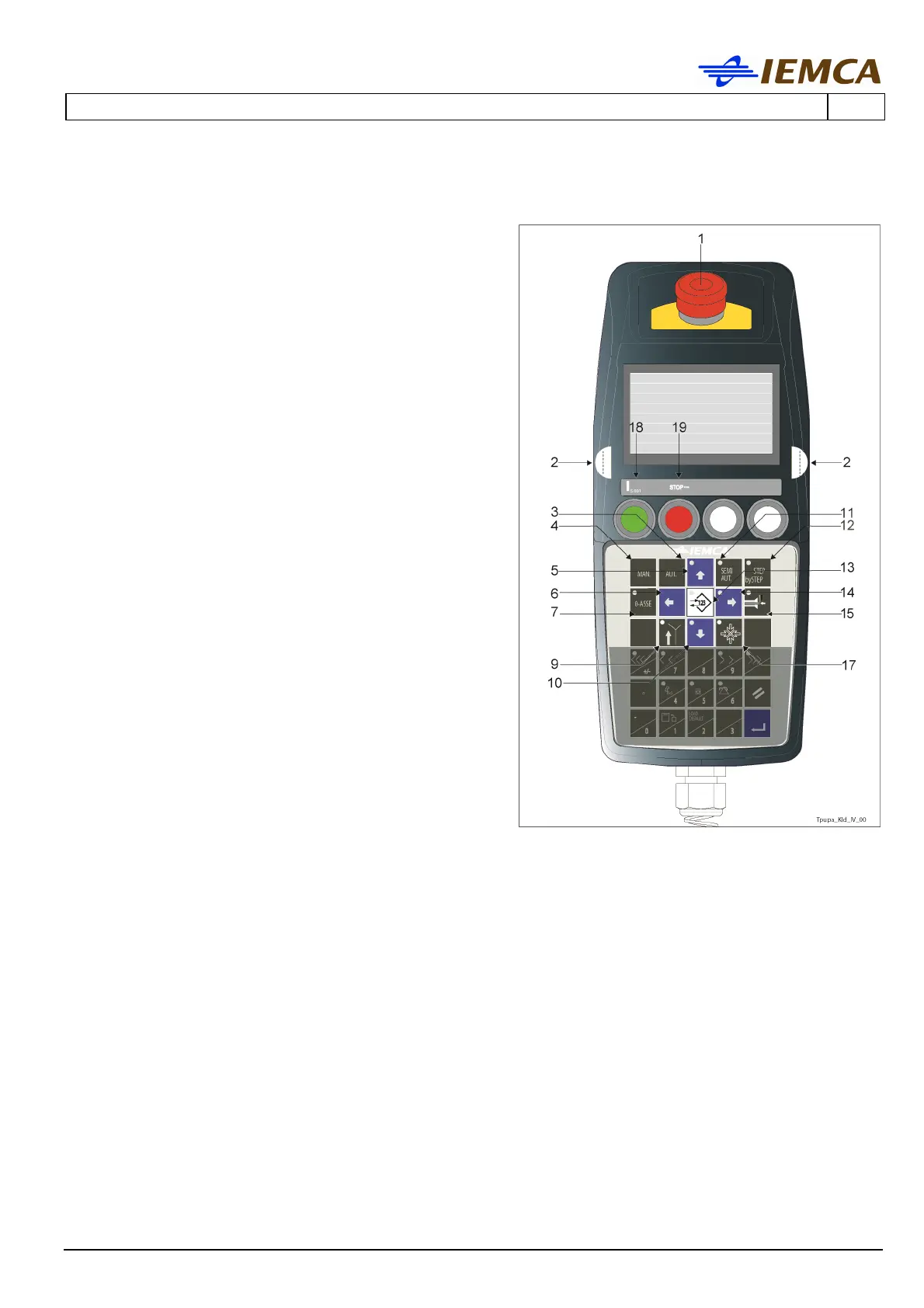
13 Selects the keyboard modes:
- with LED off [pupa_kid_barra_vert-dx];
selects the "message display" mode.
- with LED on [pupa_kid_barra_oriz-sx]; selects
the "parameter display" mode.
14 Multifunction
- Selects the next parameter
- Moves the selection cursor rightwards.
15 Selects the feeding of a new bar until the facing
position is reached.
- Press both opposite start buttons; you can
release the keys from the beginning of the
feeding. The procedure will continue until the
facing position is reached.
17 Selects the reset function after a new tooling:
- Press both opposite start buttons and then
the key; press and hold the keys until the
procedure is completed.
18 "Errors" reset button.
19 Bar feeder stop button (red); press this button
to stop the bar feeder.
- In "Manual" mode, when the bar feeder is in
the required position, the half-bushes will
close when this button is pressed. If pressed
again, the half-bushes will open.
- In "Automatic" mode, if pressed, the half-
bushes will open and close, according to the
preset sequence. If pressed again, the half-
bushes will remain open during the entire
operating cycle.







 To Next Page