EN
1 - BASE INFORMATION KID 80 SIV
1 - Pag. 14 / 15
SYS (SYSTEM) FUNCTION
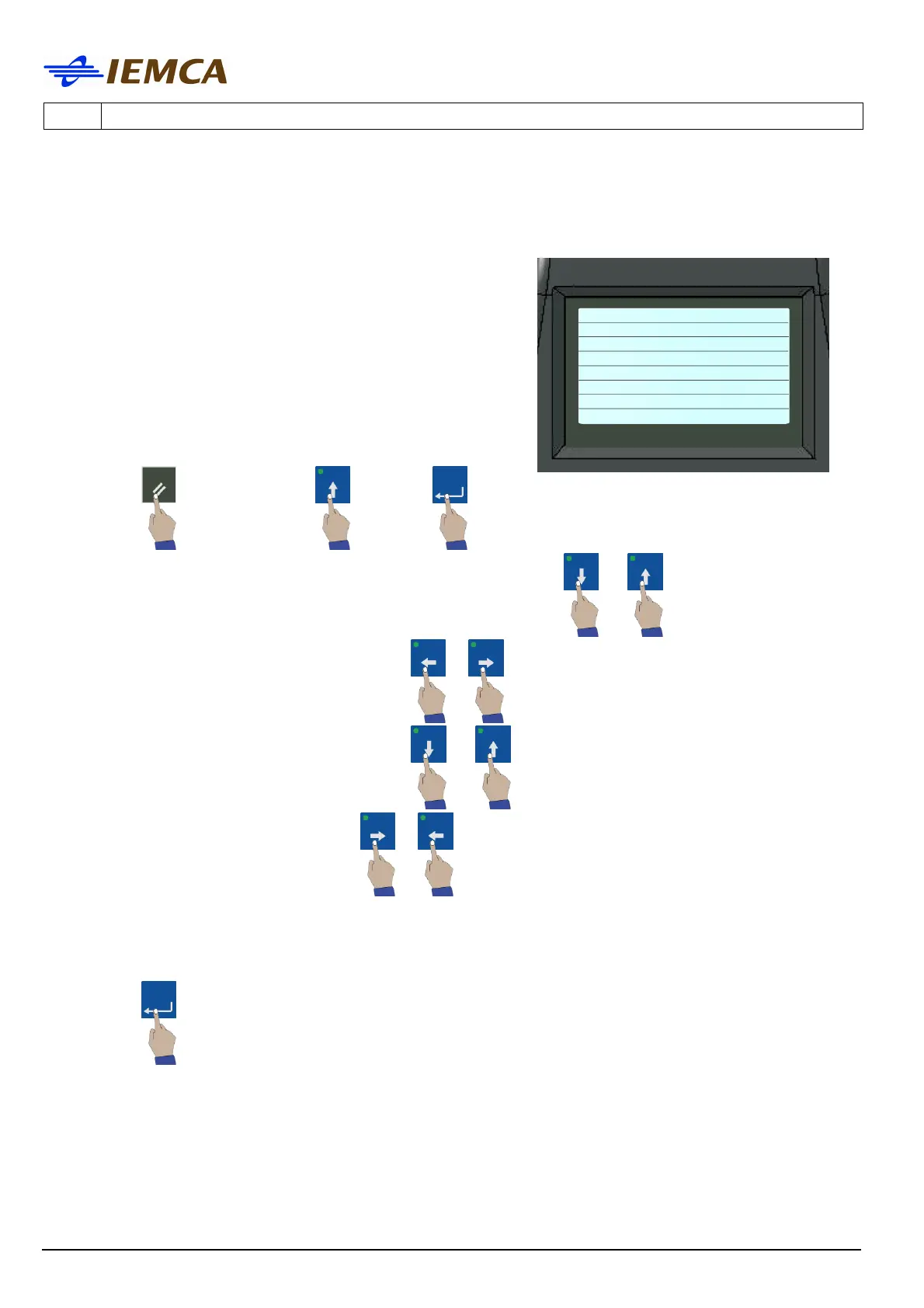
This function displays the keyboard setup parameters; the display shows:
To adjust the display brightness: LO<- DISPLAY -> HI
To reset the button LEDs: OFF<- LAMP -> ON
Shows ON-OFF between the keyboard and the PLC: PLC
... COMM ON 00
SIMANTIC S7 ETH V4.06
Shows the connection between the keyboard and the
printer: PRINTER ... OFF
Shows the keyboard battery conditions: BATTERY ... OK
1. To exit:
or select "EXIT" confirm:
2. To adjust the brightness of the display, select "DISPLAY":
or
To increase or decrease the brightness:
or
3. To test the button LEDs, select "LAMP":
or
to test the operation of the LEDs:
or
EXT (EXIT) FUNCTION
This function is used to exit from the Setup screen.
1. To exit:
LO<- DISPLAY -> HI
OFF<- LAMP -> ON
PLC ... COMM ON 00
SIMANTIC S7 ETH V4.06
PRINTER ... OFF
BATTERY ... OK
empty 0 H000 X000







 To Next Page