TOS5300 55
5
Withstanding Voltage and Insulation Resistance Tests
Saving the Calibration Date
Whenever you calibrate the TOS5300, save the calibration date.
p.73
If the calibration expiration date based on this date is reached, an expiration message will appear.
You can access the calibration date from the configuration setup screen (Configuration Menu).
1
Press CONFIG (SHIFT+FUNCTION) to display the configuration setup screen
(Configuration Menu).
2
Hold down MORE for approximately 2 seconds.
The Advanced Menu appears.
3
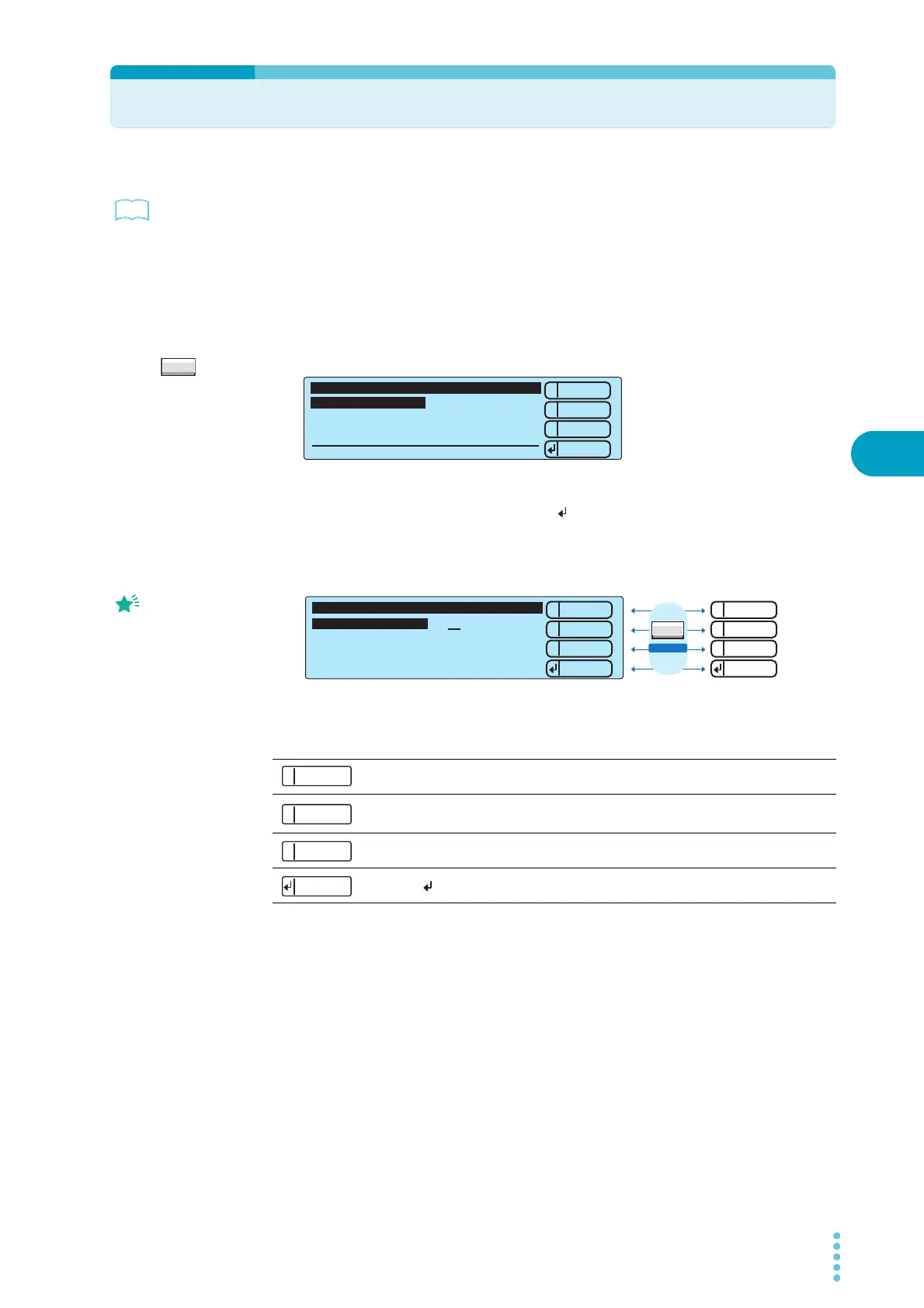
Press 2: Up (MEMORY 2) or 3: Down (MEMORY 3) to move the cursor to
2.Calibration Date, and press Select ( : RECALL) to select it.
4
Press 2: Up (MEMORY 2) or 3: Down (MEMORY 3) to select the year, month, or
day that you want to set, and then use the rotary knob to set the value.
When the calibration date setup screen is displayed, pressing SHIFT changes the functions of the
keys.
5
Press 3: Apply (SHIFT+MEMORY 3) to update the calibration date.
To leave the calibration date setup screen and return to the Advanced Menu, press 1: Menu
(MEMORY 1). To leave the Advanced Menu and return to the basic setup screen, press STOP.
See
MORE
1
2
3
Select
Down
Up
1.Measurement
2.Calibration Date
3. 6.
4.
5.
Advanced Menu
----
Press stop switch to exit!
*
Press Today (RECALL) to set
today's date.
SHIFT + 1: Back Displays the previous setup screen.
SHIFT + 2: Clear
Returns to date that was set during the last calibration
service.
SHIFT + 3: Apply Applies the set calibration date.
SHIFT + : Forward
Displays the next setup screen.
1
2
3
Apply
Clear
Back
Forward
1
2
3
Down
Up
Menu
Set Calibration Date 2012 / 2/29
Time Zone
OFF
3.Calibration Date
Today
1
Back
2
Clear
3
Apply
Forward



 To Next Page