38 TOS5300
Panel Operations
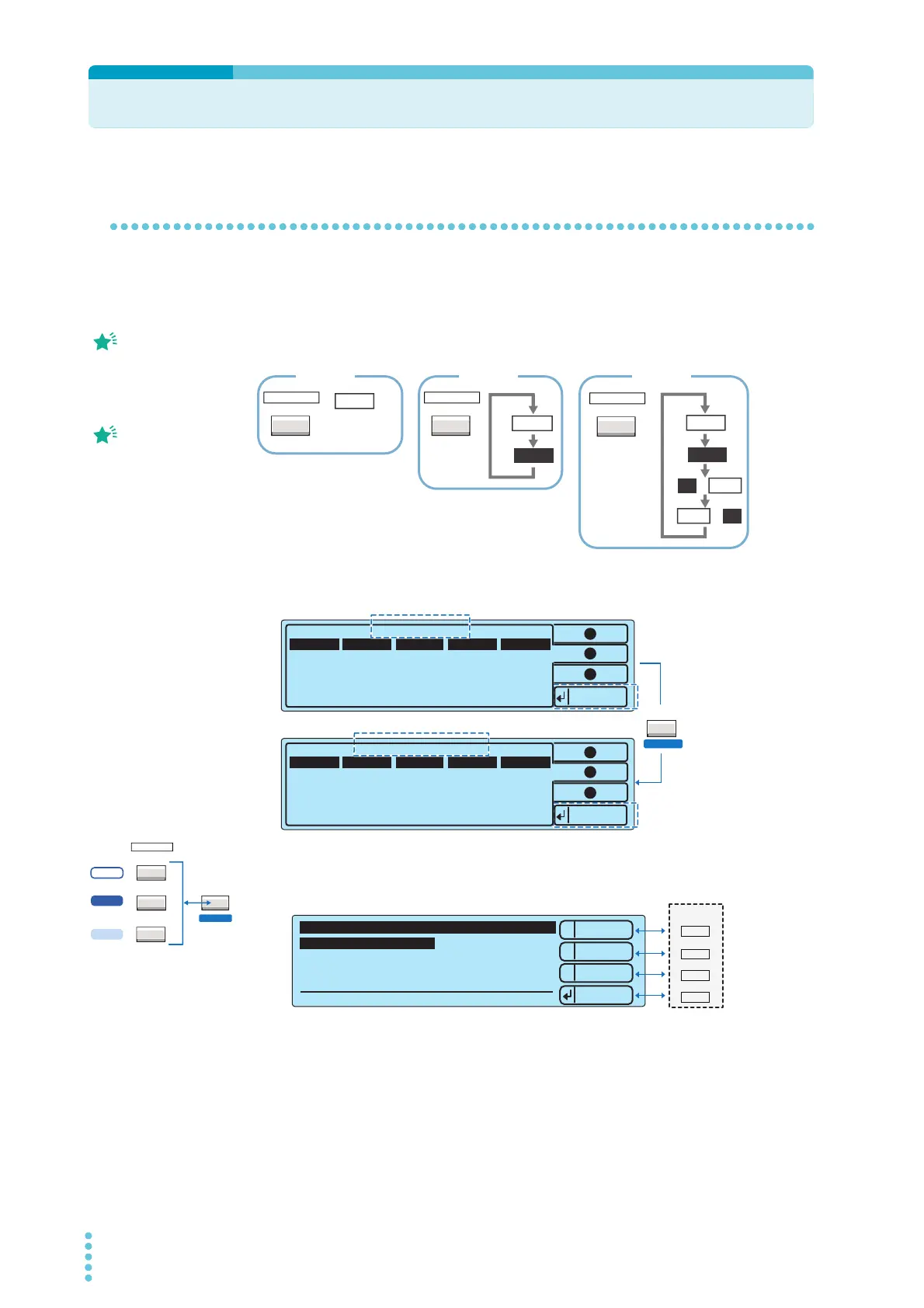
Switching between screens
The TOS5300 Series display is made up of a number of different screens. To return to the basic setup
screen, press STOP.
To switch between the test mode screens, press FUNCTION. This will display the basic setup screen
for the AC withstanding voltage, DC withstanding voltage, and insulation resistance (IR) tests. The
display switches between screens each time you press FUNCTION.
To display the memory recall screen, press MEMORY 1, MEMORY 2, or MEMORY 3. If you press SHIFT,
this screen will switch to the store screen.
To display the configuration setup screen (Configuration Menu), press CONFIG (SHIFT+FUNCTION).
On the Configuration Menu, the Up, Down, and Select menu selection functions are assigned to the
MEMORY keys.
If you display a configuration item setup menu from the Configuration Menu, functions such as
Menu, Up, Down, Check, and Apply are assigned to the MEMORY keys.
The screen that first
appears when you are
setting test conditions is
referred to as the basic
setup screen.
The ACW key on the
TOS5300, the ACW/DCW
key on the TOS5301, and
the ACW/IR/AUTO key on
the TOS5302 are all referred
to as the FUNCTION key.
ACW
ACW
ACW
DCW
IR
IR → ACW
ACW → IR
ACW
FUNCTION
ACW / DCW
FUNCTION
ACW / IR / AUTO
FUNCTION
TOS5300 TOS5301 TOS5302
* The TOS5300 only supports ACW tests.
LOCAL
SHIFT
Recall
ACW
0.00kV
OFF 0.3s
0.02mA
Lower
— Memory 2 —
Upper Voltage
Function
Time
ACW
0.50kV
OFF 0.3s
0.03mA
Lower Upper Voltage
Function
Time
Store
— Test Conditions —
1
2
3
1
2
3
While you hold down
SHIFT, the following key
and the current test
conditions are displayed.
ACW
FUNCTION
ACW / DCW
ACW / IR / AUTO
LOCAL
S
5300
5301
5302
1
2
3
1.Test Mode and Buzzer
2.Status Signal Output
3.Date and Time
4.Communication
5.Information
Configuration Menu
Select
Down
Up
----
Press stop switch to exit!
*
1
MEMORY
2
3
RECALL



 To Next Page