94 TOS5300
D
Troubleshooting
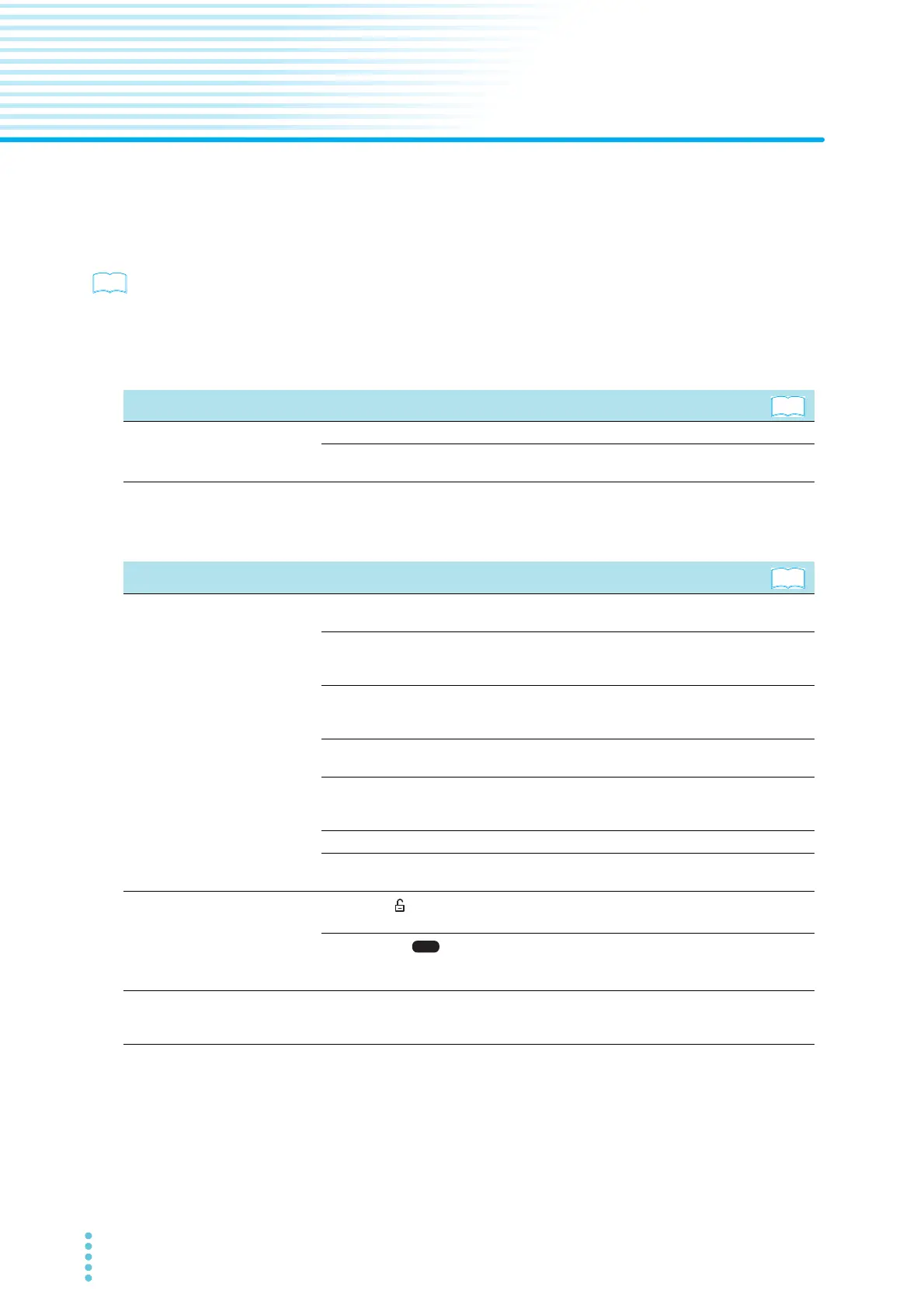
This section introduces troubleshooting measures. Typical symptoms are listed. Check whether any of the
items listed below apply to your case. In some cases, the problem can be solved quite easily.
p. A-86
If none of the items apply to your case, we recommend that you initialize the TOS5300 Series to its
factory default settings. If the remedy does not correct the problem, Contact your Kikusui agent or
distributor.
The power does not turn on
Unable to carry out panel operations
Symptom Items to check and possible remedy
The TOS5300 Series does not
operate when the POWER switch is
turned on.
Is the power cord disconnected? p.21
Has the interlock feature been activated?
Release the interlock feature.
p.23
p.68
Symptom Items to check and possible remedy
Testing does not begin when the
START switch is pressed.
Is a probe connected to the REMOTE connector?
When a probe is connected, only the probe’s START switch is enabled.
p.28
Is a STOP signal being applied to the SIGNAL I/O connector?
When you are using the SIGNAL I/O connector to control the TOS5300 Series, the
START switch on the panel is disabled.
p.67
Is the TEST LED blinking?
The TOS5300 Series is in the middle of the voltage rise time. The test will begin
when the rise time elapses.
p.58
Is “PROTECTION” message displayed on the screen?
The TOS5300 Series is in PROTECTION mode. See ”Protective Features.”
p.93
Is the double action feature on?
Press STOP, and then press START within 0.5 seconds of pressing STOP. Alternatively,
turn the double action feature off.
p.56
You cannot start tests while panel memory is being accessed. p.42
Is a message displayed in the level bar area?
A setting is invalid. Specify settings that are within the correct range.
p.46
Panel operations are not being
registered.
Is “KEY LOCK ” displayed (or blinking) in the upper right of the screen?
Release the key lock.
p.40
Is the USB icon ( ) displayed?
The USB interface is in use. To control the TOS5300 Series from the panel, press the
LOCAL key to switch to local mode.
—
The TOS5300 Series does not switch
to local mode even when the LOCAL
key is pressed.
Was a local lockout (LLO) command sent through the communication interface?
Use a communication command to clear LLO command. —



 To Next Page