28 TOS5300
Connecting to the Device under Test (DUT)
Using the optional high voltage test probe (model HP01A-TOS/
HP02A-TOS)
p.17
If you use the optional test probe instead of the test leads, you can use hands-on control to start
tests. For details, see the “OPERATION MANUAL HIGH VOLTAGE TEST PROBE HP01A-TOS/HP02A-
TOS.”
Disconnecting test leads from the DUT
1
Check that the analog voltmeter is indicating “0” and that the DANGER LED is
off.
2
Disconnect the HIGH VOLTAGE test lead (red) from the front-panel HIGH
VOLTAGE terminal.
3
Disconnect the HIGH VOLTAGE test lead (red) from the DUT.
4
Disconnect the LOW test lead (black).
You can disconnect the LOW test lead (black) first from either the DUT or the
TOS5300 Series.
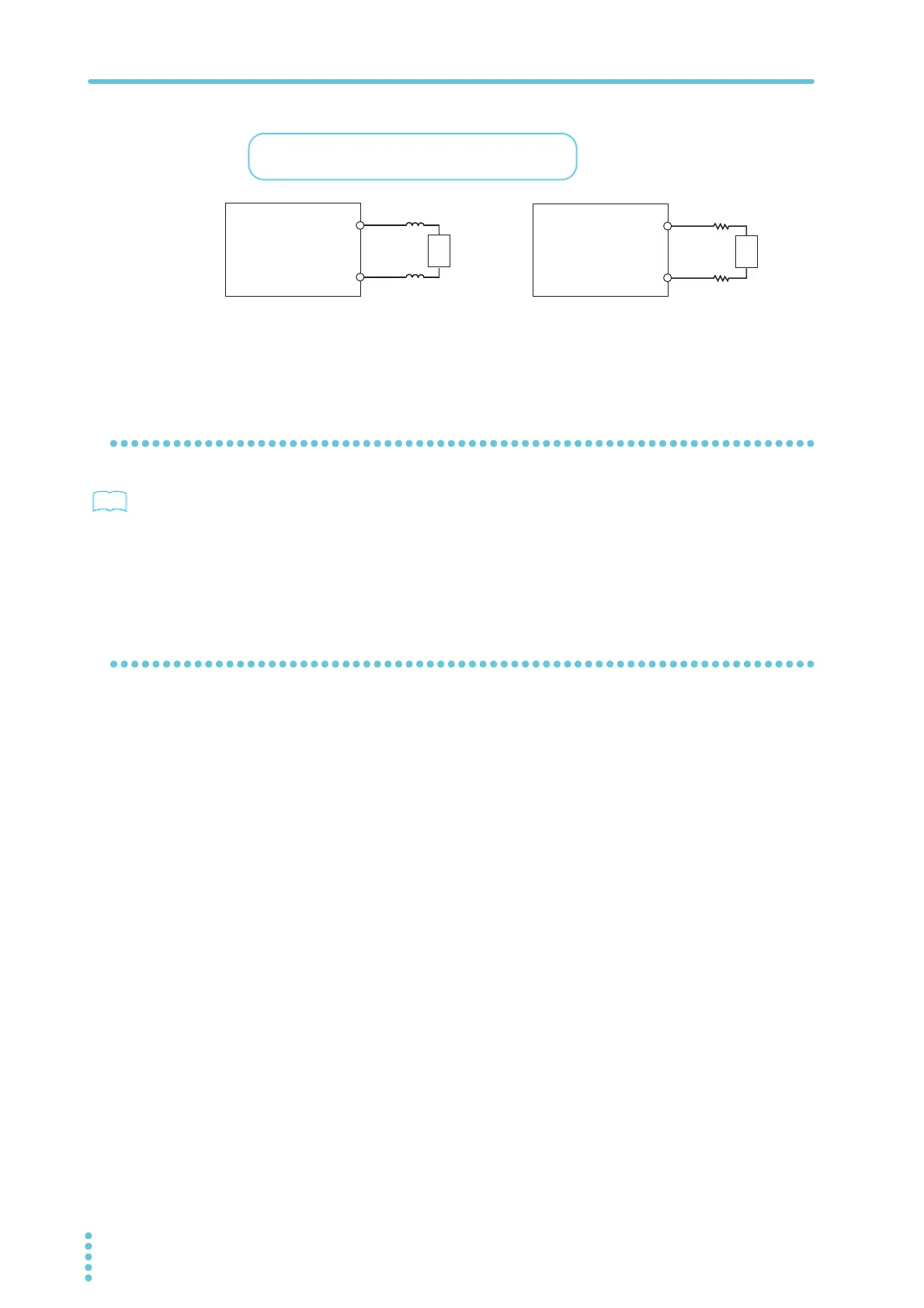
470 Ω, 3 W
470 Ω, 3 W
DUT
Toroidal core
Toroidal core
HIGH VOLTAGE
terminal
Connect the toroidal core or resistor as close to the DUT
as possible.
LOW terminal
TOS5300 Series
HIGH VOLTAGE
terminal
LOW terminal
TOS5300 Series
DUT



 To Next Page