Stratos Multi E401N
31
3.3 Sensor Connection
3.3.1 Connecting a Memosens Sensor/Optical Oxygen Sensor (LDO)
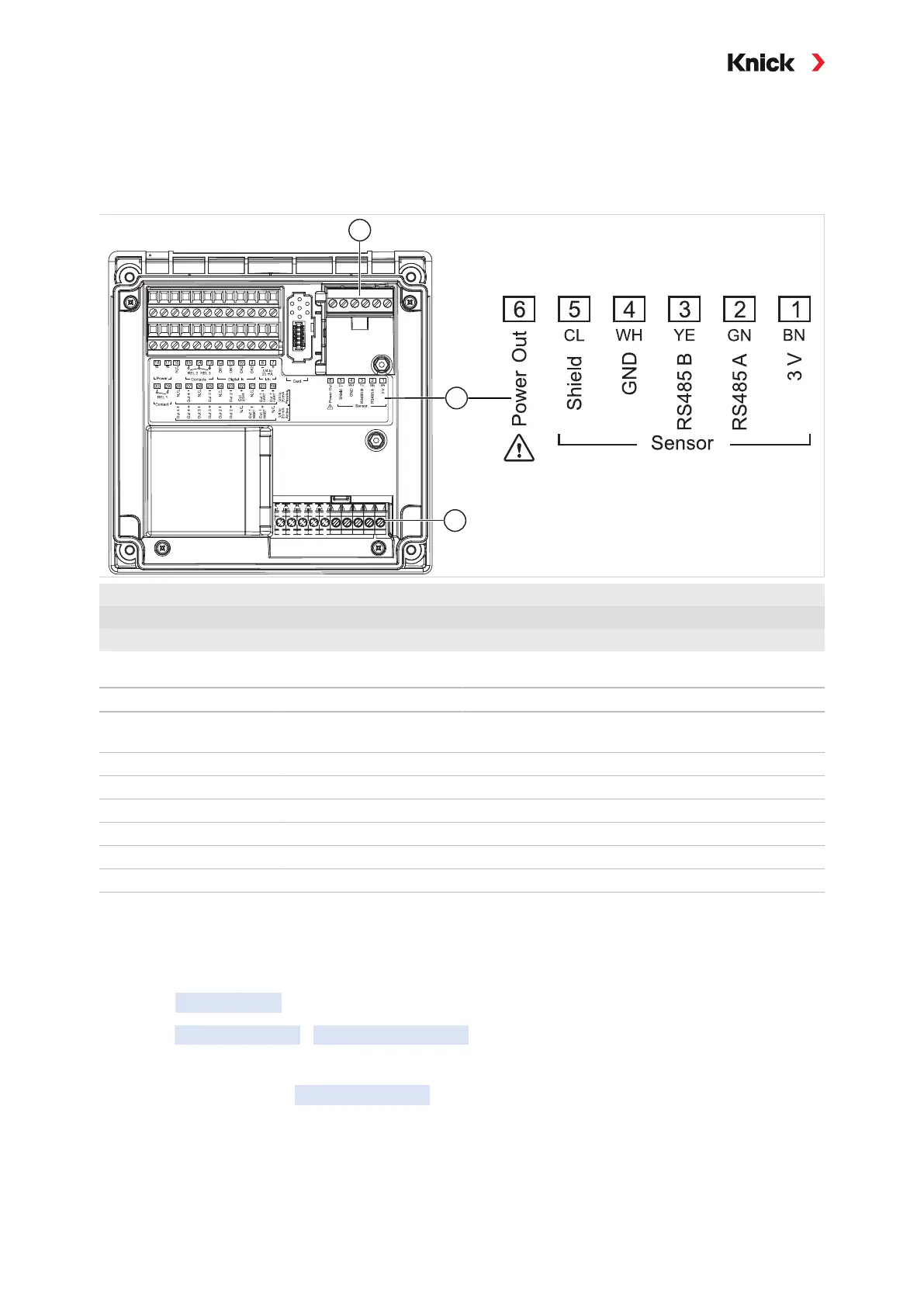
Top view of terminals for Memosens/LDO sensor. The figure shows the opened device, rear side of the
front unit.
1
Standard sensor connection for digital sensors (Memosens sensor/LDO SE740 sensor)
2
Terminal plate with terminal assignments for digital sensor
3
Sensor connection for analog sensors or second Memosens sensor via measuring module
Note: The terminals are suitable for single or stranded wires up to 2.5mm
2
.
Memosens sensor SE 740 optical oxygen sensor (LDO)
Terminal Wire color Wiring
Memosens cable
Terminal Wire color Wiring
M12 cable
1 Brown (BN) +3V 1 -
2 Green (GN) RS-485 A 2 Gray RS-485 A
3 Yellow (YE) RS-485 B 3 Pink RS-485 B
4 White (WH) GND 4 Brown Shield
5 Transparent (CL) Shield 5 - -
6 6 White Power Out
01. Using an appropriate sensor cable, connect a Memosens sensor or the SE740 optical oxygen
sensor (LDO) to the RS-485 interface (2)
of the Stratos Multi.
02. Then select a measuring function and configure the sensor:
From within measuring mode, press the left softkey: Menu
.
✓ The Menu selection opens.
03. Select Parameter Setting
Sensor Selection [I] [II] .
Note: Function check (HOLD) is active.
04. Press enter to open the Sensor Selection [I] .
05. Select process variable, mode, and functionality, and confirm with enter.
Set further parameters with the left softkey: Back
.
06. Return to measuring mode to exit parameter setting,
e.g., with the right softkey: Back to Meas
.



 To Next Page