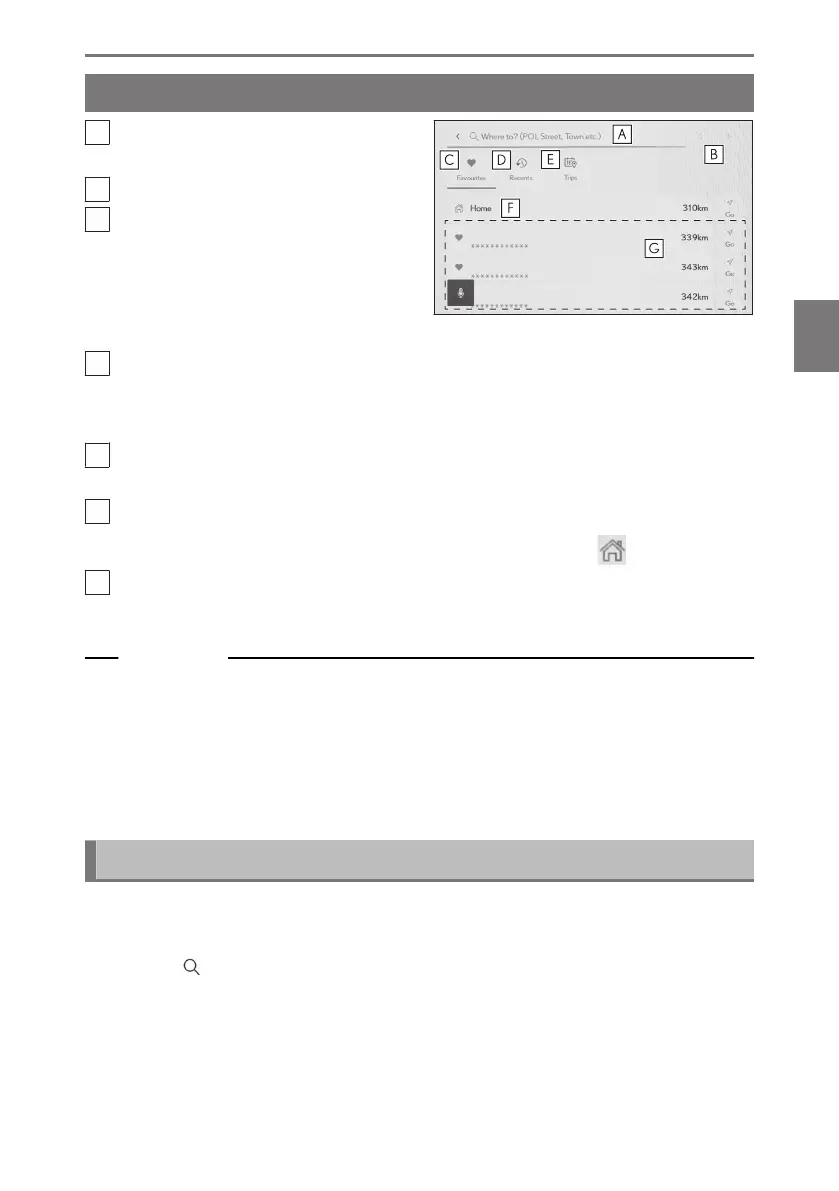
Destination search screen
A
Touch to search using a location
name, address, or phone number.
B
Touch to move the text cursor.
C
Touch to display a list of the area
around all points registered as a fa-
vorites.
This can only be used if a point has
been registered as a favorite.
D
Touch to display a list of points from the destination history (previously set
destinations).
This can only be used if destination history exists.
E
Touch to display a list of the destinations of the Drive Plan sent in advance from
a smartphone.
F
Starts a route search with your home as the destination.
If a home is not registered, it can be registered by touching [
].
G
If the name of a destination is touched, the full route map screen will be
displayed. Touch [Go] to start route guidance immediately.
Related Links
Searching through character entry(P. 157)
Searching through destination history(P. 159)
Searching through Drive Plan(P. 159)
Setting home as destination(P. 158)
Setting a favorite as the destination(P. 158)
Searching through character entry
A destination can be searched for by entering a location name, address, or phone
number.
1 Touch [ ] on the map screen.
2 Touch [Where to? (POI, Street, Town etc.)].
3 Enter the location name, address, phone number, etc. and touch [Go].
● Potential destinations are searched for and displayed with each entered character.
4-3. Destination search operation
157
4
Navigation













 To Next Page