Basic operation of navigation system
Map screen
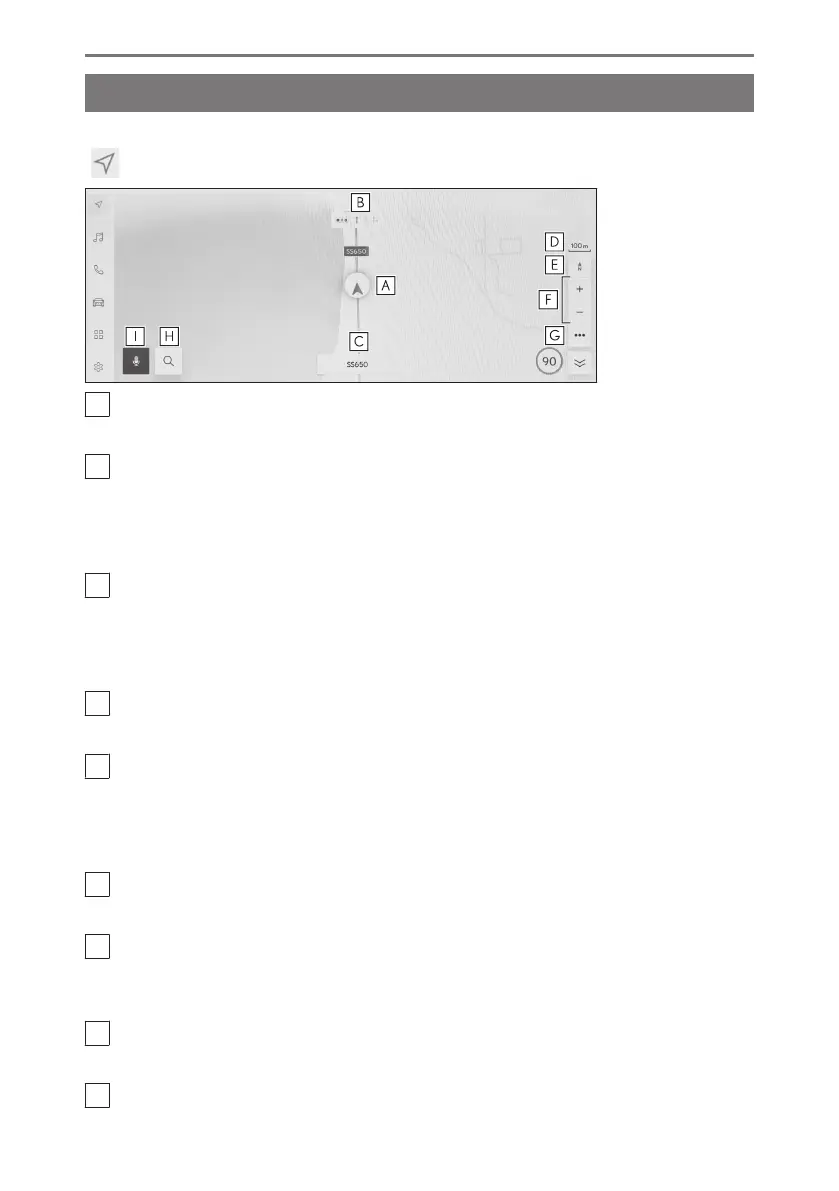
Information displayed on the map screen and its purpose is as follows. Touch
[ ] from the main menu.
A
Current position mark
Displays current position and orientation of the vehicle.
B
Lane information display
Displays the through and turning lanes at an intersection/junction.(Only available for
intersections/junctions with information in the map data)
During route guidance, the suggested lane to drive in will be displayed in highlight.
C
Name display
Depending on the situation, the following will be displayed: (Only available for points
with information in the map data)
● Names of roads being driven on
D
Scale display
Displays the scale of the displayed map.
E
Orientation mark
Displays the orientation of the map. Touch to change the orientation of the map.
For details about changing the orientation of the map, refer to changing the orientation
of the map.
F
Zoom in/out button
Zooms the map screen in/out.
G
Display setting button
Displays the display setting screen and allows for changing of the nearby POI display
settings, etc.
H
Destination button
Displays the destination search screen.
I
Microphone button
1-2. Basic operation of navigation system
28













 To Next Page