Destination setting
Full route map screen
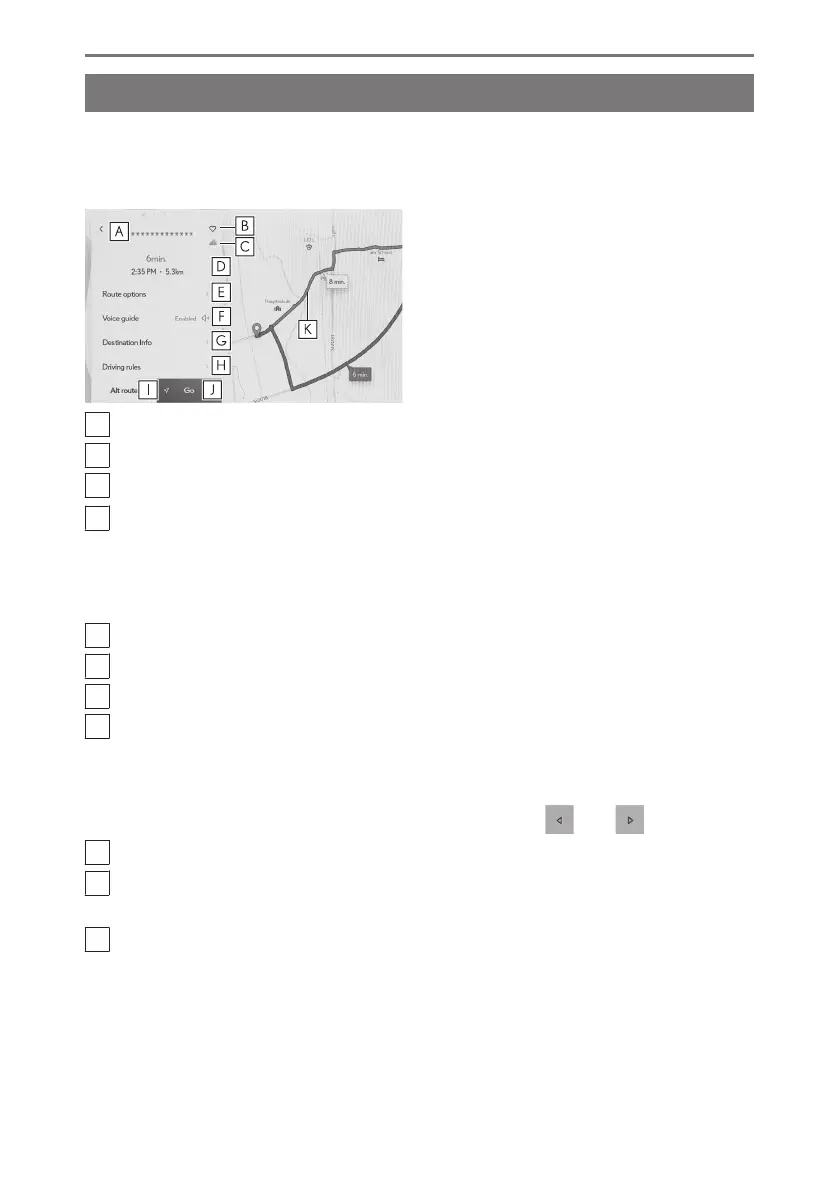
After setting a destination, the full route map screen will be displayed. On the full
route map screen, the desired route can be selected or the route information can
be checked.
A
Displays the name or address of the destination.
B
Touch to register the destination as a favorite.
C
Displays the current weather at the destination.
*1
D
Displays the distance, travel time, and estimated time of arrival from the starting
point to the destination.
When multiple destinations are set, touch to display a list of the estimated time
of arrival for each destination.
E
Touch to display the route options.
F
Touch to mute voice guidance.
G
Touch to display detailed information about the destination.
H
Touch to display driving restrictions information.
*2
If there are driving restrictions (exhaust restrictions or ecological vehicle stick-
er required segments) along a route, the restriction details can be checked.
Restriction information can be switched by touching [
] or [ ].
I
Touch to select another route.
J
Touch to start route guidance. Touch and hold to start a demo of route
guidance to the destination.
K
Touch to select the desired route other than the currently navigating route.
● Select from the following three routes: recommended route, time priority
route, and general road priority route. As initial setting, recommended route
is selected.
*1 : This function is displayed when using Connected navigation.
*2 : 14-inch display with built-in navigation system
4-4. Destination setting
164













 To Next Page