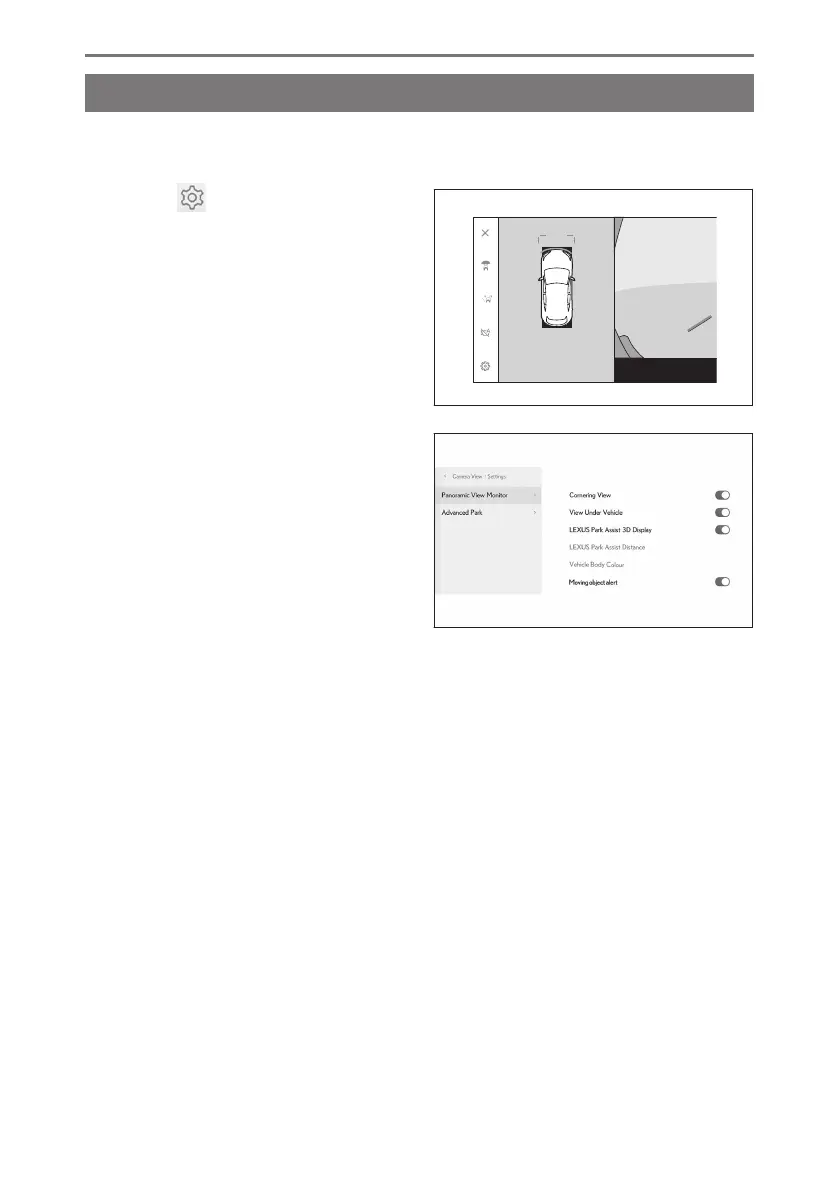
Changing the panoramic view monitor settings
Settings related to panoramic view monitor such as the cornering view auto display
and vehicle body color can be changed.
1 Touch [ ].
2 Select the desired item.
● [Cornering View]
Enable or disable the automatic dis-
play of the cornering view.
● [View Under Vehicle]
Turn the transparent underfloor vision
display setting on or off. Setting it to
on and moving the vehicle forward or
backwards displays a composite of camera vision captured in the past from the
current vehicle position to assist understanding of the situation under the vehicle,
front tire positions, and so on. The vision is displayed in panoramic view, side
clearance view, or cornering view.
● [LEXUS Park Assist 3D Display]
Show or hide the Lexus parking assist-sensor 3D display.
● [LEXUS Park Assist Distance]
Change the distance that the Lexus parking assist-sensor starts detecting obstacles.
● [Vehicle Body Colour]
Change the vehicle body color displayed on the screen.
● [Moving object alert]
*1
Enable or disable the moving objects alert.
● [Warnings when auto display mode enabled]
*1
Enable or disable the alert when auto display mode is on.
*1 : If equipped
8-2. Panoramic view monitor
318













 To Next Page