Route guidance
Route guidance screen
Easy to understand, vocal and visual guidance are provided during route guidance
at relevant points, such as intersections and junctions.
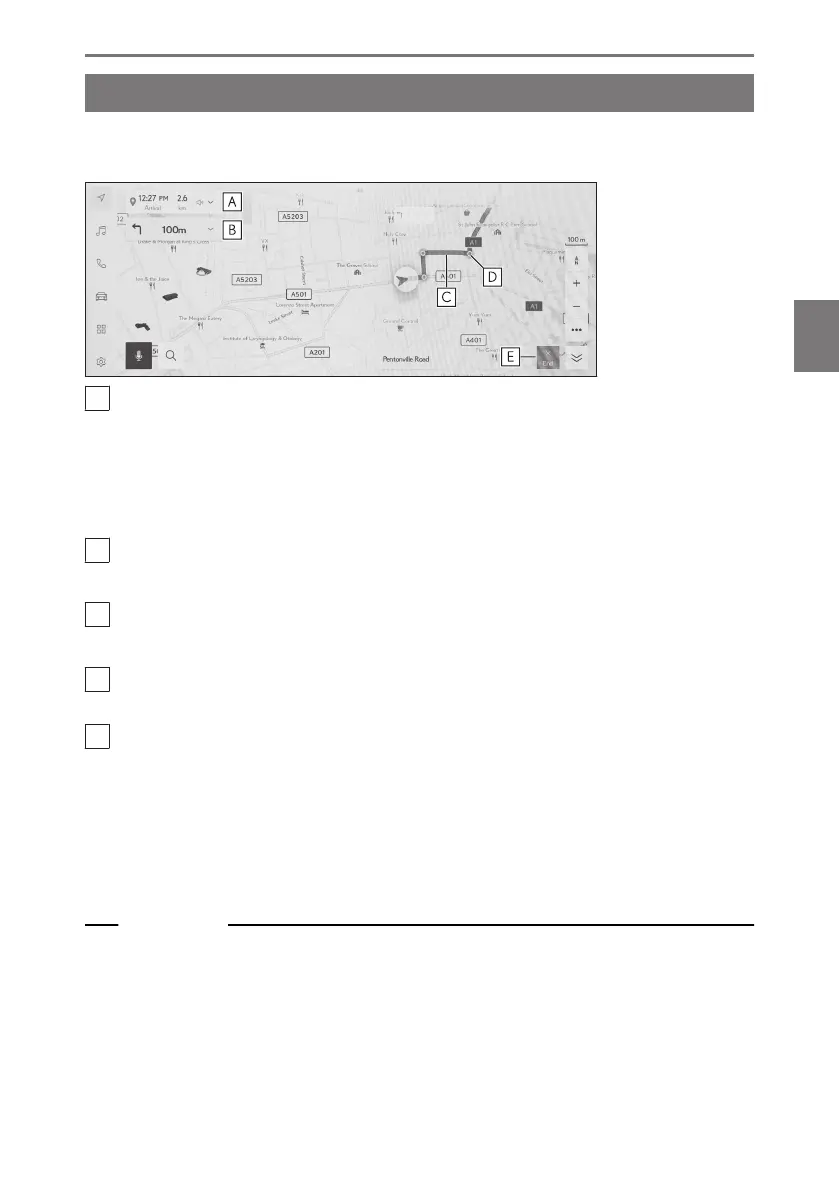
A
Displays the distance and estimated time of arrival from the current position of
the vehicle to the destination.
If the route has been deviated from, the estimated time of arrival will not be
displayed. Instead, the straight line distance to the destination will be displayed.
Touch to display the full route map screen.
B
Displays the distance to the next turn and the turn direction.
Touch to display a lane list up to the destination.
C
Display the route to the destination.
For setting the display color of the route, refer to setting the map display.
D
Displays the nearest intersection/junction to be passed or turned at during
route guidance.
E
Touch to end route guidance. When multiple destinations have been set, touch
[Delete destination]to delete all destinations and stop route guidance, and
touch [Delete next destination] to delete only the next destination and continue
route guidance.
● If the route cannot be searched for, a message will be displayed on the
screen.
Related Links
Changing the map display settings(P. 80)
Lane display screens(P. 172)
4-5. Route guidance
171
4
Navigation













 To Next Page