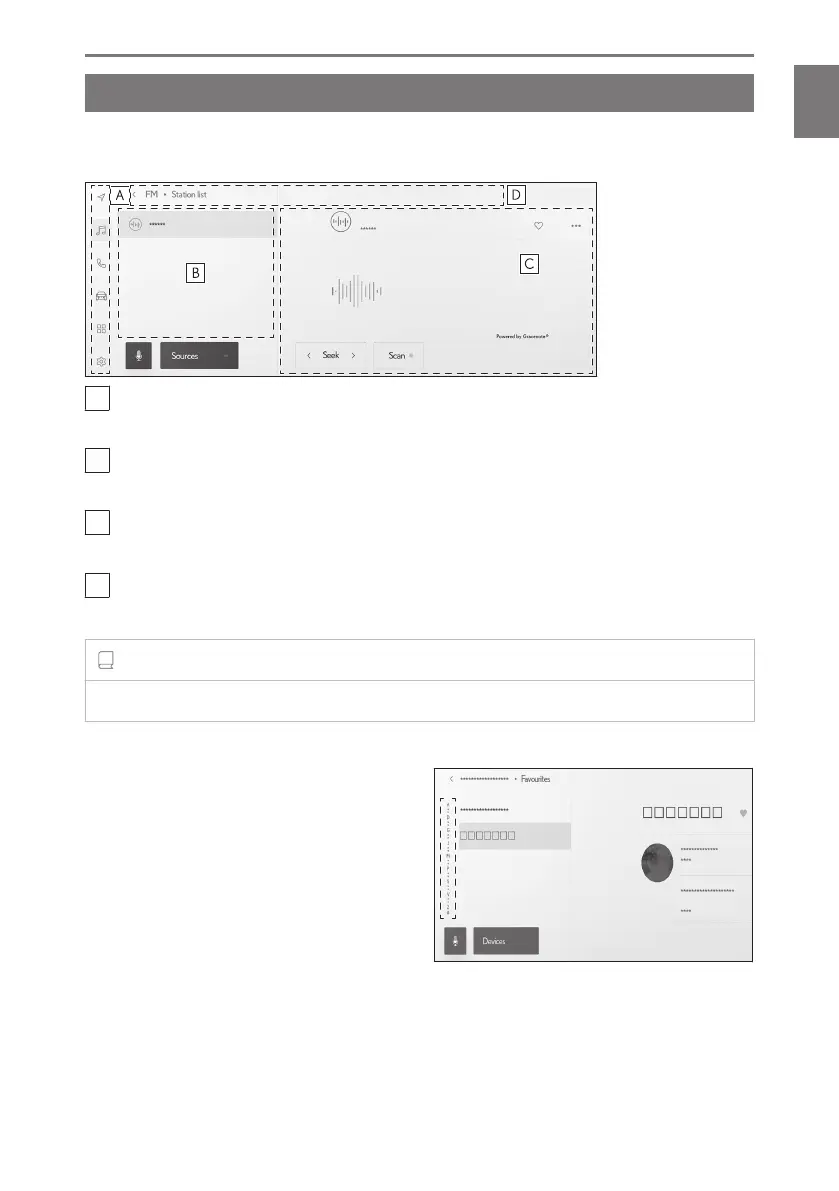
Basic screen function
A list screen will be displayed if there are multiple candidates such as settings and
audio. Scroll the list to select the desired item.
A
Main menu
Changes the function to be displayed on the screen by touching an icon.
B
Submenu
Displays items on a list. Scrolling the list can be done by dragging or flicking the screen.
C
Description area
Displays detailed information about the item you selected on the submenu.
D
Breadcrumb list
Displays screen titles in a hierarchy. Touching [<] returns to the hierarchy one level up.
INFORMATION
Operation of the screen is restricted while driving.
■ Searching a list
Touching text in an index displays the de-
sired item from the list.
1-1. Basic operation of multimedia system
25
1
Basic operation













 To Next Page