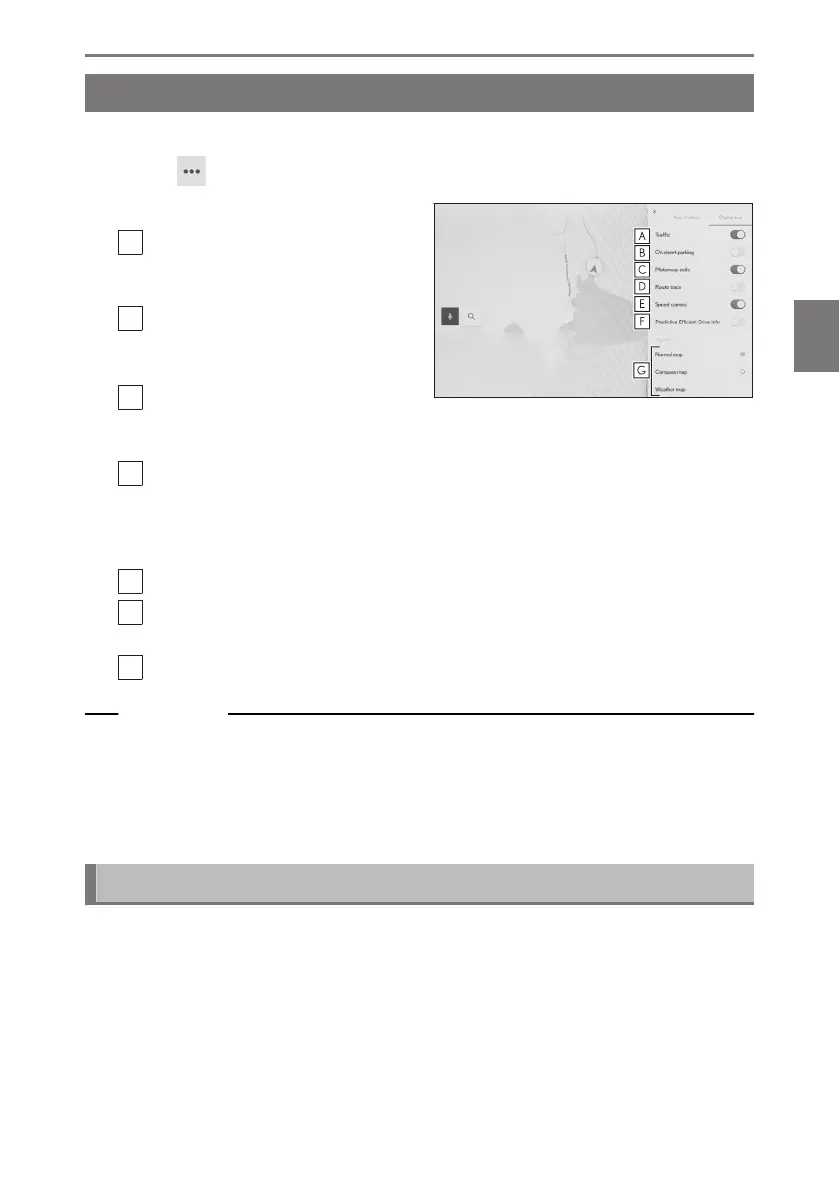
Map display settings
Traffic information, etc. can be displayed on the map screen.
1 Touch [ ] on the map screen.
2 Touch [Display map].
A
Touch to change the display of traffic
information between displayed/hid-
den.
B
Touch to change the display of near-
by on street parking between dis-
played/ hidden.
*1
C
Touch to change the display of Mo-
torway exits between displayed/hid-
den.
D
Touch to change the display of the driven route (route trace) between displayed/
hidden.
When changed to hidden, a popup asking to confirm the deletion of stored
information will be displayed.
E
Touch to change the display of speed camera between displayed/hidden.
*1*2
F
Touch to change the display of predictive efficient drive between displayed/hid-
den.
*1*3
G
Touch to change the map display from Normal Map, Compass, and Weather Map.
Related Links
On street parking(P. 151)
Displaying the driven route (route trace)(P. 152)
Speed cameras(P. 152)
Traffic Information(P. 153)
On street parking
*1
If [On street parking] is set to on in the map display settings, on street parking near
the vehicle will be displayed. If it is set to off, on street parking near the destination
will be displayed.
This function is not made available in some countries or areas.
4-2. Map information
151
4
Navigation













 To Next Page