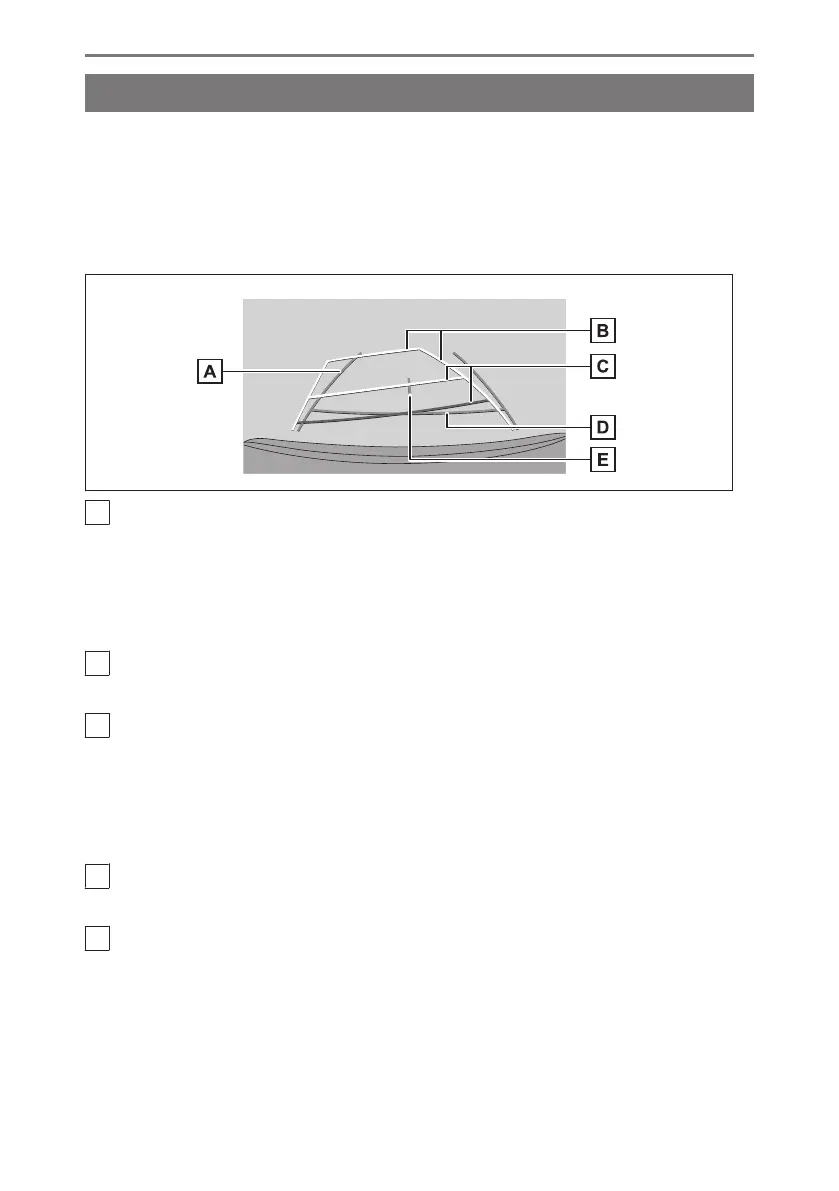
Changing the guide line display mode
The guide line display mode changes every time you touch the guide line switching
button.
■ Estimated course lines mode
This mode displays estimated course lines that move in accordance with the
operation of the steering wheel.
A
Vehicle width guide lines
Displays course lines when the vehicle is being reversed in a straight line.
● The lines are wider than the actual width of the vehicle.
● When the vehicle is straight, the guide lines will overlap with the estimated course
lines.
B
Estimated course lines
Displays course lines (yellow) that are linked to operation of the steering wheel.
C
Distance guide lines
Displays the distance behind the vehicle.
● The distance guide line is linked to the estimated course lines.
● Displays about 0.5 m (1.5 ft.) (red) and 1 m (3 ft.) (yellow) from the center of the end
of the rear bumper.
D
Distance guide line
Displays about 0.5 m (1.5 ft.) (blue) from the end of the rear bumper.
E
Vehicle center guide line
Displays the center of the vehicle width guide lines.
■ Parking assist guide lines mode
This mode displays the steering wheel return points (parking assist guide lines).
This mode is recommended for those who have a sense of the vehicle and can park
the vehicle without the aid of the estimated course lines.
8-1. Lexus parking assist monitor
272













 To Next Page