L-DALI User Manual 192 LOYTEC
Version 5.2 LOYTEC electronics GmbH
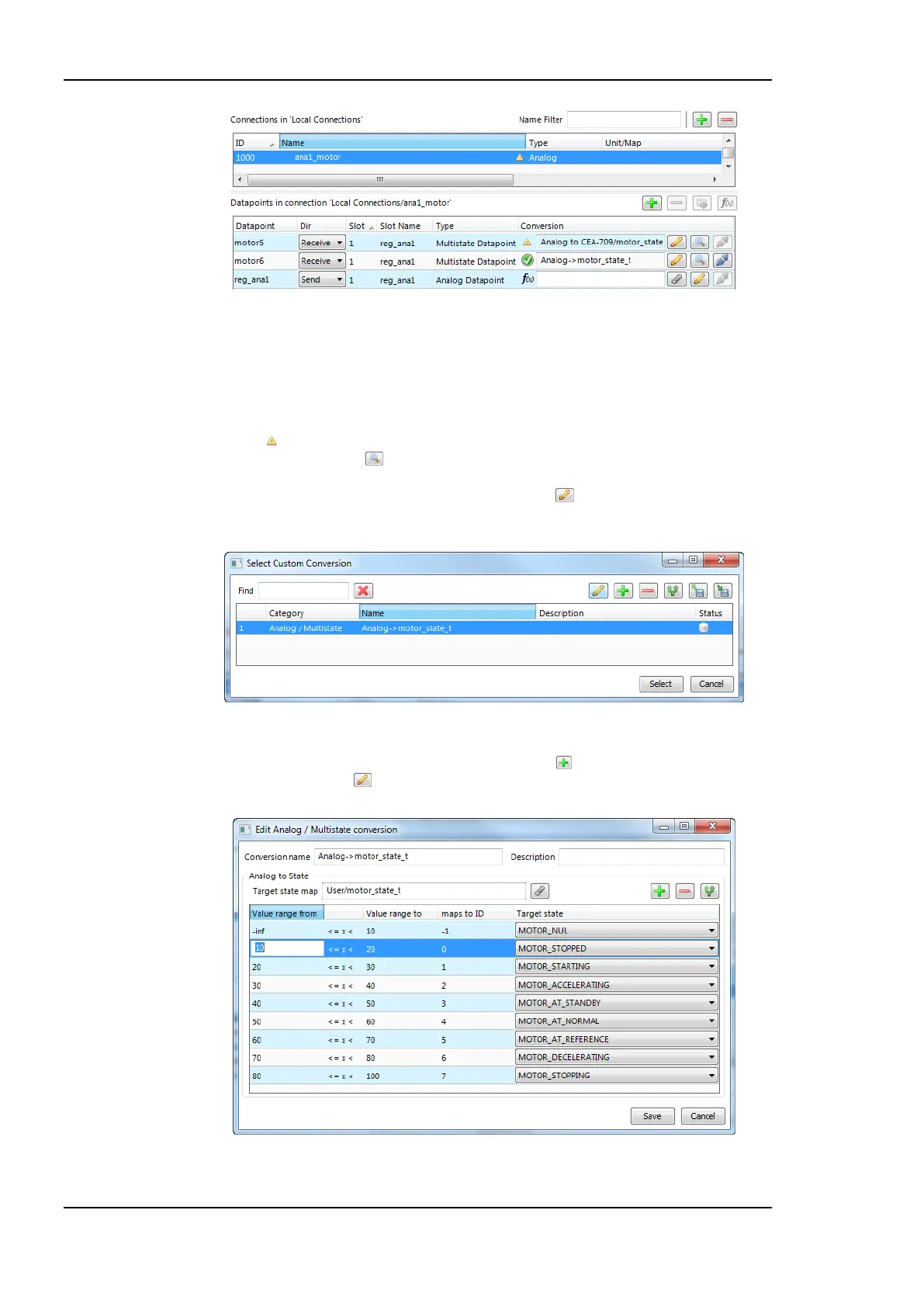
Figure 174: Connection tab with a connection and data points.
8. Change the direction by modifying Send or Receive. For changing multiple data points
use multi-select. Optionally, select Disable to temporarily exclude this data point from
communication in the connection.
9. If the attached data point needs a conversion, the item displays a yellow exclamation
mark and the default conversion (e.g. ‘Analog to CEA-709/motor_state_t’). By
clicking on the button to view the current conversion.
10. To add a new conversion to this item, click on the button. A dialog opens, which
displays the matching adaptors already available in the library as shown in Figure 175.
Figure 175: Choose a custom conversion.
11. Select an existing conversion, click the plus button to create a new conversion, or
click the edit button to modify an existing conversion.
Figure 176: Edit an analog to multi-state conversion.



 To Next Page