Home
LulzBot
3D Printers
TAZ 5
Page 95 (Infill Patterns at Varying Densities)
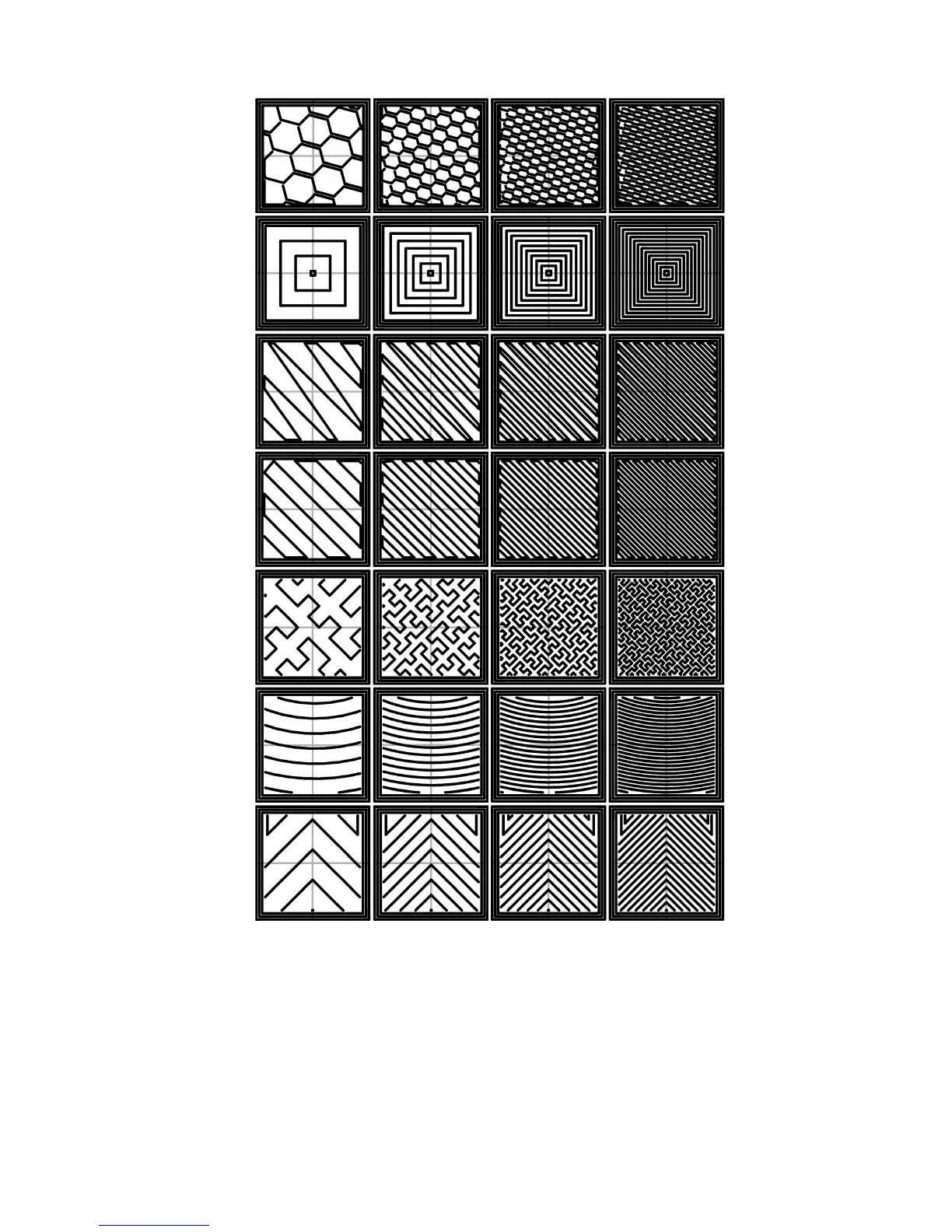
LulzBot TAZ 5 - Infill Patterns at Varying Densities; Left to Right; 20%,40%,60%,80%. Top to Bottom: Honeycomb, Concentric
173 pages
Manual
Save Page as PDF
To Next Page
To Next Page
To Previous Page
To Previous Page
Loading...
2.5.
EXPERT
MODE
Figure
2.31:
Inll
patterns
at
v
arying
densities.
Left
to
Right:
20%,40%,60%,80%.
T
op
to
Bottom:
Honeycom
b,
Concentric,
Line,
Rec-
tilinear,
Hilb
ert
Curv
e,
Arc
himedean
Chords,
Octagram
Spiral
95
94
96
Table of Contents
Main Page
Table of Contents
3
Warnings
9
Safety Information
9
Lulzbot
9
Hazards and Warnings
10
Support
11
Printer Software
13
Software Overview
14
Software Types
14
Installing Drivers
15
Cura
15
Quick Print Settings
17
High Detail
17
Material Selection
18
Options after Selecting Model
19
Rotating Your Model
20
View Options
21
Scaling Your Model
21
View in Normal Mode
22
View in Overhang
22
View in Ghost
23
View in Xray
23
View in Layers
24
Viewing Cumulative Layers
24
Starting Your First Print
25
Viewing Specific Layers
25
Control Screen
26
Removing Your First Print
28
Full Settings
28
Basic Tab Options
29
View in Full Settings
29
Differences in Layer Height
30
Shell Thickness
30
Support Types
32
Advanced Tab Options
33
Retraction Distance
34
Cutoff Example
35
Dual Extrusion Overlap
35
Travel Speed
35
Plugins
36
Outer Shell Speed
36
Inner Shell Speed
36
Start and End Gcode Settings
37
View of Plugins
37
Expert Settings
38
Retraction
38
View Expert Settings
38
Skirt
39
Minimum Travel
39
Line Count
39
Cool
40
Start Distance
40
Minimal Length
40
Support
41
Black Magic
42
Brim
42
Raft
42
Extra Margin
43
Line Spacing
43
Fix Horrible
44
Surface Layers
44
Extensive Stitching
44
Dual Extrusion
45
First Dual Print
47
Before Merge
48
After Merge
49
Setting Dual Temps
49
Printrun
50
Printrun Application for 3D Printer Control
50
Using Printrun
52
Printrun Functions
54
Movement Controls
54
CAD and 3D Modeling Software
56
Alternative Printer Host Software
57
Slic3R
59
Introduction
60
Getting Slic3R
61
First Print
62
Configuration Wizard: Welcome Screen
64
Configuration Wizard: Firmware Type
65
Configuration Wizard: Bed Size
66
Configuration Wizard: Nozzle Diameter
67
Configuration Wizard: Filament Diameter
68
Configuration Wizard: Extrusion Temperature
69
Configuration Wizard: Bed Temperature
70
Configuration Wizard: End
71
The Important First Layer
72
Shapesmith Online CAD Tool
75
Plater
76
Minimug Model
77
STL File Loaded
77
Simple Mode
79
Simple Mode: Print Settings
80
An Example of Insufficient Top Layers
81
Creating a Vase from a Solid Model
82
An Example of an Object Printed with Support Material
83
An Example of Brim
84
Simple Mode: Filament Settings
85
Simple Mode: Printer Settings
86
Expert Mode
88
Expert Mode Speed Options
89
Infill Pattern Settings
92
Infill Pattern: Line (344.51Mm / 5M:20S)
92
Infill Pattern: Rectilinear (350.57Mm / 5M:23S)
92
Infill Pattern: Concentric (351.80Mm / 5M:30S)
93
Infill Pattern: Honeycomb (362.73Mm / 5M:39S)
93
Infill Pattern: Hilbert Curve (332.82Mm / 5M:28S)
93
Infill Pattern: Archimedean Chords (333.66Mm / 5M:27S)
93
Infill Pattern: Octagram Spiral (318.63Mm / 5M:15S)
94
Infill Pattern Comparison in a Complex Object. Left to Right: Honeycomb, Line
94
Infill Patterns at Varying Densities
95
Left to Right
95
20%,40%,60%,80%. Top to Bottom: Honeycomb, Concentric
95
Infill Advanced Settings
96
Retraction Settings
97
Skirt Settings
99
Cooling Strategy
101
Cooling Advanced Settings
102
Support Material
103
Support Structure Options
104
Minimug Model, Tilted
105
Support Infill Pattern: Rectilinear
105
Support Infill Pattern: Rectilinear Grid
105
Support Infill Pattern: Honeycomb
106
Example of Pattern Angle Rotated
106
Multiple Extruder Options - Printer Settings Tab (General). Note the Two Extruders Defined in the Left-Hand Pane
107
Plater with Multiple Filament Options
108
Multiple Extruder Options - Print Settings Tab
109
Multiple Extruder Options - Tool Change G-Code
110
Extrusion Widths Options
111
Example Model Highlighting Use Case for Variable Layer Heights
112
Example with Normal Layer Height
113
Variable Layer Height Options - Info
114
Variable Layer Height Options - Layers
115
Example with Variable Layer Height
115
Example Print with Variable Layer Height
116
Example with Skipped Layers
116
Configuration Organization
117
Saving a Profile
118
Deleting a Profile
118
Repairing Models
119
Freecad Part Repair
119
Advanced Topics
120
Sequential Printing Options
120
The Clearance Cylinder Around an Extruder
121
Post-Processing Script Option
127
Example Post-Processing Script to Display Slic3R Environment Variables
127
Example Post-Processing Script to Print each Line to Output
128
Extrusion Width
129
Bridging Filament Shape
130
Extrusion Shape
131
No Path Overlap
131
Sane Defaults
132
Troubleshooting
133
Dimension Errors
133
Holes Made through Polygonal Segments
134
Variable Filament Diameter Changing Layer Stacking
135
Slic3R Support
138
Printing with the Graphic LCD
141
Printing with the Graphic LCD
142
GLCD Controller, Cura or Printrun Host
142
Multiple Connections
142
Putting Print Files on the SD Card
143
GLCD Info Screen
143
Printing with the Graphic LCD
144
Main Menu
145
Maintaining Your 3D Printer
147
Overview
148
Smooth Rods
148
Lead Screw Drive Rods
148
PEI Surface
148
Hobbed Bolt
149
Belts
149
Hot End
149
Electronics
149
Advanced Usage
151
Intro
152
Changing Nozzles
152
Bed Adhesion
152
Using 1.75Mm Filament
153
Hardware and Software Source Code
155
Printer Support
158
Community
158
Warranty Information
159
Warranty
160
Extended Warranty
160
Contact Information
161
Support
162
Sales
162
Websites
162
Index
163
Glossary
169
Other manuals for LulzBot TAZ 5
Guide
9 pages
Quick Start Guide
8 pages
Related product manuals
LulzBot TAZ
120 pages
LulzBot TAZ 6
93 pages
LulzBot TAZ Workhorse
110 pages
LulzBot Mini
148 pages
LulzBot Mini 2
66 pages



 To Next Page