262335 120 Revision A
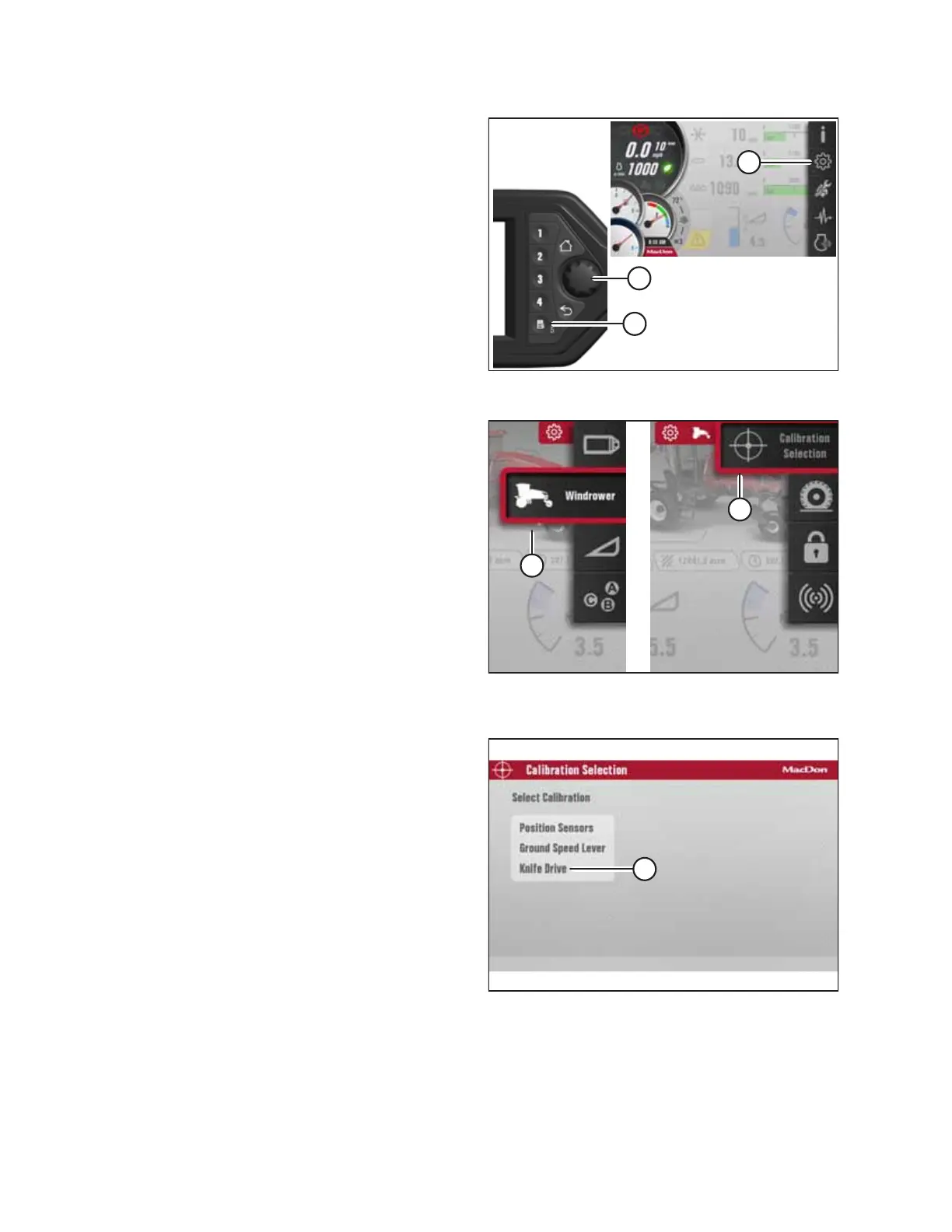
Figure 5.47: Opening the Main Menu
2. Press soft key 5 (A) to open the main menu.
NOTE:
Calibrations MUST be performed with the engine running.
Some calibrations will not be available with the engine off.
3. Use HPT scroll knob (B) or the ground speed lever (GSL)
scroll wheel (not shown) to highlight SETTINGS icon (C).
4. Press HPT scroll knob (B) or the GSL SELECT button (not
shown) to activate the settings menu options.
Figure 5.48: Windrower Settings Icon and Calibration
Submenu Icon
5. Scroll to WINDROWER (A) and press the HPT scroll knob to
select.
6. Scroll to CALIBRATION SELECTION (B) and press the scroll
knob to select.
Figure 5.49: Calibration Selection Page
7. On the Calibration Selection page, scroll to KNIFE DRIVE (A)
and press the scroll knob to select.
NOTE:
When the calibration process is initiated, the engine ramps
up to its desired speed (+/- 20 rpm) and the header to its
desired flow (+/- 0.1 gpm). When the system reaches the
desired ranges and has a steady oil flow of less than
0.45 gpm for 3 seconds, the current is locked in. The knife
then ramps up to the next target flow and the process is
repeated. Once the three target flows are completed, the
engine speed ramps up to the next rpm and the process is
repeated until all nine points have been locked in.
Figure 5.50: Knife Drive Calibration Page
NOTE:
The display on the screen will change to show that the
calibration has started. Pressing X icon (A) on the screen at
any time during the calibration process will stop and exit the calibration.
PERFORMING PREDELIVERY CHECKS



 To Next Page