12.2 mvDeviceConfigure 105
or
mvDeviceConfigure.exe set_processor_idle_states=0 quit
The additional quit will result in the application to terminate after the new value has been applied.
Note
With Windows Vista or newer mvDeviceConfigure must be started from a command shell with administrator
privileges in order to modify the processors sleep states.
12.2.4 Command-line options
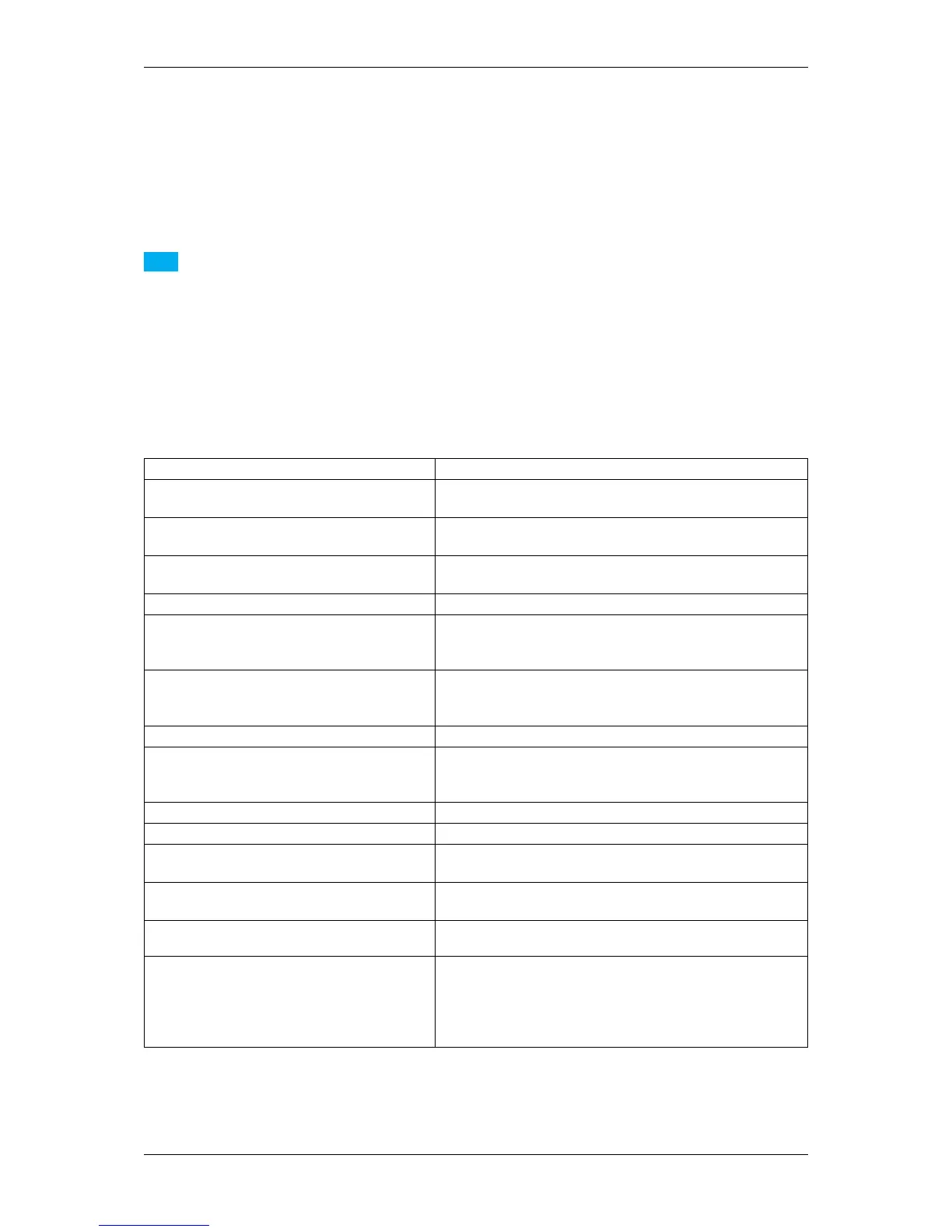
It is possible to start mvDeviceConfigure via command line and controlling the starting behavior using parameters.
The supported parameter are as follows:
Parameter Description
setid or id Updates the firmware of one or many devices(syntax←-
: 'id=<serial>.<id>' or 'id=<product>.<id>').
set_processor_idle_states or spis Changes the C1, C2 and C3 states for ALL processors in the
current system(syntax: 'spis=1' or 'spis=0').
set_userset_persistence or sup Sets the persistency of UserSet settings during firmware up-
dates (syntax: 'sup=1' or 'sup=0').
update_fw or ufw Updates the firmware of one or many devices.
update_fw_file or ufwf Updates the firmware of one or many devices. Pass a full
path to a text file that contains a serial number or a product
type per line.
custom_genicam_file or cgf Specifies a custom GenICam file to be used to open devices
for firmware updates. This can be useful when the actual XML
on the device is damaged/invalid.
update_kd or ukd Updates the kernel driver of one or many devices.
ipv4_mask Specifies an IPv4 address mask to use as a filter for the se-
lected update operations. Multiple masks can be passed here
separated by semicolons.
fw_file Specifies a custom name for the firmware file to use.
fw_path Specifies a custom path for the firmware files.
log_file or lf Specifies a log file storing the content of this text control upon
application shutdown.
quit or q Ends the application automatically after all updates have been
applied.
force or f Forces a firmware update in unattended mode, even if it isn't
a newer version.
∗ Can be used as a wildcard, devices will be searched by se-
rial number AND by product. The application will first try to
locate a device with a serial number matching the specified
string and then (if no suitable device is found) a device with a
matching product string.
The number of commands that can be passed to the application is not limited.
MATRIX VISION GmbH



 To Next Page