244 CONTENTS
20.5.1 Controlling strobe or flash at the outputs
Of course, the mvBlueFOX3supports strobe or flash lights. However, there are several things you have to keep in
mind when using strobes or flash:
1. Be sure that the illumination fits with the movement of the device under test.
2. Bright illumination and careful control of exposure time are usually required.
3. To compensate blur in the image, short exposure times are needed.
Alternatively, you can use flash with short burn times. For this, you can control the flash using the camera. The
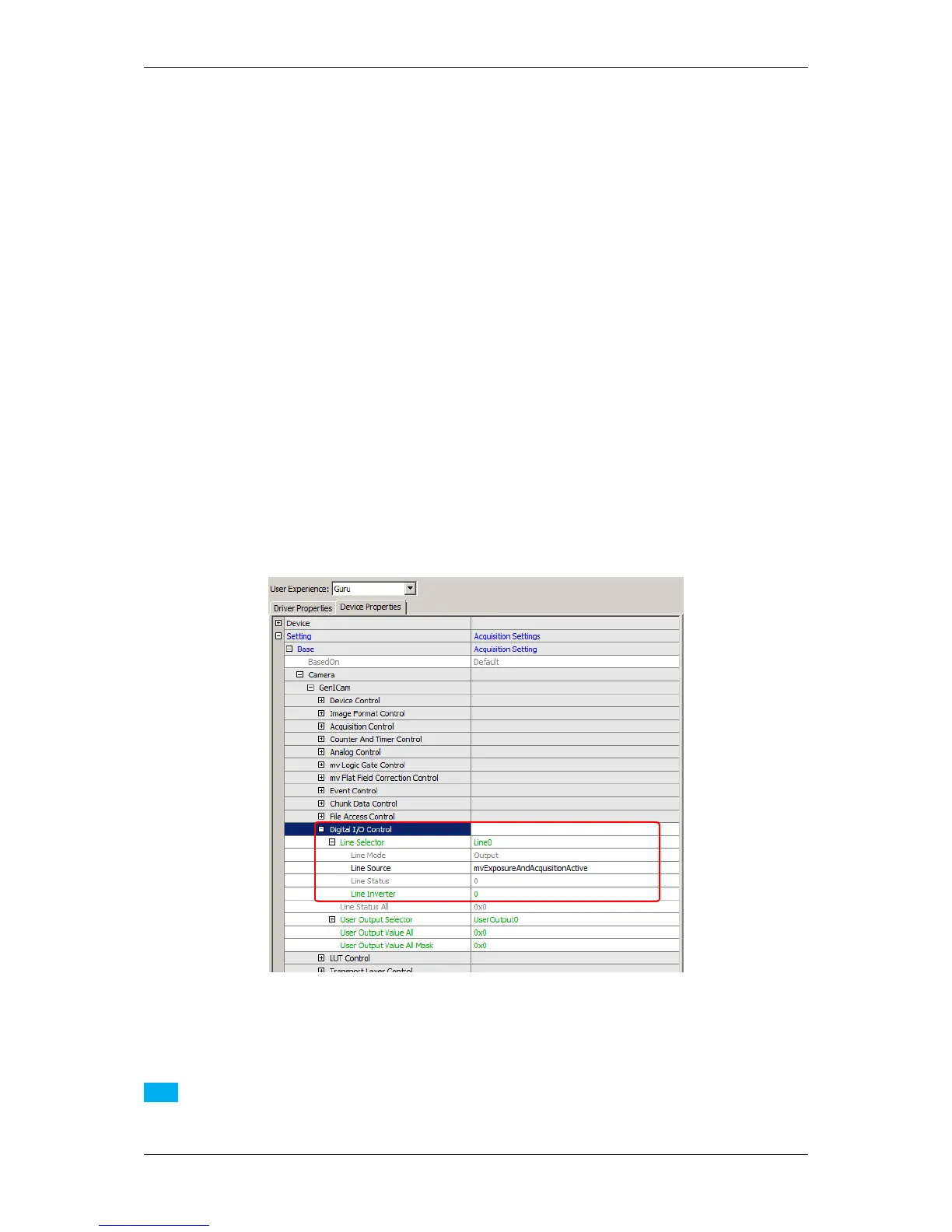
following figures show, how you can do this using wxPropView (p. 74)
1. Select in "Setting -> Base -> Camera -> Digital I/O Control" the output line with the "Line Selector" to which
the strobe or flash is connected.
2. Now, set the "Line Source" to "mvExposureAndAcquisitionActive".
This means that the signal will be high for the exposure time and only while acquisition of the camera is active.
Figure 1: Setting the "Line Source" to "mvExposureAndAcquisitionActive"
Note
This can be combined using an external trigger.
MATRIX VISION GmbH



 To Next Page