260 CONTENTS
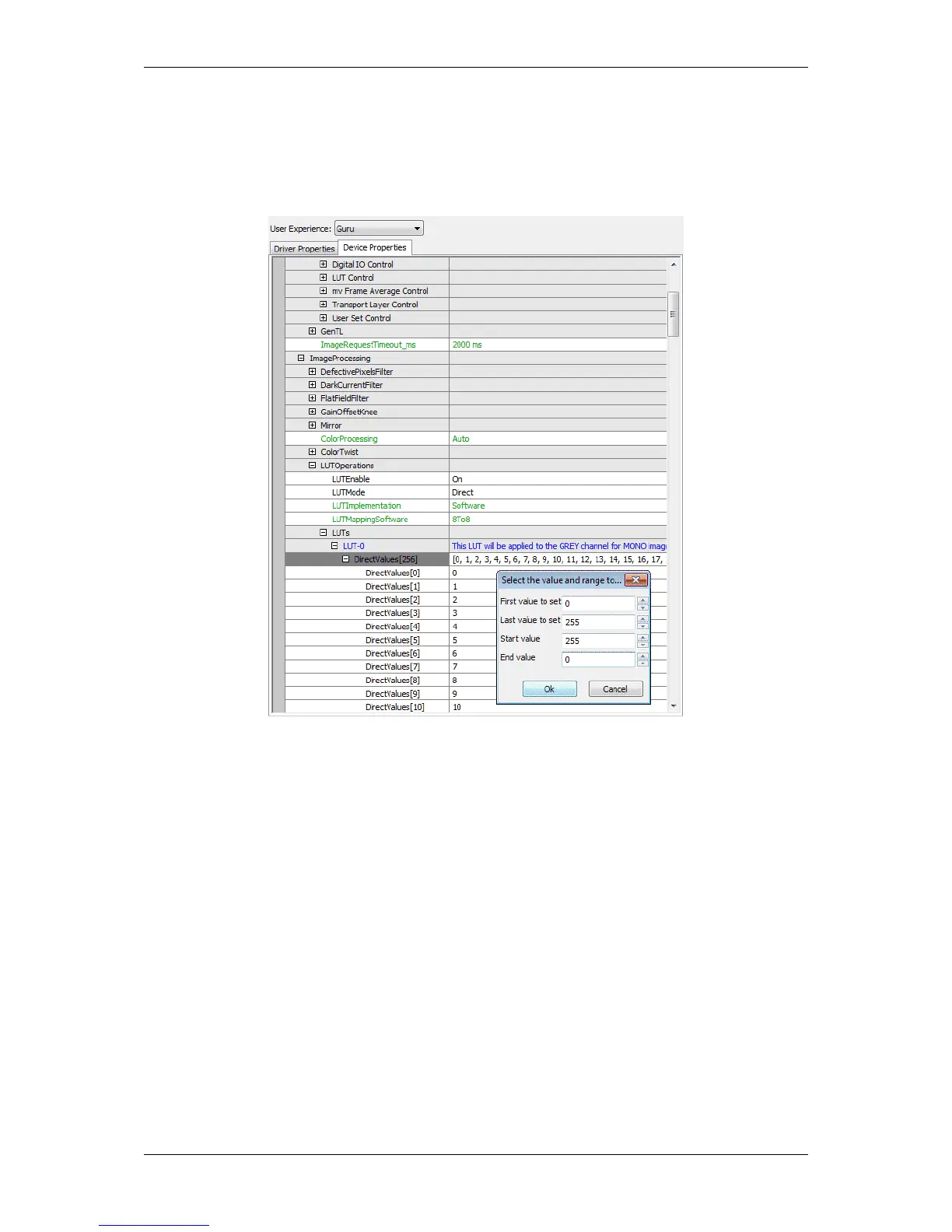
3. Right-click on "LUTs -> LUT-0 -> DirectValues[256]" and select "Set Multiple Elements... -> Via A User
Defined Value Range".
This is one way to get an inverted result. It is also possible to use the "LUTMode" - "Interpolated".
4. Now you can set the range from 0 to 255 and the values from 255 to 0 as shown in Figure 2.
Figure 5: Inverting an image using wxPropView with LUTMode "Direct"
20.7.2 Working with LUTValueAll
Working with the LUTValueAll feature requires a detailed understanding on both Endianess and the cameras
internal format for storing LUT data. LUTValueAll typically references the same section in the cameras memory as
when accessing the LUT via the features LUTIndex and LUTValue.
LUT data can either be written to a device like this (C++ syntax):
const size_t LUT_VALUE_COUNT = 256;
int64_type LUTData[LUT_VALUE_COUNT] = getLUTDataToWriteToTheDevice();
mvIMPACT::acquire::GenICam::LUTControl lut(getDevicePointerFromSomewhere());
for(int64_type i=0; i< static_cast<int64_type>(LUT_VALUE_COUNT); i++ )
{
lut.LUTIndex.write( i );
lut.LUTValue.write( LUTData[i] );
}
MATRIX VISION GmbH



 To Next Page