162 CONTENTS
20 Use cases
20.1 GenICam to mvIMPACT Acquire code generator
20.1.1 Using the code generator
As any GenICam™ compliant device for which there is a GenICam™ GenTL compliant capture driver in mvIMPACT
Acquire can be used using the mvIMPACT Acquire interface and it can't be known which features are supported
by a device until a device has been initialised and its GenICam™ XML file has been processed it is not possible to
provide a complete C++ wrapper for every device statically.
Therefore an interface code generator has been embedded into each driver capable of handling arbitrary devices.
This code generator can be used to create a convenient C++ interface file that allows access to every feature offered
by a device.
Warning
A code generated interface can result in incompatibility issues, because the interface name will be constructed
from the version and product information that comes with the GenICam XML file (see comment in code sample
below). To avoid incompatibility, please use the common interface from the namespace mvIMPACT::acquire←-
::GenICam whenever possible.
To access features needed to generate a C++ wrapper interface a device needs to be initialized. Code can only
be generated for the interface layout selected when the device was opened. If interfaces shall be created for more
than a single interface layout the steps that will explain the creation of the wrapper files must be repeated for each
interface layout.
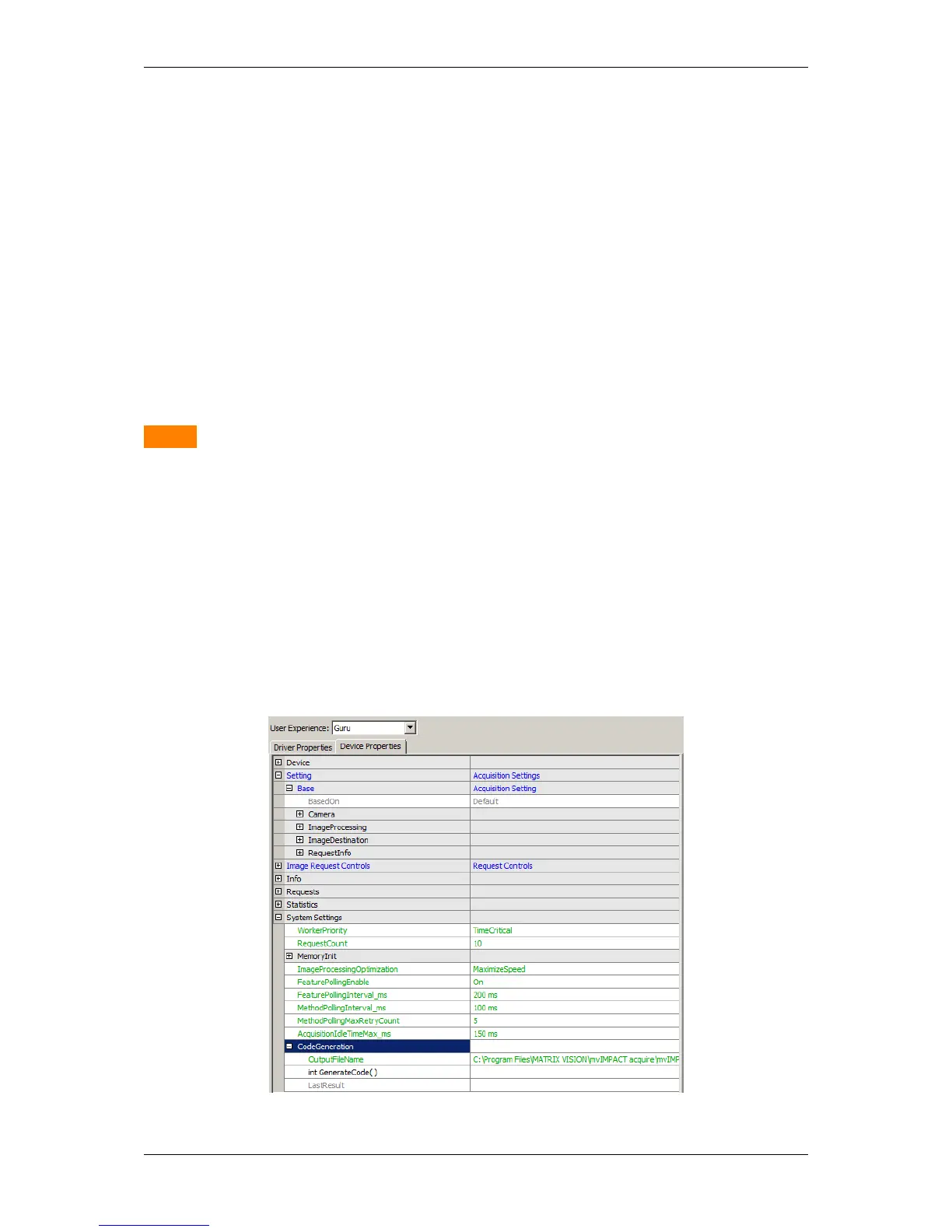
Once the device has been opened the code generator can be accessed by navigating to "System Settings
-> CodeGeneration".
Figure 1: wxPropView - Code Generation section
MATRIX VISION GmbH



 To Next Page