20.1 GenICam to mvIMPACT Acquire code generator 163
To generate code first of all an appropriate file name should be selected. In order to prevent file name clashes the
following hints should be kept in mind when thinking about a file name:
• If several devices from different families or different vendors shall later be included into an application each
device or device family will need its own header file thus either the files should be organized in different
subfolders or must have unique names.
• If a device shall be used using different interface layouts again different header files must be generated.
If only a single device family is involved but 2 interface layouts will be used later a suitable file name might be
"mvIMPACT_acquire_GenICam_Wrapper_DeviceSpecific.h".
For a more complex application involving different device families using the GenICam interface layoutonly something
like this might make sense:
• mvIMPACT_acquire_GenICam_Wrapper_MyDeviceA.h
• mvIMPACT_acquire_GenICam_Wrapper_MyDeviceB.h
• mvIMPACT_acquire_GenICam_Wrapper_MyDeviceC.h
• ...
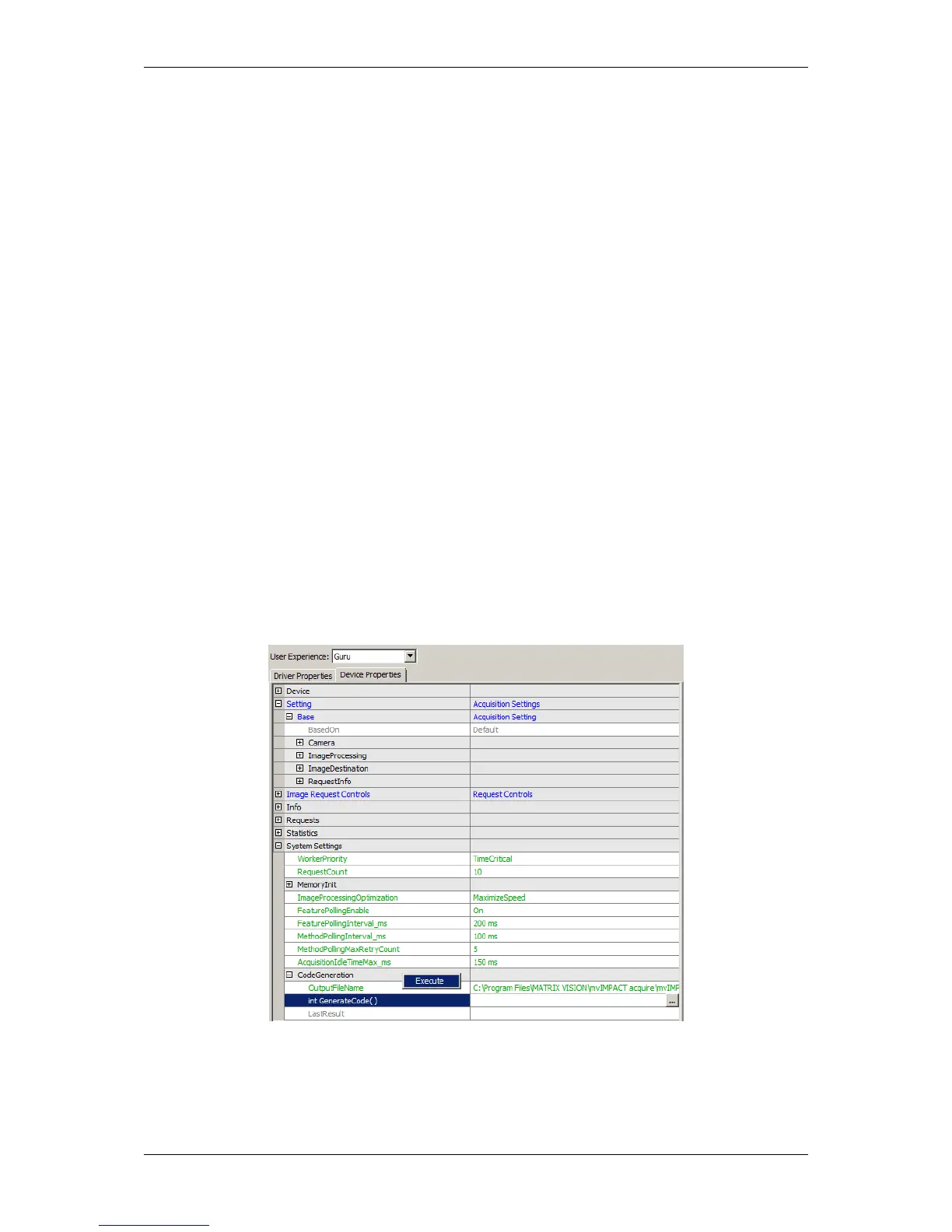
Once a file name has been selected the code generator can be invoked by executing the "int GenerateCode()"
method:
Figure 2: wxPropView - GenerateCode() method
The result of the code generator run will be written into the "LastResult" property afterwards:
MATRIX VISION GmbH



 To Next Page