166 CONTENTS
20.2.1 Acquiring a number of images
As described in chapter Acquisition Control (p. 109), if you want to acquire a number of images, you can use as
"Setting -> Base -> Camera -> Acquisition Control -> Acquisition Mode" "MultiFrame" and you have to set the
"Acquisition Frame Count".
Afterwards, if you start the acquisition via the button "Acquire", the camera will deliver the number of images.
The "MultiFrame" functionality can be combined with an external signal to start the acquisition.
There are several ways and combinations possible, e.g.:
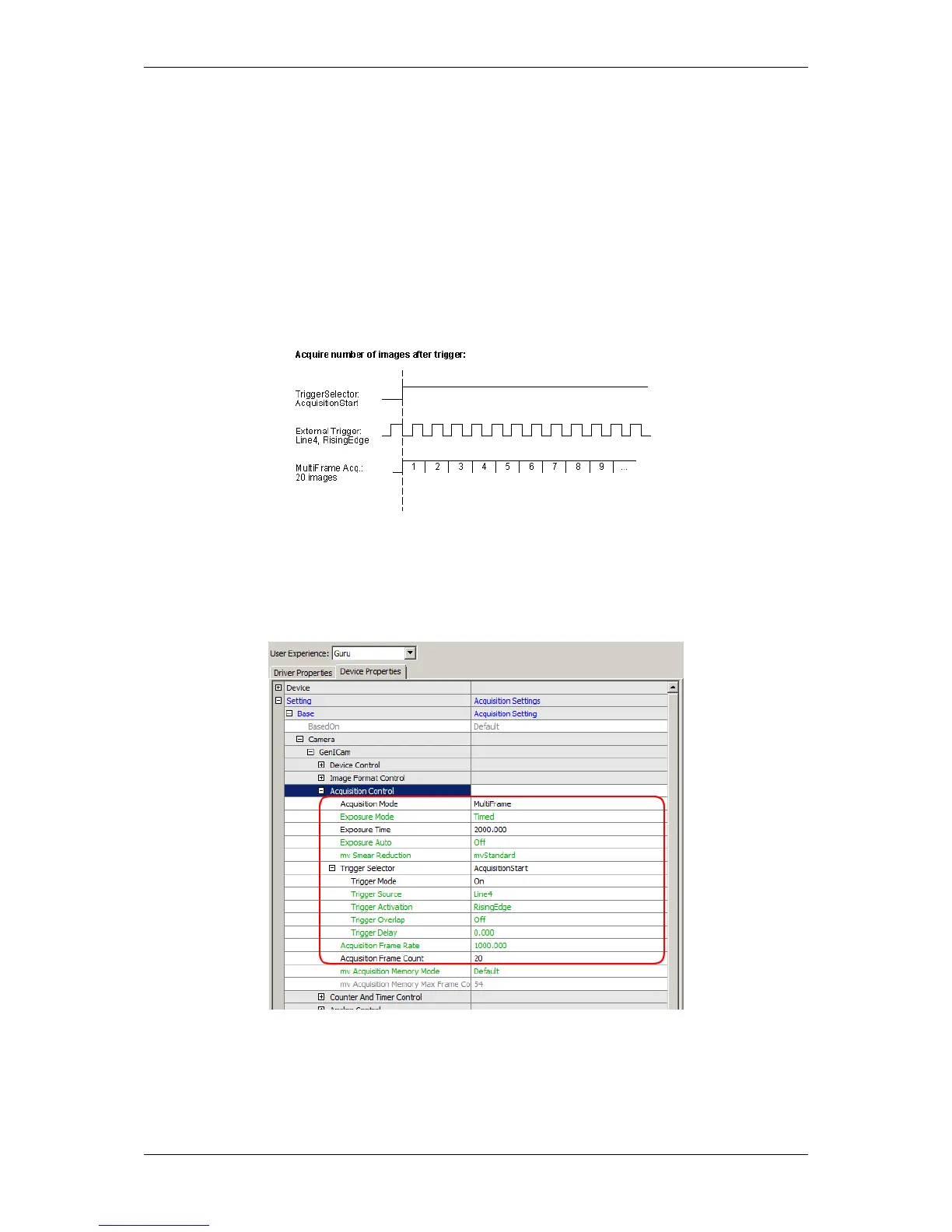
• A trigger starts the acquisition (Figure 1).
• A trigger starts the acquisition start event and a second trigger starts the grabbing itself (Figure 2).
Figure 1: Starting an acquisition after one trigger event
For this scenario, you have to use the "Setting -> Base -> Camera -> Acquisition Control -> Trigger Selector"
"AcquisitionStart".
The following figure shows, how to set the scenario shown in Figure 1 with wxPropView (p. 74)
Figure 2: wxPropView - Setting acquisition of a number of images started by an external signal
A rising edge at line 4 will start the acquisition of 20 images.
MATRIX VISION GmbH



 To Next Page