20.2 Introducing acquisition / recording possibilities 181
20.2.6 Working with burst mode buffer
If you want to acquire a number of images at sensor's maximum frame rate while at the same time the image transfer
should be at a lower frame rate, you can use the internal memory of the mvBlueFOX3.
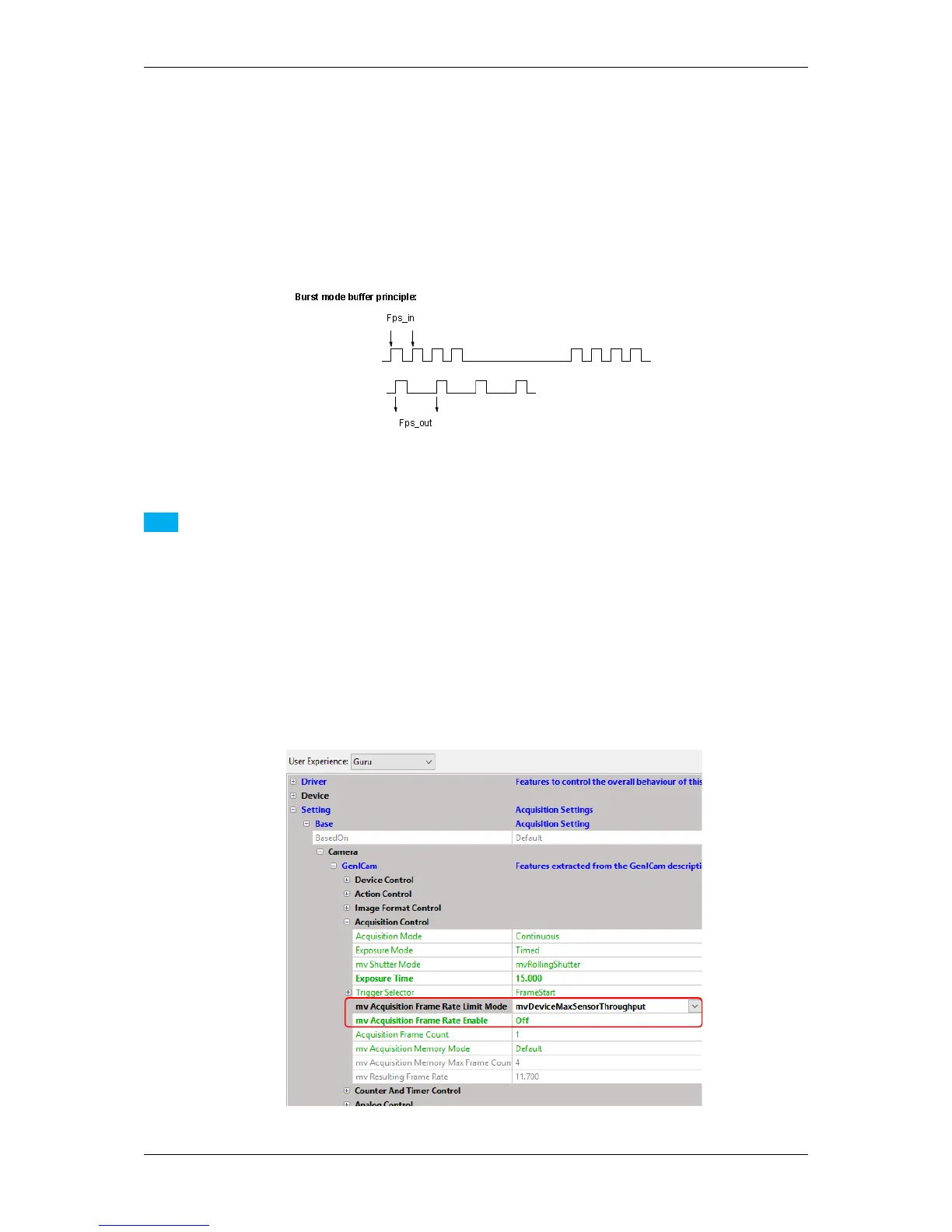
Figure 1: Principle of burst mode buffering of images
Note
The maximum buffer size can be found in "Setting -> Base -> Camera -> GenICam -> Acquisition Control
-> mv Acquisition Memory Max Frame Count".
To create a burst mode buffering of images, please follow these steps:
1. Set image acquisition parameter ("Setting -> Base -> Camera -> GenICam -> Acquisition Control -> mv
Acquisition Frame Rate Limit Mode") to "mvDeviceMaxSensorThroughput".
2. Finally, set the acquisition parameter "mv Acquisition Frame Rate Enable" to "Off".
Figure 2: wxPropView - Setting the bandwidth using "mv Acquisition Frame Rate Limit Mode"
MATRIX VISION GmbH



 To Next Page