20.4 Working with triggers 237
• exposure of the sensor and
• readout of the sensor data
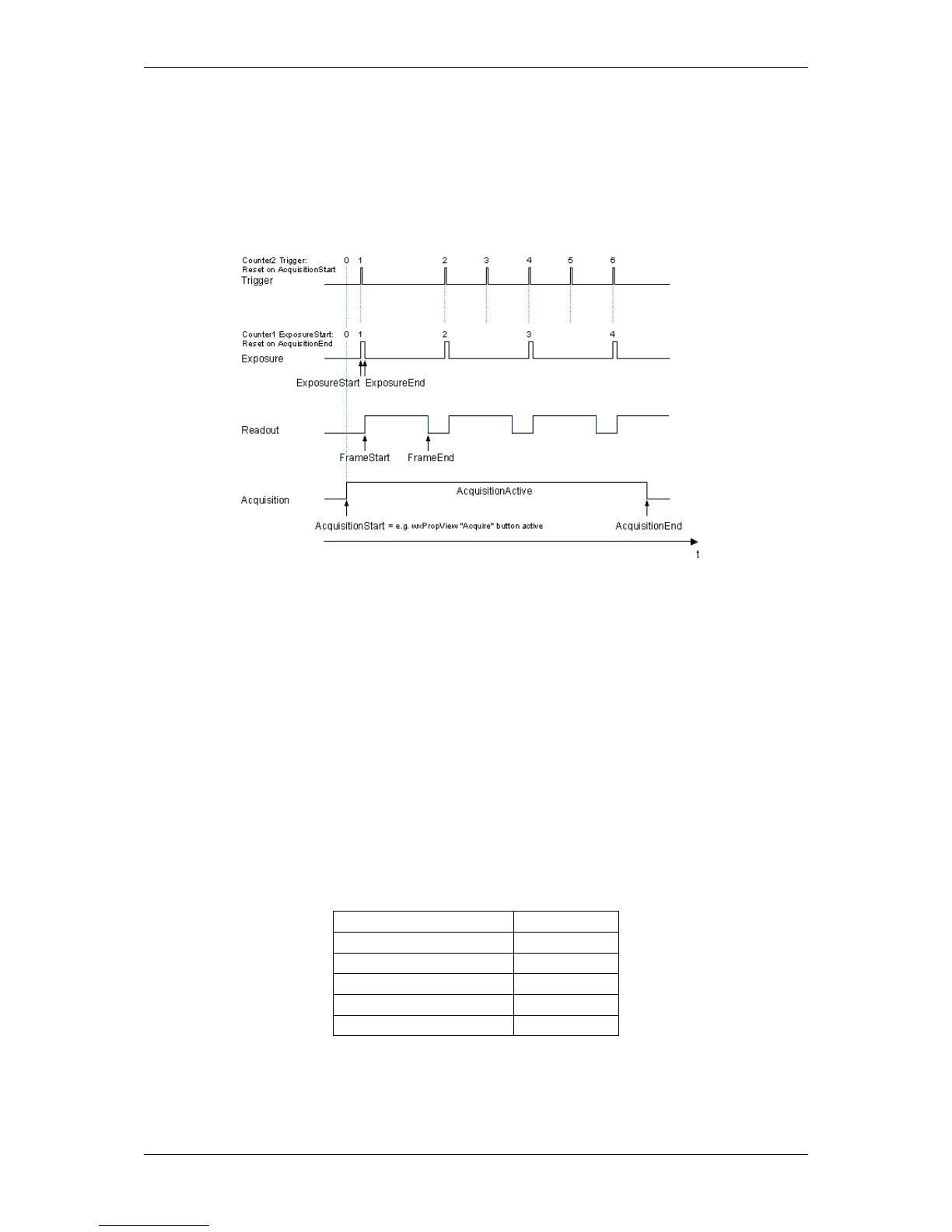
During these steps, a trigger signal will be skipped:
Figure 1: Trigger counter increases but the start exposure counter not
To notice overtriggering, you can use counters (p. 113):
• One counter counts the incoming trigger signals, the
• second counter counts the ExposureStart signals.
Using the chunk data (p. 118) you can overlay the counters in the live image.
20.4.5.2 Setting the overtrigger detector using wxPropView
First of all, we have to set the trigger in "Setting -> Base -> Camera -> GenICam -> Acquisition Control" with
following settings:
Property name wxPropView Setting
Trigger Selector FrameStart
Trigger Mode On
Trigger Source Line4
Trigger Activation RisingEdge
Exposure Mode Timed
This trigger will start an acquisition after a rising edge signal on line 4 (= DigIn0 ).
Now, set the two counters. Both counters (Counter1 and Counter2) will be reset and start after the acquisition
(AcquisitionStart) has started.
MATRIX VISION GmbH



 To Next Page