242 CONTENTS
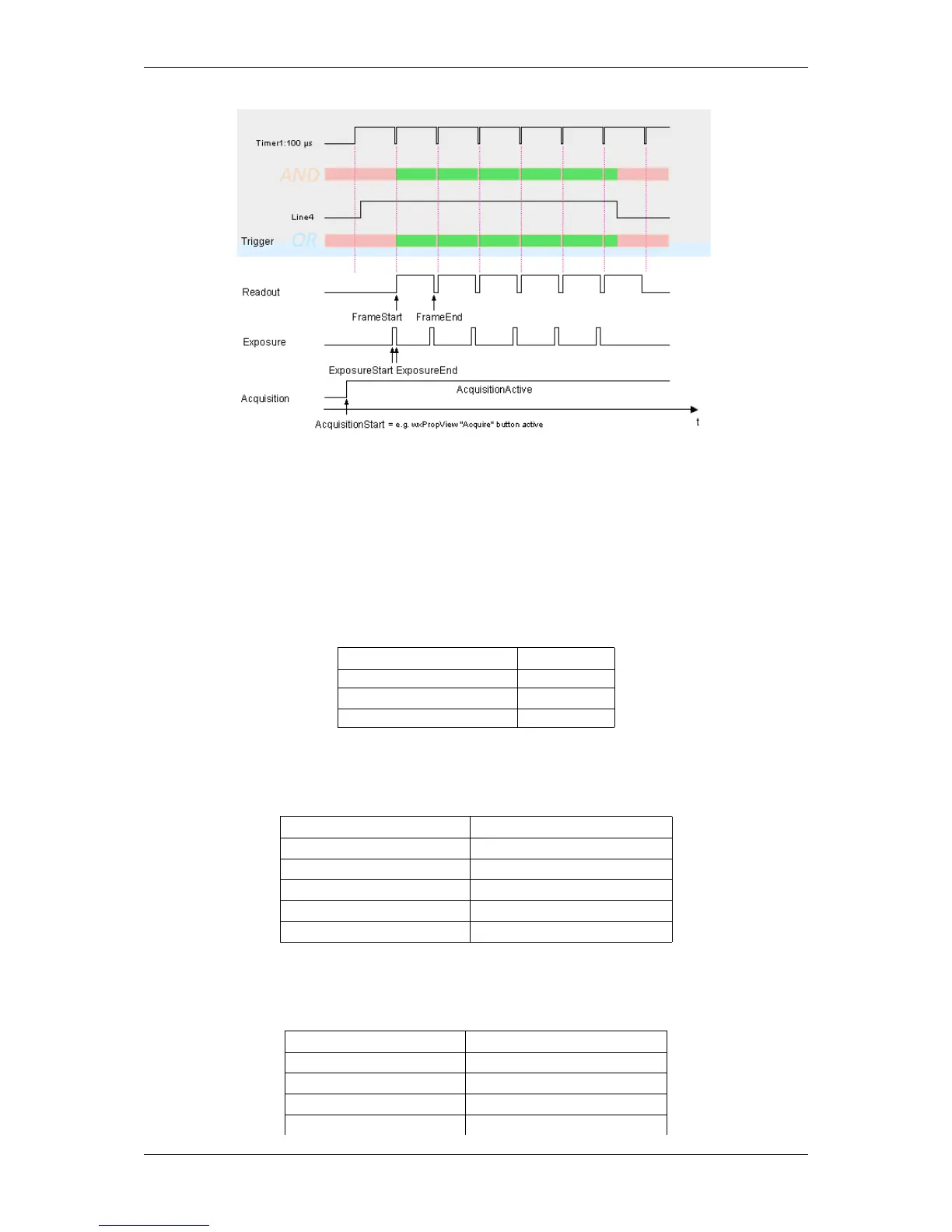
Figure 1: Schematic illustration of the settings
With this setting, there is still an acceptable time delay of approx. 100 to 130 us possible.
20.4.6.2 Creating the use case using wxPropView
First of all, we have to set the timer in "Setting -> Base -> Camera -> GenICam -> Counter And Timer Control"
with following settings:
Property name wxPropView Setting
Timer Selector Timer1
Timer Trigger Source Timer1End
Timer Duration 100.000
Afterwards, we have to set the logical gates in "Setting -> Base -> Camera -> GenICam -> mv Logic Gate
Control" with following settings:
Property name wxPropView Setting
mv Logic Gate AND Selector mvLogicGateAND1
mv Logic Gate AND Source 1 Line4
mv Logic Gate AND Source 2 Time1Active
mv Logic Gate OR Selector mvLogicGateOR1
mv Logic Gate OR Source 1 mvLogicGateAND1Output
Finally, we have to set the trigger in "Setting -> Base -> Camera -> GenICam -> Acquisition Control" with following
settings:
Property name wxPropView Setting
Trigger Selector FrameStart
Trigger Mode On
Trigger Source mvLogicGateAND1Output
Trigger Activation RisingEdge
MATRIX VISION GmbH



 To Next Page