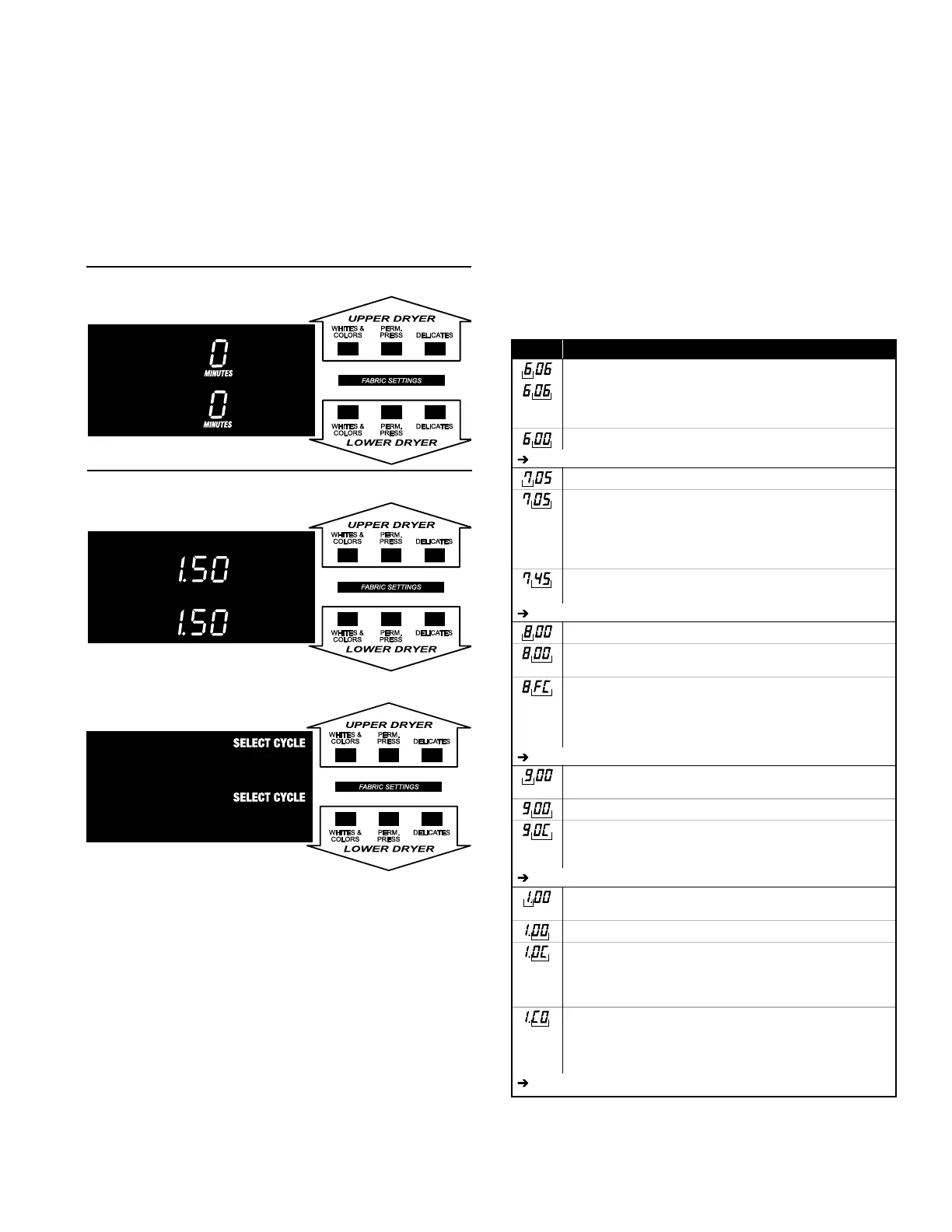
will show the price. In PN models set for free
The PERM. PRESS button advances from
code to code.
the code value.
deselects options.
models except where noted.
left hand characters. The set-up code value
characters.
the factory default.
CODE EXPLANATION
REGULAR CYCLE PRICE
Represents the number of coins (coin 1); may adjust from 0–39
(See b.xx set-up for VALUE OF COIN 1). Advance from 0–39
by pressing WHITES & COLORS. Factory default of 6 x coin 1.
PN MODELS ONLY: Factory default of 6 00, or 0 coins.
Press PERM. PRESS button once to advance to next code.
REGULAR DRY TIME
Represents the number of minutes per coin (coin 1).
Factory default of 5 minutes per coin.
Example: 6 coins x 5 minutes = 30 minutes.
By pressing the WHITES & COLORS button, value adjusts
from 1–99 minutes.
PN MODELS: Represents the cycle length for free cycles.
As example: ‘7 45’ = 45 minutes.
Press PERM. PRESS button once to advance to next code.
TYPE OF DRYER PRICING
Fixed Cycle with Top Off. For detailed description, see General
User Information.
Fixed Cycle. For detailed description, see General User
Information.
Use DELICATES button to make this selection.
PN MODELS ONLY: Factory default of FC.
Press PERM. PRESS button once to advance to next code.
CYCLE COUNTER OPTION
This option is either SELECTED ‘ON’ or NOT SELECTED ‘OFF’.
Not Selected ‘OFF’.
Selected ‘ON’ and not able to be deselected. Press DELICATES
button 3 consecutive times to select ‘ON’. Once selected ‘ON’
it cannot be deselected.
Press PERM. PRESS button once to advance to next code.
CODE EXPLANATION
REGULAR CYCLE PRICE
Represents the number of coins (coin 1); may adjust from 0–39
(See b.xx set-up for VALUE OF COIN 1). Advance from 0–39
by pressing WHITES & COLORS. Factory default of 6 x coin 1.
PN MODELS ONLY: Factory default of 6 00, or 0 coins.
Press PERM. PRESS button once to advance to next code.
REGULAR DRY TIME
Represents the number of minutes per coin (coin 1).
Factory default of 5 minutes per coin.
Example: 6 coins x 5 minutes = 30 minutes.
By pressing the WHITES & COLORS button, value adjusts
from 1–99 minutes.
PN MODELS: Represents the cycle length for free cycles.
As example: ‘7 45’ = 45 minutes.
Press PERM. PRESS button once to advance to next code.
TYPE OF DRYER PRICING
Fixed Cycle with Top Off. For detailed description, see General
User Information.
Fixed Cycle. For detailed description, see General User
Information.
Use DELICATES button to make this selection.
PN MODELS ONLY: Factory default of FC.
Press PERM. PRESS button once to advance to next code.
CYCLE COUNTER OPTION
This option is either SELECTED ‘ON’ or NOT SELECTED ‘OFF’.
Not Selected ‘OFF’.
Selected ‘ON’ and not able to be deselected. Press DELICATES
button 3 consecutive times to select ‘ON’. Once selected ‘ON’
it cannot be deselected.
Press PERM. PRESS button once to advance to next code.
MONEY COUNTER OPTION
This option is either SELECTED ‘ON’ or NOT SELECTED ‘OFF’.
Not Selected ‘OFF’.
Selected ‘ON’.
Press DELICATES button 3 consecutive times to select ‘ON’
and 3 consecutive times to remove (Not Selected ‘OFF’.) Counter
resets by going from ‘OFF’ to ‘ON’.
Selected ‘ON’ and not able to be deselected.
To select ‘ON’ and not able to be deselected, first select ‘ON’,
then within two seconds press DELICATES twice, WHITES &
COLORS once, and exit the set-up mode.
Press PERM. PRESS button once to advance to next code.
MONEY COUNTER OPTION
This option is either SELECTED ‘ON’ or NOT SELECTED ‘OFF’.
Not Selected ‘OFF’.
Selected ‘ON’.
Press DELICATES button 3 consecutive times to select ‘ON’
and 3 consecutive times to remove (Not Selected ‘OFF’.) Counter
resets by going from ‘OFF’ to ‘ON’.
Selected ‘ON’ and not able to be deselected.
To select ‘ON’ and not able to be deselected, first select ‘ON’,
then within two seconds press DELICATES twice, WHITES &
COLORS once, and exit the set-up mode.
Press PERM. PRESS button once to advance to next code.
CODE EXPLANATION
REGULAR CYCLE PRICE
Represents the number of coins (coin 1); may adjust from 0–39
(See b.xx set-up for VALUE OF COIN 1). Advance from 0–39
by pressing WHITES & COLORS. Factory default of 6 x coin 1.
PN MODELS ONLY: Factory default of 6 00, or 0 coins.
Press PERM. PRESS button once to advance to next code.
REGULAR DRY TIME
Represents the number of minutes per coin (coin 1).
Factory default of 5 minutes per coin.
Example: 6 coins x 5 minutes = 30 minutes.
By pressing the WHITES & COLORS button, value adjusts
from 1–99 minutes.
PN MODELS: Represents the cycle length for free cycles.
As example: ‘7 45’ = 45 minutes.
Press PERM. PRESS button once to advance to next code.
TYPE OF DRYER PRICING
Fixed Cycle with Top Off. For detailed description, see General
User Information.
Fixed Cycle. For detailed description, see General User
Information.
Use DELICATES button to make this selection.
PN MODELS ONLY: Factory default of FC.
Press PERM. PRESS button once to advance to next code.
CYCLE COUNTER OPTION
This option is either SELECTED ‘ON’ or NOT SELECTED ‘OFF’.
Not Selected ‘OFF’.
Selected ‘ON’ and not able to be deselected. Press DELICATES
button 3 consecutive times to select ‘ON’. Once selected ‘ON’
it cannot be deselected.
Press PERM. PRESS button once to advance to next code.
MONEY COUNTER OPTION
This option is either SELECTED ‘ON’ or NOT SELECTED ‘OFF’.
Not Selected ‘OFF’.
Selected ‘ON’.
Press DELICATES button 3 consecutive times to select ‘ON’
and 3 consecutive times to remove (Not Selected ‘OFF’.) Counter
resets by going from ‘OFF’ to ‘ON’.
Selected ‘ON’ and not able to be deselected.
To select ‘ON’ and not able to be deselected, first select ‘ON’,
then within two seconds press DELICATES twice, WHITES &
COLORS once, and exit the set-up mode.
Press PERM. PRESS button once to advance to next code.


 To Next Page