60-36 Maintenance - 200 Service Hours VX30/VX50 Gen3/ECO50 Vacuum Systems
Clean Battery Terminals and Chec
k Electrolyte Level
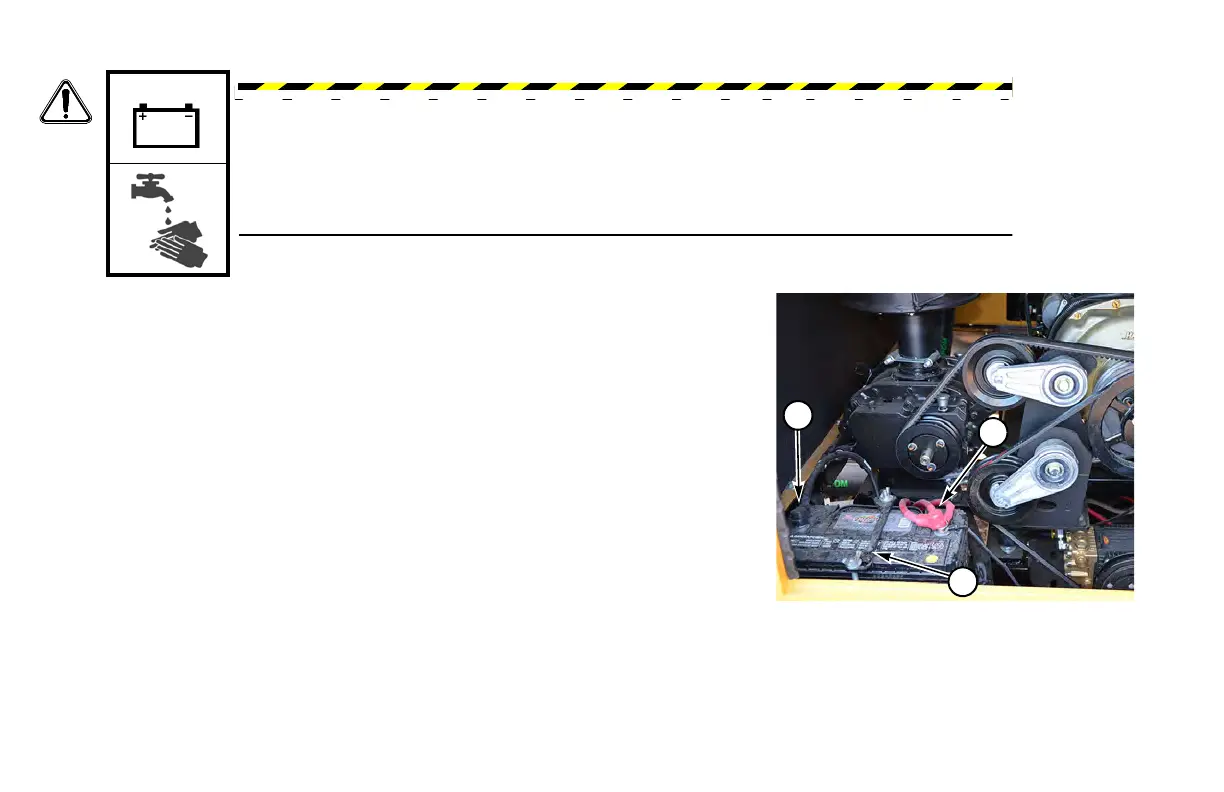
Step 1: Remove NEGATIVE (-) ca
ble (1), then remove POSITIVE (+) cable (2).
Step 2: Remove
the hold-down bracket (3) and battery.
Step 3: Clean
terminals and cable clamps with a stiff wire brush.
Step 4: Apply
a light coating of petroleum jelly around the base of each terminal.
Step 5: Remove bat
tery cell caps if equipped; fill each cell with distilled water
(never add acid). Install cell caps.
NOTICE: In
freezing weather, run the engine immediately after filling the battery to
allow water and electrolyte to mix.
Step 6: Ins
tall battery and hold-down bracket.
Step 7: Install
POSITIVE (+) cable and red cover (2) first. Then install
NEGATIVE (-) cable (1).
WARNING: Battery post, terminals, and related accessories contain lead and lead
compounds, chemicals known to the state of California to cause cancer and reproductive
harm.
Wash hands after handling.


 To Next Page