VX30/VX50 Gen3/ECO50 Vacuum Systems Maintenance - As Required 60-51
Step 1: Ac
cess battery by opening engine compartment door.
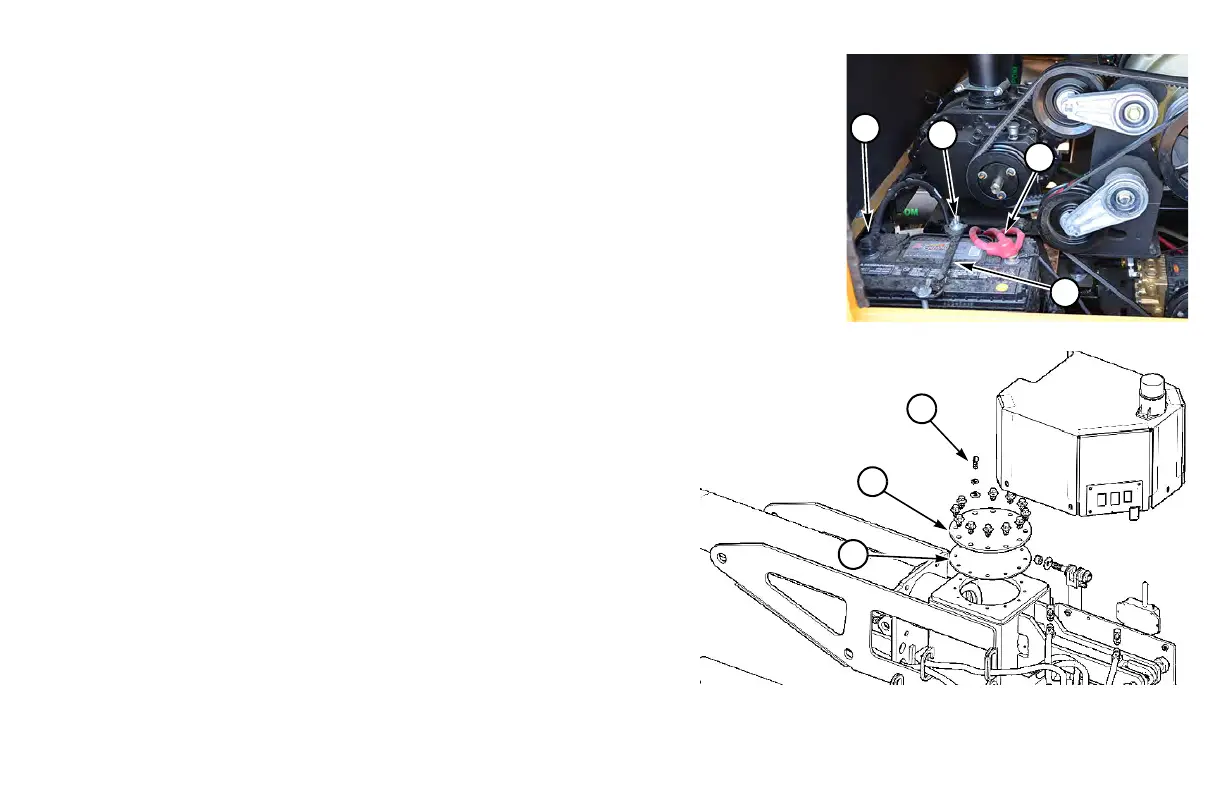
Step 2: Remove NEGATIVE (-) ca
ble (1). Then remove POSITIVE (+) cable (2).
Step 3: Loosen nuts (3) an
d remove hold-down bracket (4).
Step 4: Remove bat
tery.
Step 5: Apply a
light coating of petroleum jelly around the base of each terminal of
the new, fully charged battery.
Step 6: Ins
tall the new battery and the hold-down bracket.
Step 7: Install
POSITIVE (+) cable and red cover (2); then install NEGATIVE (-)
cable and black cover (1).
Boom Cleanout Cover - Remove/Check for Clogs
If boom obstruction is suspected:
Step 1: Follow Shutdown Procedure, page 23
-1.
Step 2: Open s
poil tank inlet valve to relieve system pressure.
Step 3: Use a su
itable access method such as a shop stepladder to
safely access boom cleanout cover (1).
Step 4: Remove mounting hardware (2)
and cleanout cover (1).
Retain gasket (3) beneath cover.
Step 5: Inspect cleanout are
a of boom for any material which might
be clogging boom. Carefully remove material.
Step 6: Wh
en finished, install cleanout cover with gasket. Secure
with mounting hardware.


 To Next Page