20-8 Controls VX30/VX50 Gen3/ECO50 Vacuum Excavators
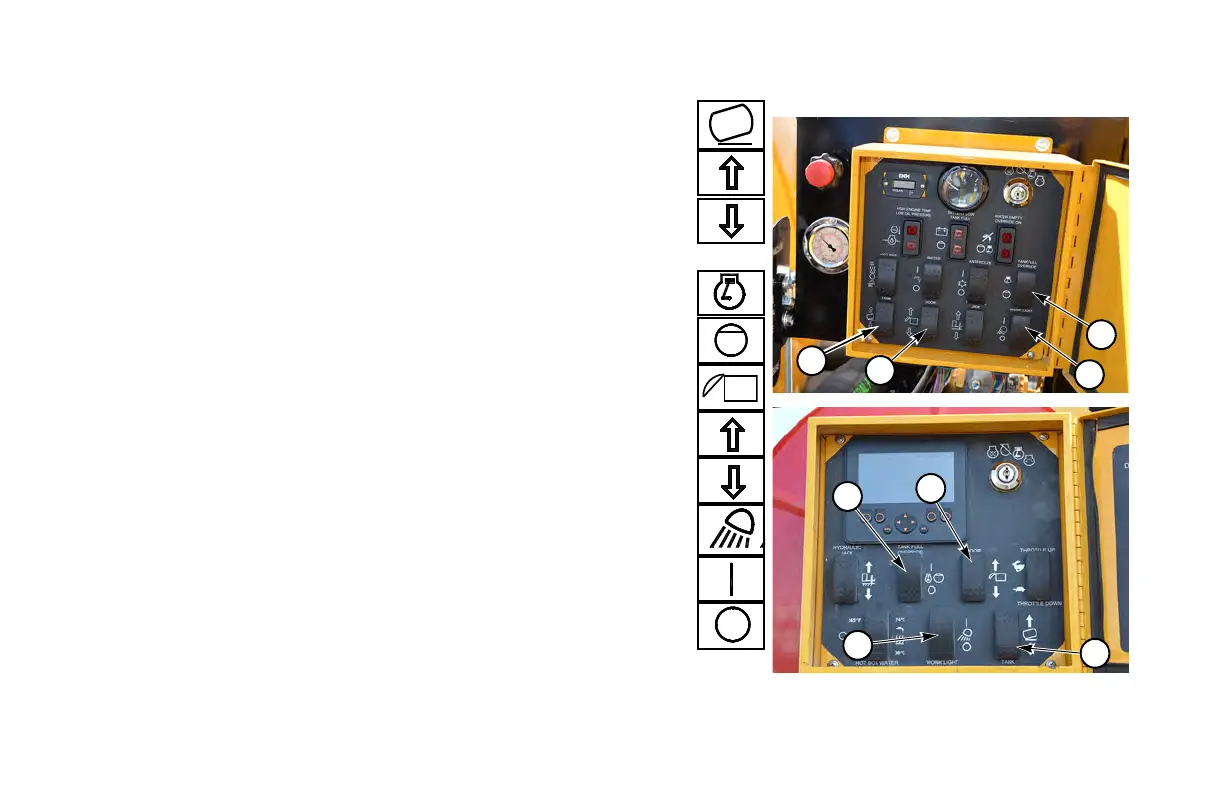
SWITCHES
(1) Tank Dump Switch. . . . . . . . . . . . . . . . . . . . . . . . . . . . . . . . . . . . . .
Press top. . . . . . . . . . . . . . . . . . . . . . . . raise tank to dumping position
Press bottom . . . . . . . . . . . . . . . . . . .lower tank to operating position
(2) Tank Full Override Switch
Press top. . . . . . . . . . . . . . . . tank full override ON - engine continues
. . . . . . . . . . . . . . . . . . . . . . . . . . . . . . to run when spoil tank is full
If not pressed, engine shuts down when spoil tank
is full.
(3) Hydraulic Tank Door Open/Close Switch . . . . . . . . . . . . . . . . . .
Press top and hold . . . . . . . . . . . . . . . . . . unlock and open tank door
Press bottom and hold. . . . . . . . . . . . . . . . . close and lock tank door
(4) Work Lights Switch). . . . . . . . . . . . . . . . . . . . . . . . . . . . . . . . . . . . .
Press top. . . . . . . . . . . . . . . . . . . . . . . . . . . . . . . . . . . work lights ON
Press bottom . . . . . . . . . . . . . . . . . . . . . . . . . . . . . . work lights OFF


 To Next Page