VX30/VX50 Gen3/ECO50 Vacuum Excavators Controls 20-23
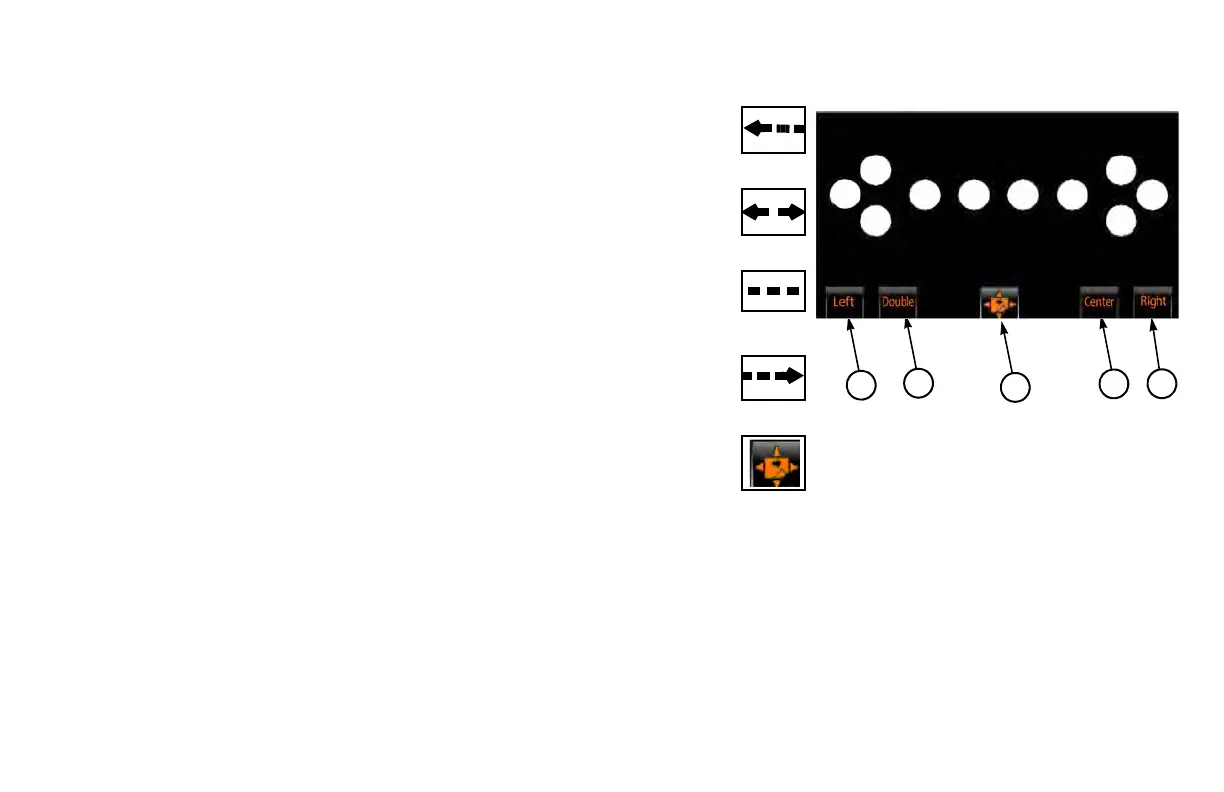
VX50 Arrow Board Control Screen
(1) Left Arrow ON/OFF Switch . . . . . . . . . . . . . . . . . . . . . . . . . . . . . . .
Press to turn left arrow ON or OFF.
(2) Double Arrow ON/OFF Switch. . . . . . . . . . . . . . . . . . . . . . . . . . . . .
Press to turn double arrow ON or OFF.
(3) Center Lights ON/OFF Switch . . . . . . . . . . . . . . . . . . . . . . . . . . . . .
Press to turn center lights ON or OFF. Arrow board defaults to this
sett
ing upon machine startup.
(4) Right Arrow ON/OFF Switch . . . . . . . . . . . . . . . . . . . . . . . . . . . . . .
Press to turn right arrow ON or OFF.
(5) Screen Selection Switch . . . . . . . . . . . . . . . . . . . . . . . . . . . . . . . . . .
Press up or right arrow to go to main screen.
Press down or left arrow
to go to engine screen.


 To Next Page