VX30/VX50 Gen3/ECO50 Vacuum Excavators Electronic Controller 21-1
Section 21: Electronic Controller
VX50/ECO50 LCD DISPLAY
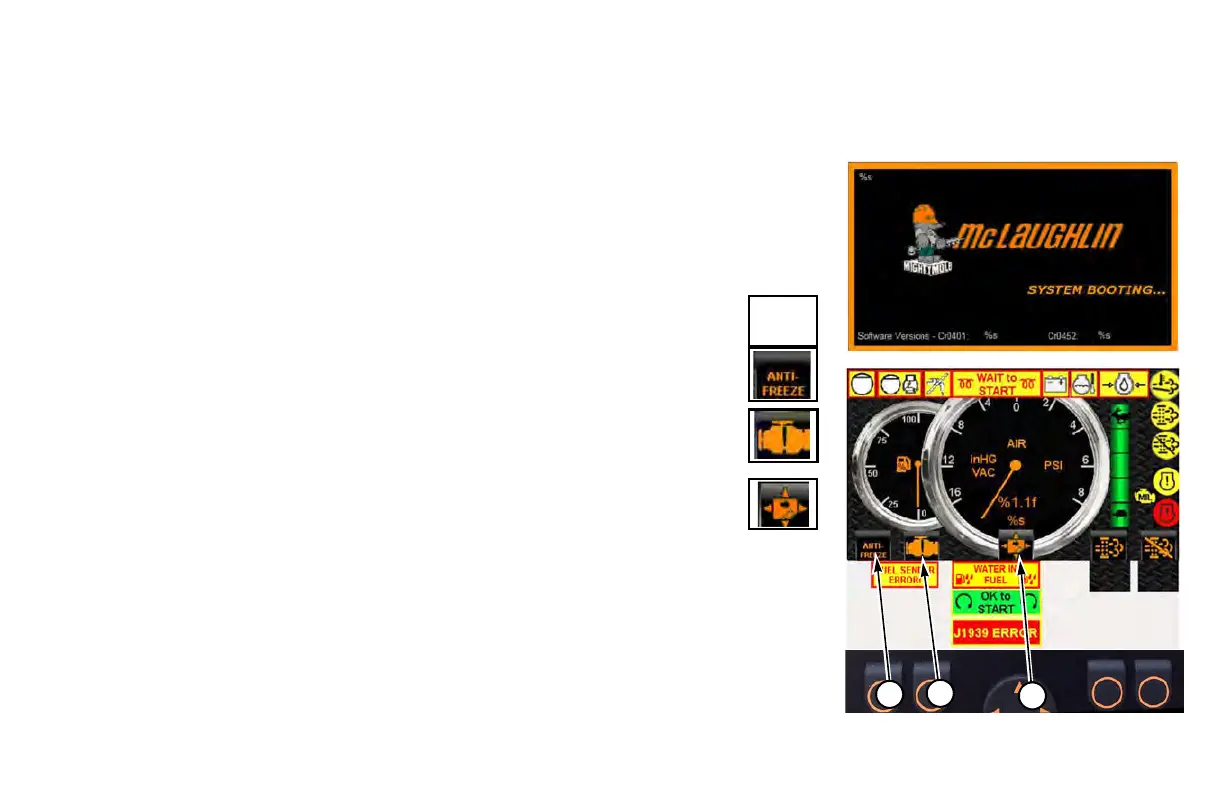
The “System Booting” screen displays for 3 seconds, then
automatically switches to the main engine screen shown below.
(1)
Antifreeze/Water ON/OFF Switch
Icon displays Water On when water level is low in the fresh water
ta
nk. When tank is emptied, icon will change to Antifreeze.
Press to turn water pump ON. Press ag
ain to turn water pump OFF.
Press and hold to turn antifreeze ON. Release to turn
antifreeze OFF.
(2) Engine Error Codes
Press switch to display a list of
ECU reported engine error codes.
(3) Screen Selection
Press UP or RIGHT arrow to go to engine screen. Press
DOWN or
LEFT arrow to go to arrow board screen.


 To Next Page