20-22 Controls VX30/VX50 Gen3/ECO50 Vacuum Excavators
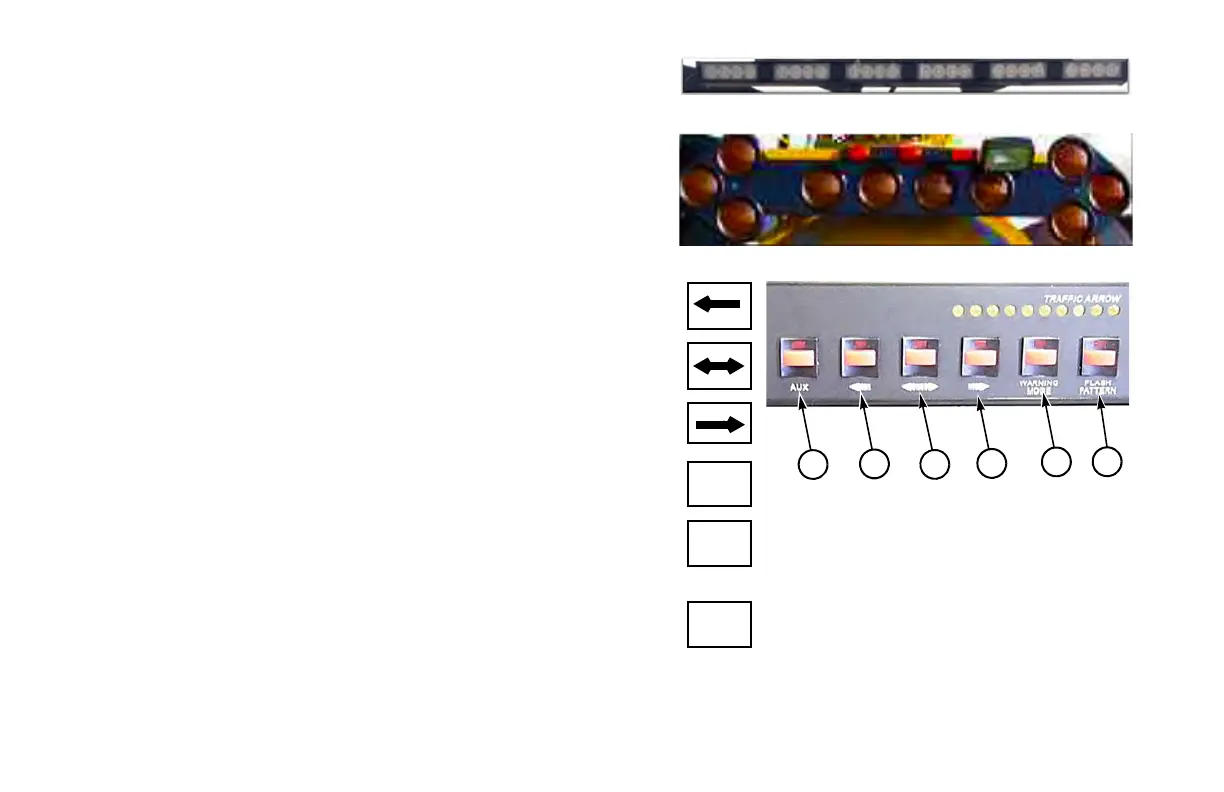
ARROW BOARD (OPTIONAL)
The arrow board is located at the back of the machine, on top of the spoil
tank. Flashing arrow lights alert oncoming motorists and direct traffic
flow around the machine when working on or near a roadway.
VX30 Arrow Board Controls
The small yellow lights at the top of control panel display the selected
light pattern.
(1) Left Arrow ON/OFF Switch. . . . . . . . . . . . . . . . . . . . . . . . . . . . . . .
Press to turn left arrow light pattern ON or OFF.
(2) Double Arrow ON/OFF Switch . . . . . . . . . . . . . . . . . . . . . . . . . . . .
Press to turn double arrow light pattern ON or OFF.
(3) Right Arrow ON/OFF Switch . . . . . . . . . . . . . . . . . . . . . . . . . . . . .
Press to turn right arrow light pattern ON or OFF.
(4) Warning Mode Switch . . . . . . . . . . . . . . . . . . . . . . . . . . . . . . . . . . .
Press to turn preset warning mode lig
ht pattern ON or OFF.
(5) Flash Pattern ON/OFF Switch . . . . . . . . . . . . . . . . . . . . . . . . . . . .
Press to scroll through flashing light patterns until desired pattern i
s
displayed.
(6) Aux. Switch
Not currently used.


 To Next Page