50-16 Operating the Vacuum Excavator VX30/VX50 Gen3/ECO50 Vacuum Excavators
Boom (VX50/ECO50 Option)
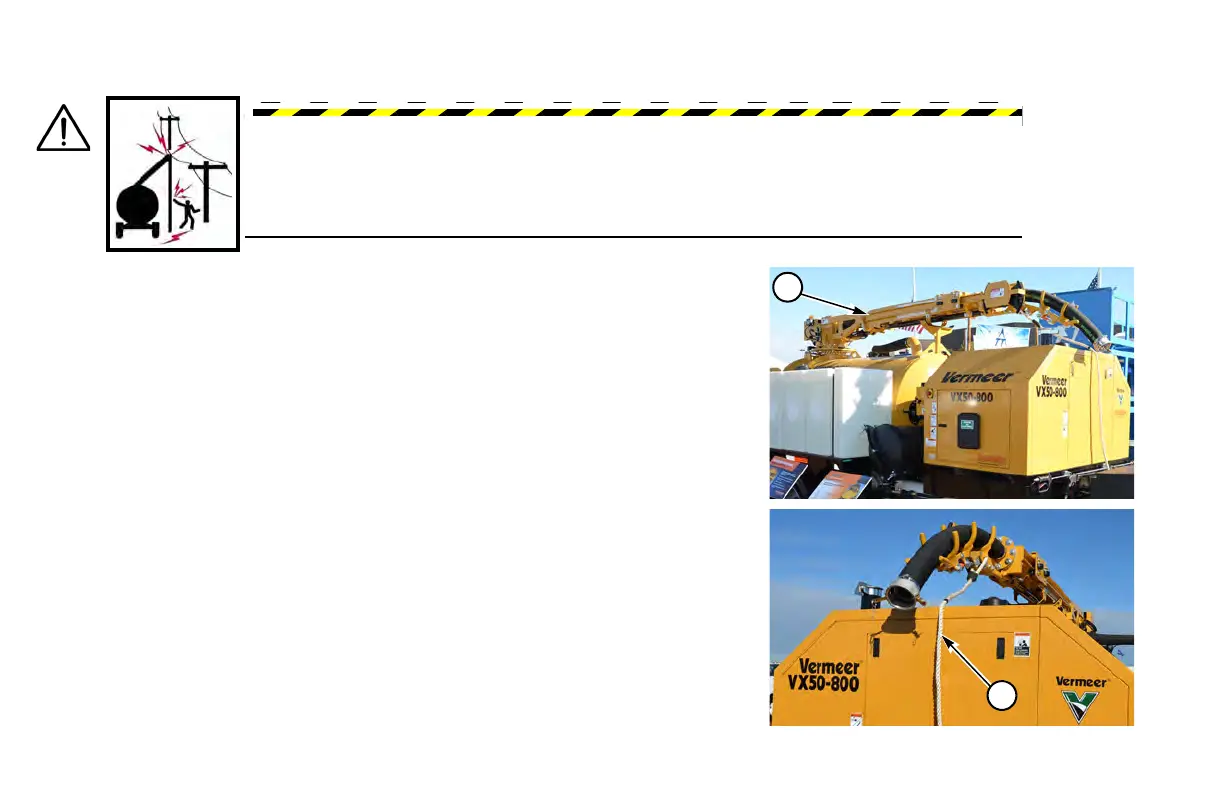
The hydraulic telescoping boom (1) maintains hose length during extension and
allows remote controlled boom operation plus a remote controlled hydraulic valve
for vacuum shutoff. Hydraulic (1) or manual (2) boom rotation is available.
Step 1: Remove remot
e control from curbside door.
Step 2: Follow the “Starting Procedure,” p
age 22-1. Set throttle to high speed.
Step 3: Us
ing remote control, raise the boom so it clears all obstructions in the
travel path.
Step 4: Manual Boom: Press and ho
ld Lock Switch on remote control to unlock
the pin. Use the rope (2) to manually swing the boom into position. Once
boom is in place, release Lock Switch to lock pin into place.
Hydraulic Boom: Us
ing remote control, move boom to desired position.
Boom automatically locks in place.
DANGER: ELECTROCUTION HAZARD. Death or serious injury will result if boom
approaches or touches overhead electrical power lines.
Keep boom away from overhead utilities. Use caution when operating boom.


 To Next Page