30-6 Transporting the Machine VX30/VX50 Gen3/ECO50 Vacuum Excavators
Boom (Option) - Store for Transport
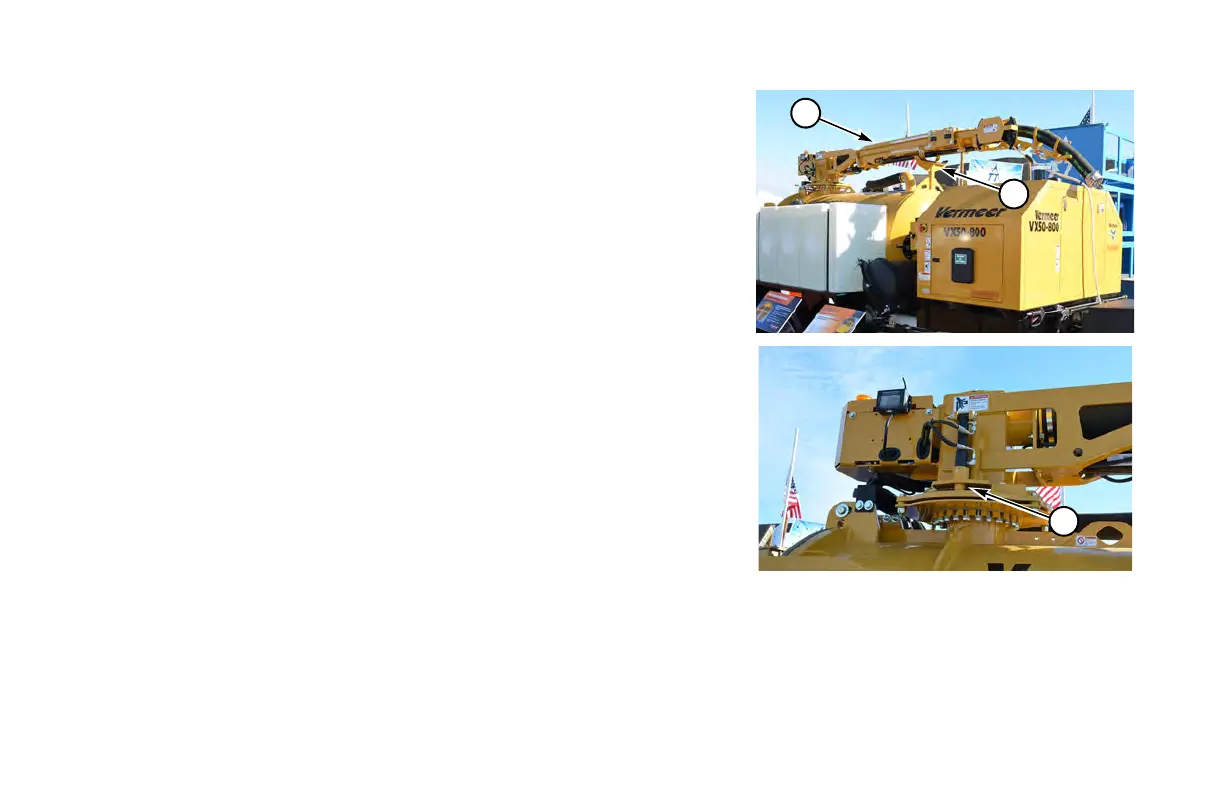
If equipped with a boom (1), stow and lock boom in transport position as follows:
Step 1: Sta
rt machine, and move throttle to high speed.
Hydraulic rotation boom:
Step 2: Using
remote control, retract boom, then raise boom until it clears any
obstructions in travel path.
Step 3: Using rem
ote control, swing boom into storage position above bracket
(2).
Step 4: Lower boom
onto bracket. Lock cylinder engages automatically.
Manual rotation boom:
Step 2: Using remote control, retract boom, then raise boom until it clears any
obstructions in its travel path.
Step 3: Using rem
ote control, press and hold Brake Button and use rope to
manually swing boom into storage position above bracket (2).
Step 4: Lower boom
onto bracket.
Step 5: Releas
e Brake Button to engage lock pin (3).


 To Next Page