© Microhard Systems Inc. 113
4.0 WebUI Configuration
4.10.9 Advanced > Power Saving
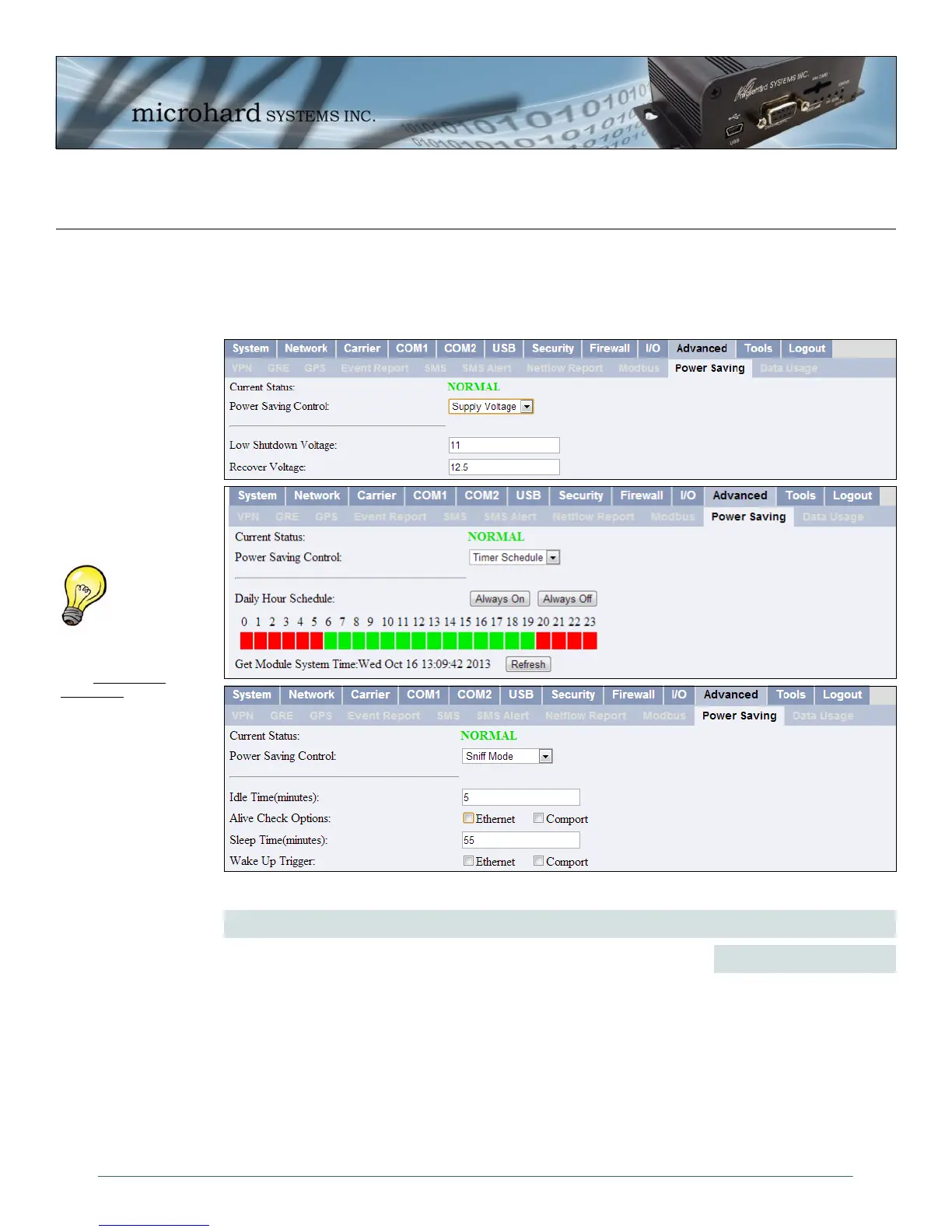
Various power saving options are available in the IPn3G. The IPn3G can be put into power saving mode
by either using the input voltage, a simple timer, or by sensing incoming local data.
Image 4-71: Advanced > Power Saving Options
Power Saving Control
Values (selection)
Select the desired power saving mode for the IPn3G. Note that while in
power saving mode (asleep), the unit cannot be reached remotely using
the WAN IP address.
Supply Voltage Mode - The IPn3G will go into power saving mode when
the voltage supplied to the IPn3G drops below a specified value. The unit
will return to normal operation once the recovery threshold is crossed.
Timer Schedule - The IPn3G can go into power saving modes at specific
time intervals on hourly intervals.
Sniff Mode - The IPn3G will enter power saving mode after the Idle time
has expired until the sleep timer expires, unless woken up by data being
detected on the Ethernet and/or Serial com port.
Disable
Supply Voltage
Timer Schedule
Sniff Mode
The power saving mode
can be enabled/switched
using System SMS
Commands.



 To Next Page