© Microhard Systems Inc. 121
4.0 WebUI Configuration
4.11.1.5 Firmware Upgrades
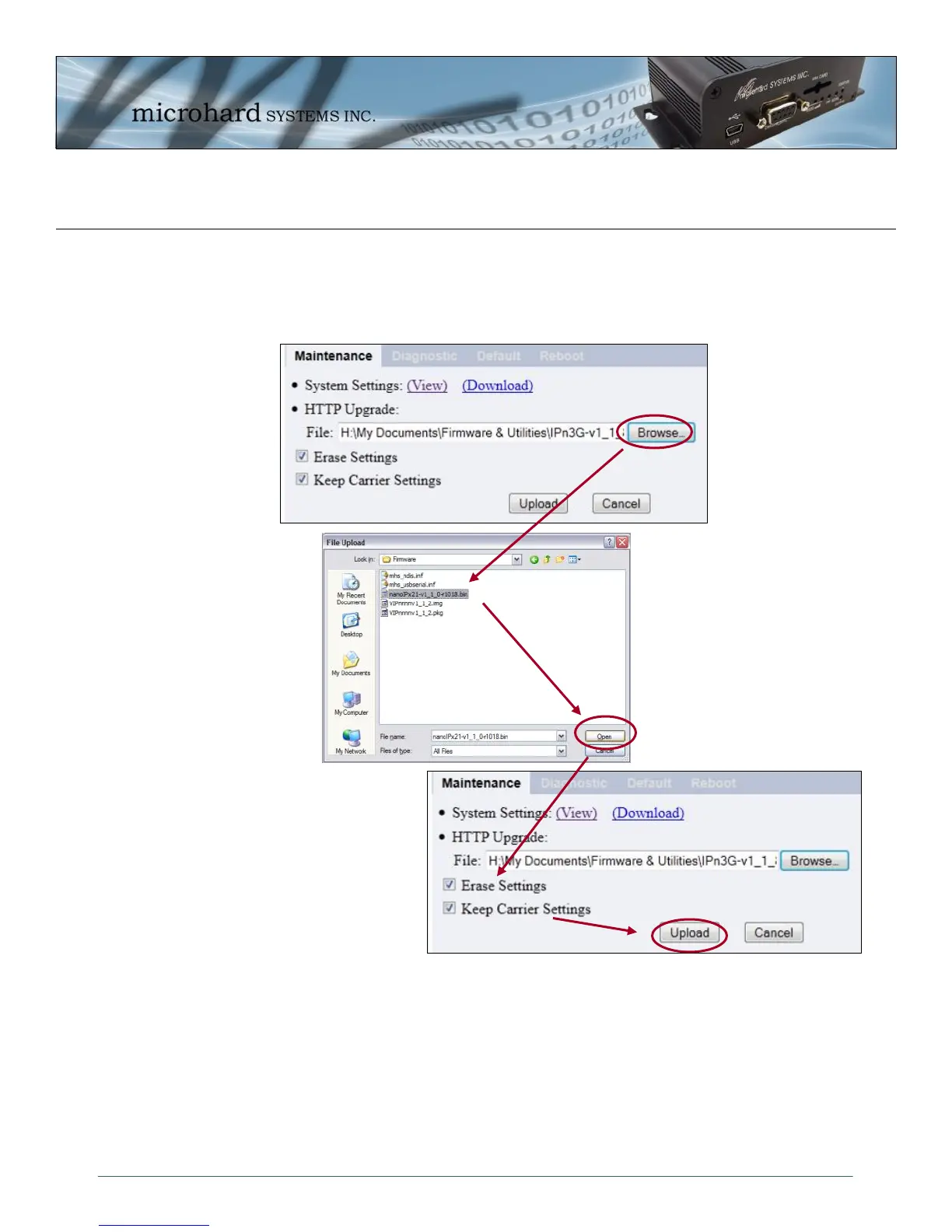
HTTP Upgrade is used to upgrade the IPn3G ’s system software (firmware). Select the Browse button to
locate the upgrade file provided my Microhard Systems.
Using the Erase Settings checkbox tells the IPn3G not to store the current configuration settings, there-
fore once the upgrade process is complete the unit will have factory default settings (Including the default
Carrier Settings).
Use the Keep Carrier Settings checkbox to retain the carrier settings. This is recommended if the unit is
remote as all access will be lost if the carrier settings are erased.
The Upload button will begin the process. It can take several minutes to complete. The unit will reboot once
the upgrade process is complete.
Image 4-79: Tools > Maintenance > WebUI Firmware Upload



 To Next Page