© Microhard Systems Inc. 70
4.0 WebUI Configuration
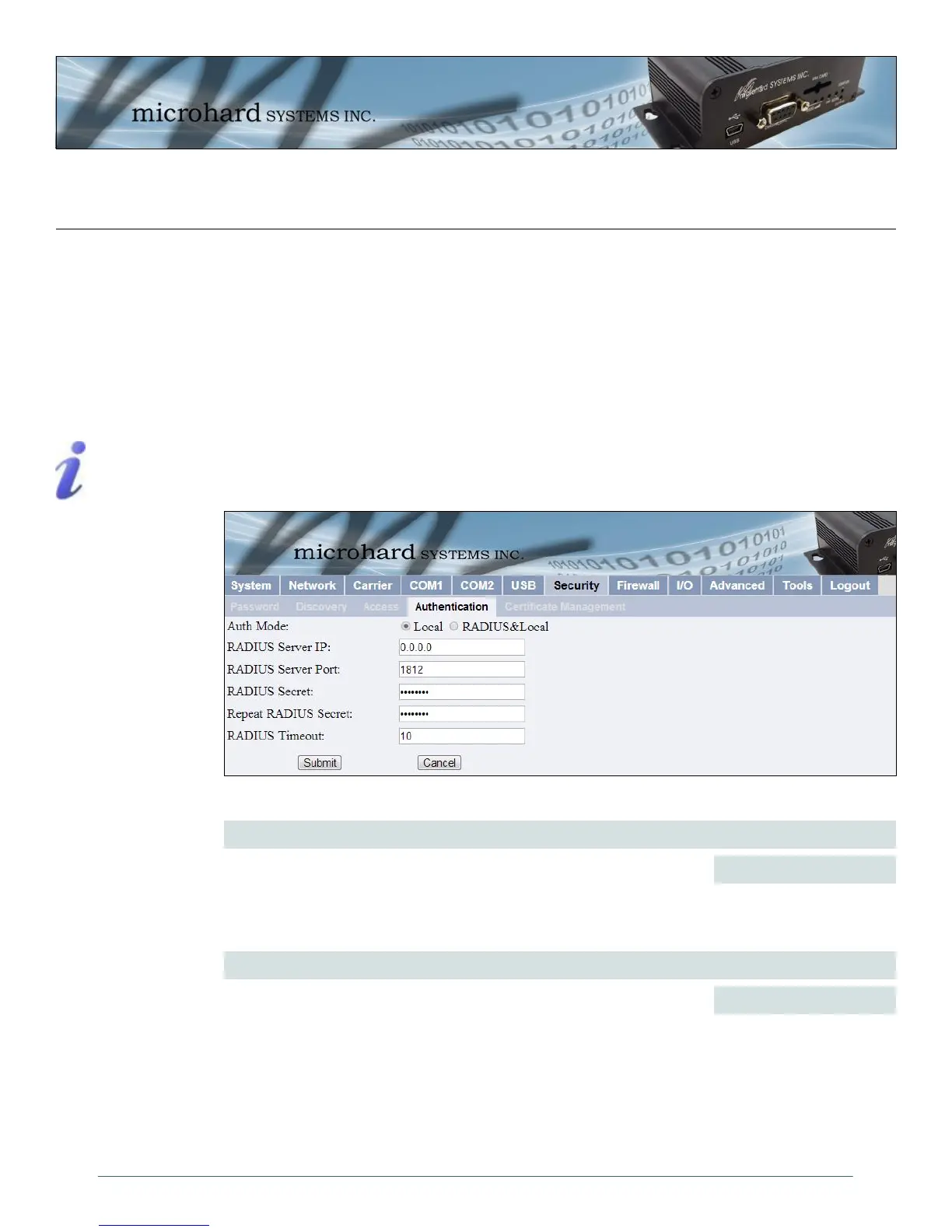
Image 4-36: Security Config. Menu, Authentication Config. Submenu
4.7.4 Security > Authentication
There are two methods whereby a user may be authenticated for access to the IPn3G:
Local
Using the Admin or Upgrade access and associated passwords - the authentication is
done ‘locally’ within the IPn3G, and
RADIUS&Local
RADIUS authentication (using a specific user name and password supplied by your
RADIUS Server Administrator) - this authentication would be done ‘remotely’ by a
RADIUS Server; if this authentication fails, proceed with Local authentication as per
above.
RADIUS: Remote
Authentication Dial In
User Service. An
authentication,
authorization, and
accounting protocol which
may be used in network
access applications.
A RADIUS server is used
to verifying that
information is correct.
RADIUS Server IP
In this field, the IP address of the RADIUS server is to be entered if
RADIUS&Local has been selected as the Authorization Mode.
Values
Local
RADIUS&Local
Values
Valid RADIUS server IP
address
0.0.0.0
Auth Mode
Select the Authentication Mode: Local (default) or RADIUS&Local. For
the latter selection, RADIUS authentication must be attempted FIRST; if
unsuccessful, THEN Local authentication may be attempted.



 To Next Page