© Microhard Systems Inc. 114
4.0 WebUI Configuration
4.10.10 Advanced > Data Usage
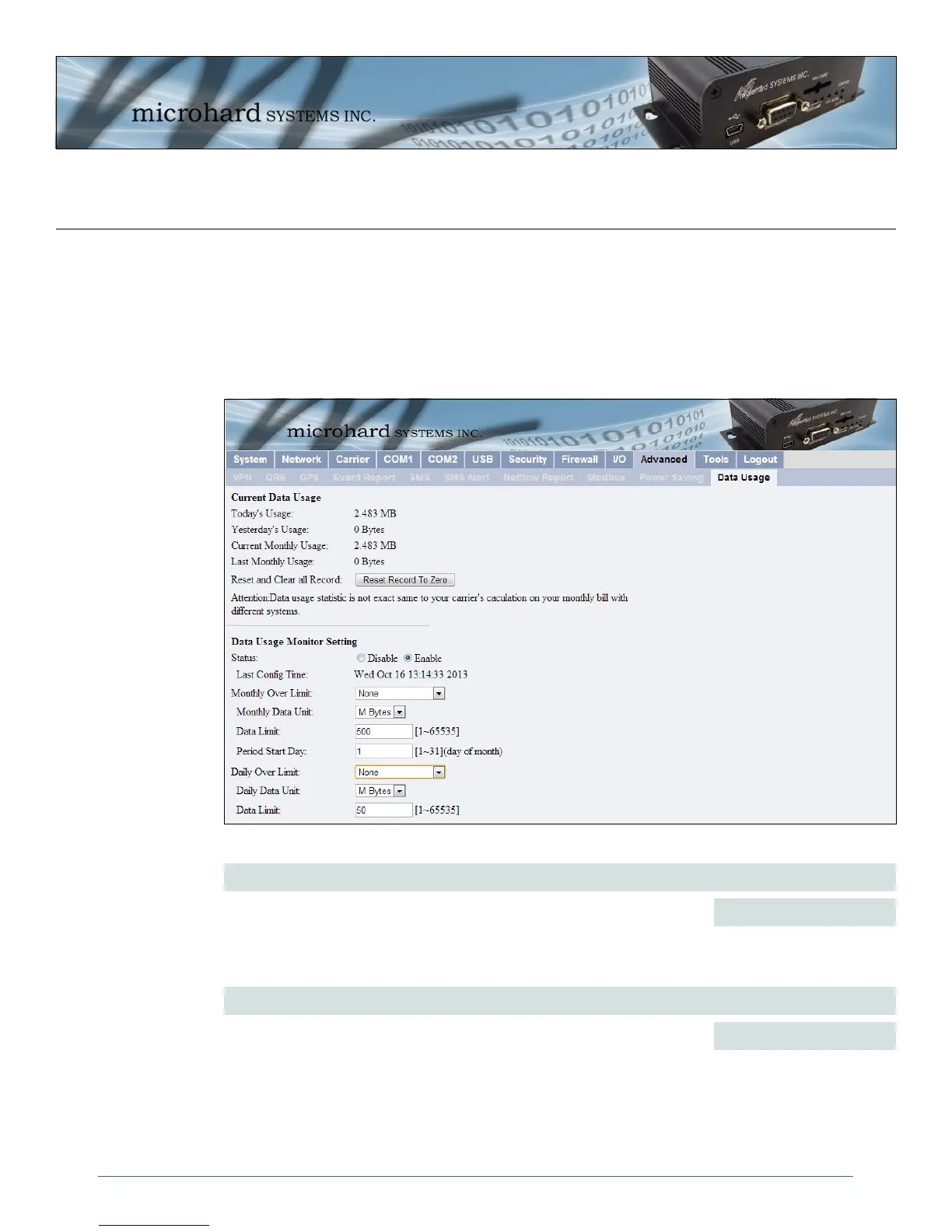
The Data Usage tool on the IPn3G allows users to monitor the amount of cellular data consumed. Since
cellular devices are generally billed based on the amount of data used, alerts can be triggered by setting
daily and/or monthly limits. Notifications can be sent using SMS or Email, allowing a early warning if
configurable limits are about to be exceeded. The usage data reported by the Data Usage Monitor may not
match the data reported by the carrier, but it gives the users an idea of the bandwidth consumed by the
IPn3G.
Image 4-72: Advanced > Data Usage
Status
Values (selection)
If enabled the IPn3G will track the amount of cellular data consumed. If
disabled, data is not recorded, even in the Current Data Usage display.
Disable
Enable
Monthly/Daily Over Limit
Values (selection)
Select the notification method used to send alerts when daily or monthly
thresholds are exceeded. If none is selected, notifications will not be sent,
but data usage will be recorded for reference purposes.
None
Send Notice SMS
Send Notice Email



 To Next Page