© Microhard Systems Inc. 122
4.0 WebUI Configuration
4.11.1.6 Firmware Upgrades (FTP)
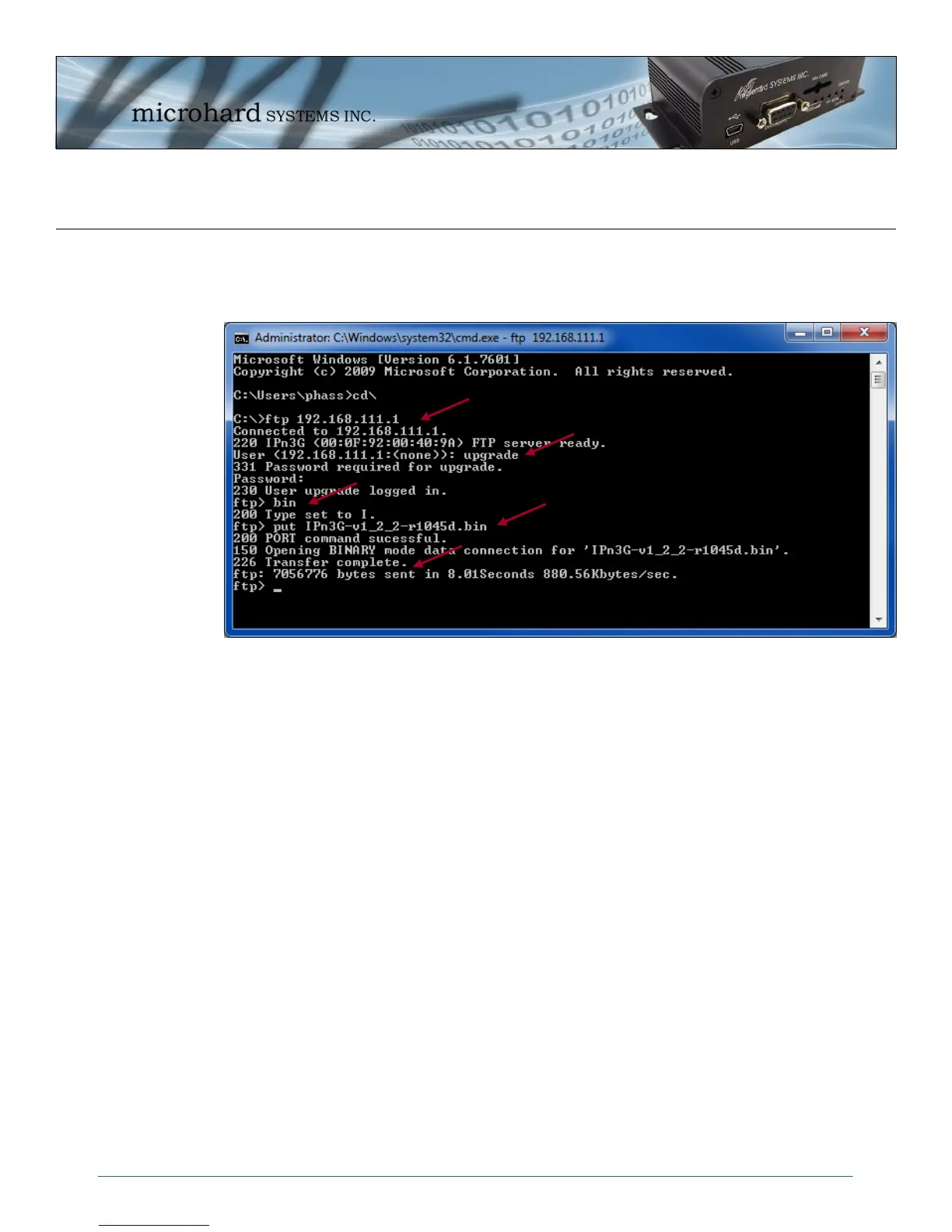
FTP can also be used to upgrade the system firmware as seen below:
Image 4-80: Tools > Maintenance > Firmware Upgrade (FTP)
1. From a DOS command prompt, start a FTP session with the IPn3G, you can FTP to the USB NDIS IP
Address (192.168.111.1), the LAN IP Address (192.168.0.1), and if the firewall settings allow, the
WAN IP Address. The example uses the USB NDIS Interface address. It is recommended to navigate
to the folder (in DOS) in which the firmware file is located and launch the FTP session from there.
2. Login using the username: upgrade and the password: admin
3. Since the firmware files are in binary format, the bin command must be issued to the IPn3G to but it
into binary transfer mode.
4. “put” the file by specifying the complete filename of the firmware file.
5. The Transfer should show as complete.
6. The unit will reboot with the new firmware.
1
2
3
4
5



 To Next Page