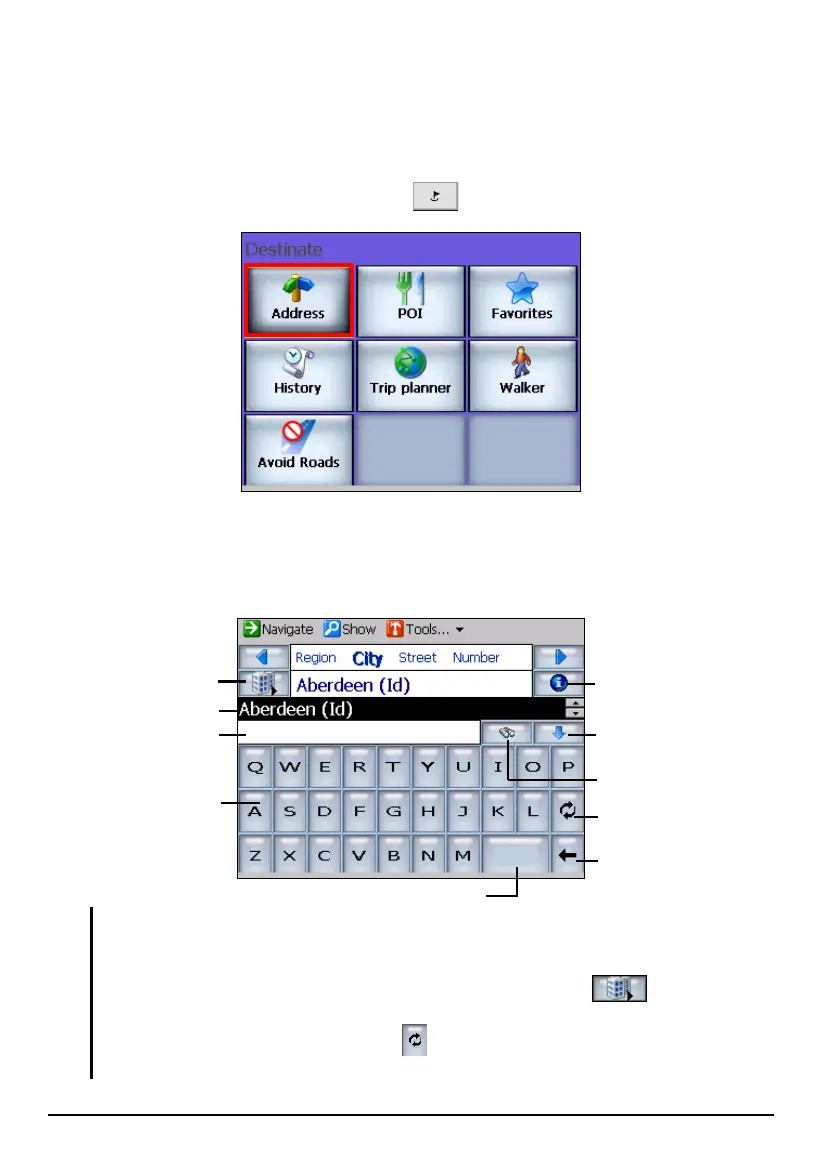
Using Address
If you have information such as address, intersection, or zip code of your
destination, you can use this method to select a location.
1. Press the Navigation Settings button
once and tap Address.
2. By default, the sequence for entering the address is
City Street Number.
Displayed on the screen is the city name that tops the city list in the
alphabetical order.
NOTE:
By tapping Region, you can switch to another map. This cross-region navigation feature
allows you to navigate a route that extends across more than one region (map).
You can change the sequence for entering the address using the button. (See the
subsection later on for instructions on using a different address sequence.)
When using the soft keyboard, tap the
button once to switch to the alphabetical-order
keyboard and twice to switch to the number/symbol keyboard.
Sequence change
Backspace
Space ba
Information
Soft keyboard
Input field
Scroll list
Keyboard switch
Key letter search
Tap to expand scroll list.
38



 To Next Page