Operation
5-30 October 2019 16K PLUS
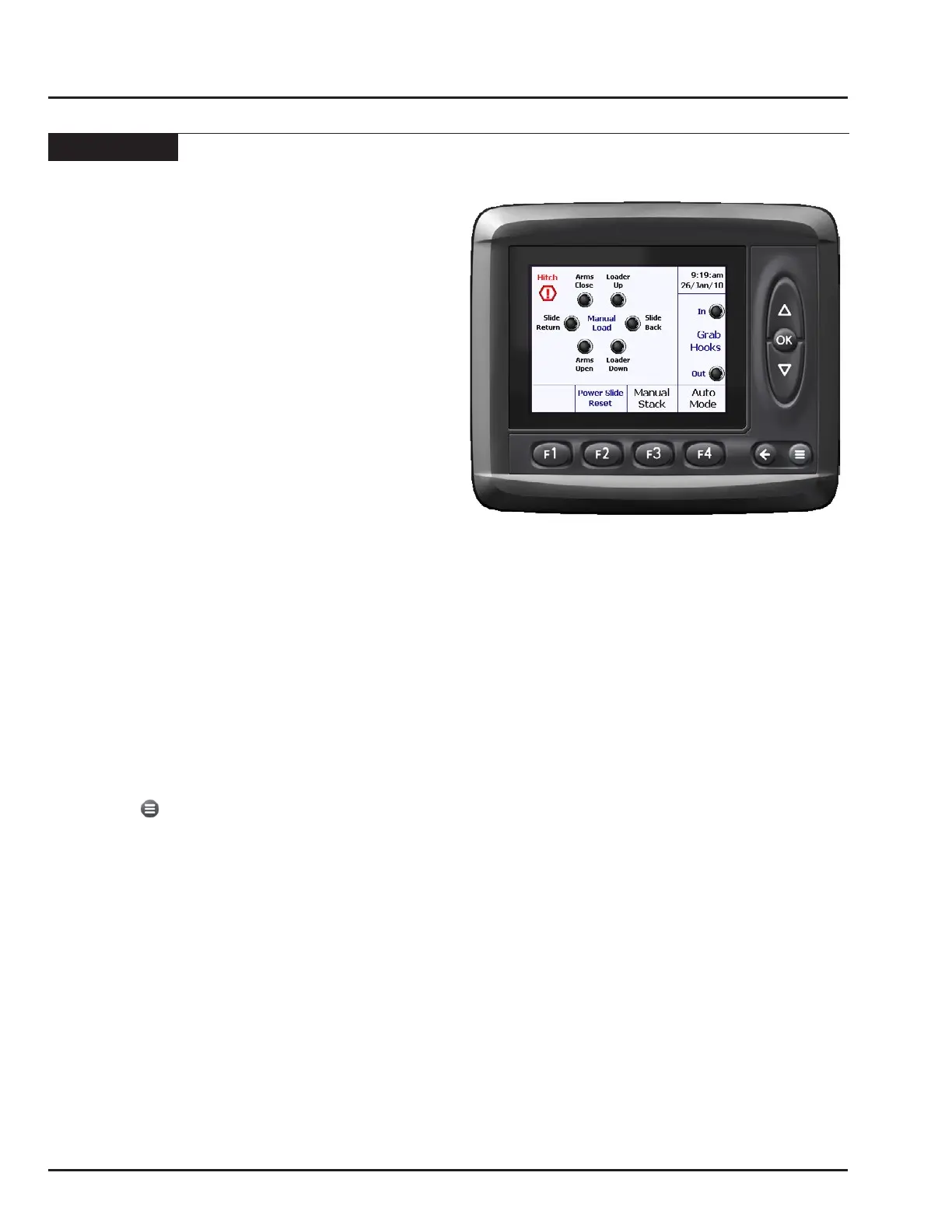
Manual Load
When the Manual Load screen is displayed, the operator
can perform the following functions pressing the
corresponding button on the monitor or on the joystick
as indicated on the screen.
Functions will only operate when the user is pressing
the corresponding button. When the user releases the
button, the function will stop. There is no sequencing in
manual mode.
Note: Crash avoidance is built into the monitor
programming to aid operator in avoiding
damage. If a function is selected that could
potentially harm the machine, the monitor
will disregard the command and a warning
screen will be displayed. See “Trouble
Shooting” for more information.
The functions on the Manual Load screen are those
typically needed to pick bales up off the eld:
Arms Close - Squeezes the alignment arms shut.
Arms Open - Opens the alignment arms.
Loader Up - Raises the loader.
Loader Down - Lowers the loader.
Slide Back - Pushes bales back down the bed.
Slide Return - Returns the slider to its home position.
Hooks In - Engages the grab hooks.
Hooks Out - Releases the grab hooks.
From this screen the user can get to three other screens:
Auto Mode press F4 button.
Manual Stack press F3 button.
Menu press button.



 To Next Page