Operation
5-34 October 2019 16K PLUS
Automatic Mode - Continued
Operating the Machine in Automatic Mode
1. Setting up the stacker to load bales.
A. Check if the loader is up.
• If the loader is not up go to step B.
• If it is up go to step C.
B. Manually raise the loader.
• Press the Manual Load button on the monitor to get to the Manual Load screen.
• Raise the loader using the Loader Up button on the joystick.
• Return to the Automatic screen by pressing the Auto Load button.
C. Conrm that the Power Slide is in home position.
• Visually check to ensure the power slide is in the proper position.
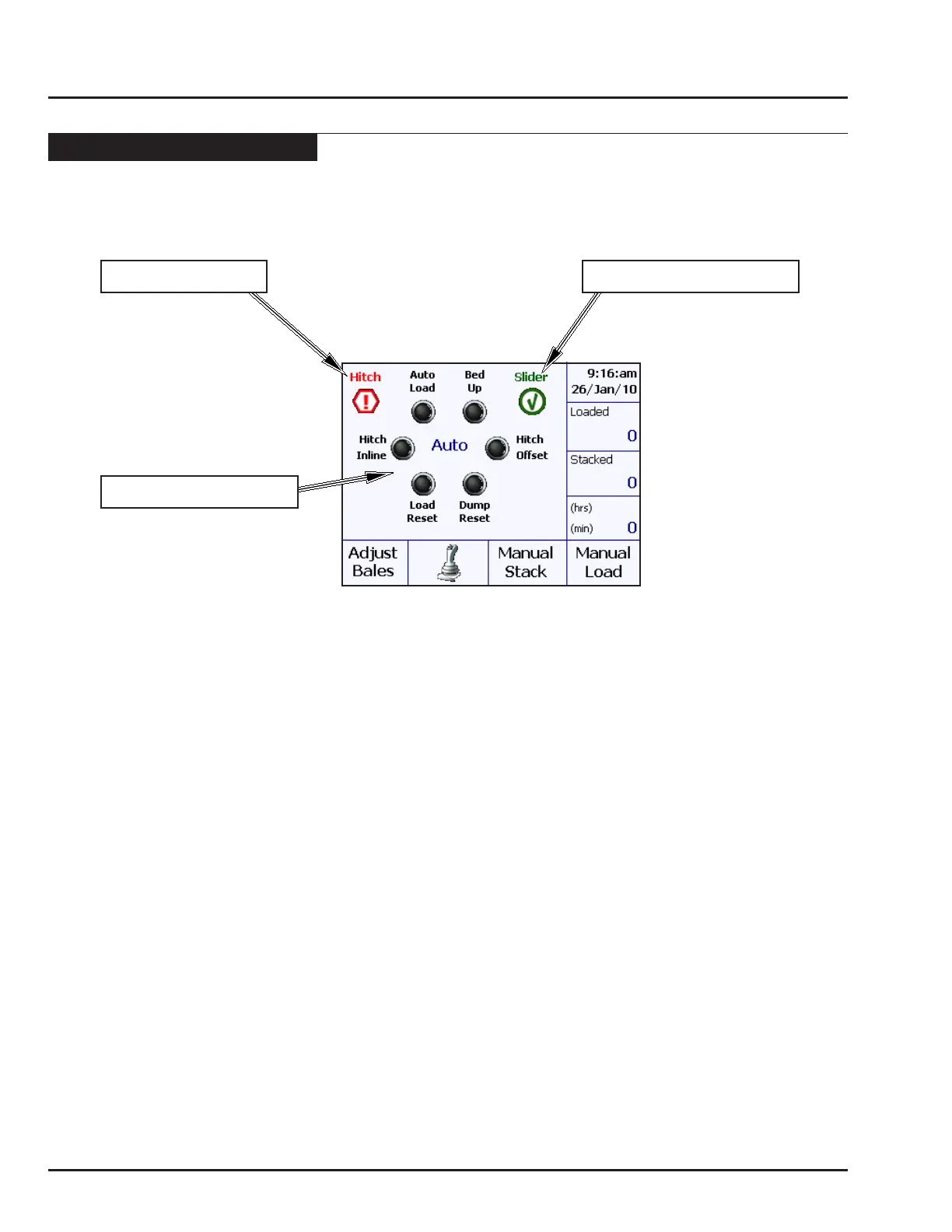
• Ensure the Power Slide Indicator on the monitor shows a green check mark .
• See Resting Power Slide for more details.
D. Move the hitch offset using the Hitch Offset button on the joystick.
• Ensure the Hitch Indicator on the monitor shows a red ! mark.
E. Lower the loader using the Load Reset button on the joystick.
• The alignment arms open and then the loader begins to lower.
• After 1.5 seconds the operator may release the Load Reset switch.
• The monitor continues to lower the loader for the time specied in the Conguration screen.
POWER SLIDE INDICATOR
HITCH INDICATOR
JOYSTICK INDICATOR



 To Next Page