Operation
5-40 October 2019 16K PLUS
Operation of Controls - Continued
Operation Screens - Continued
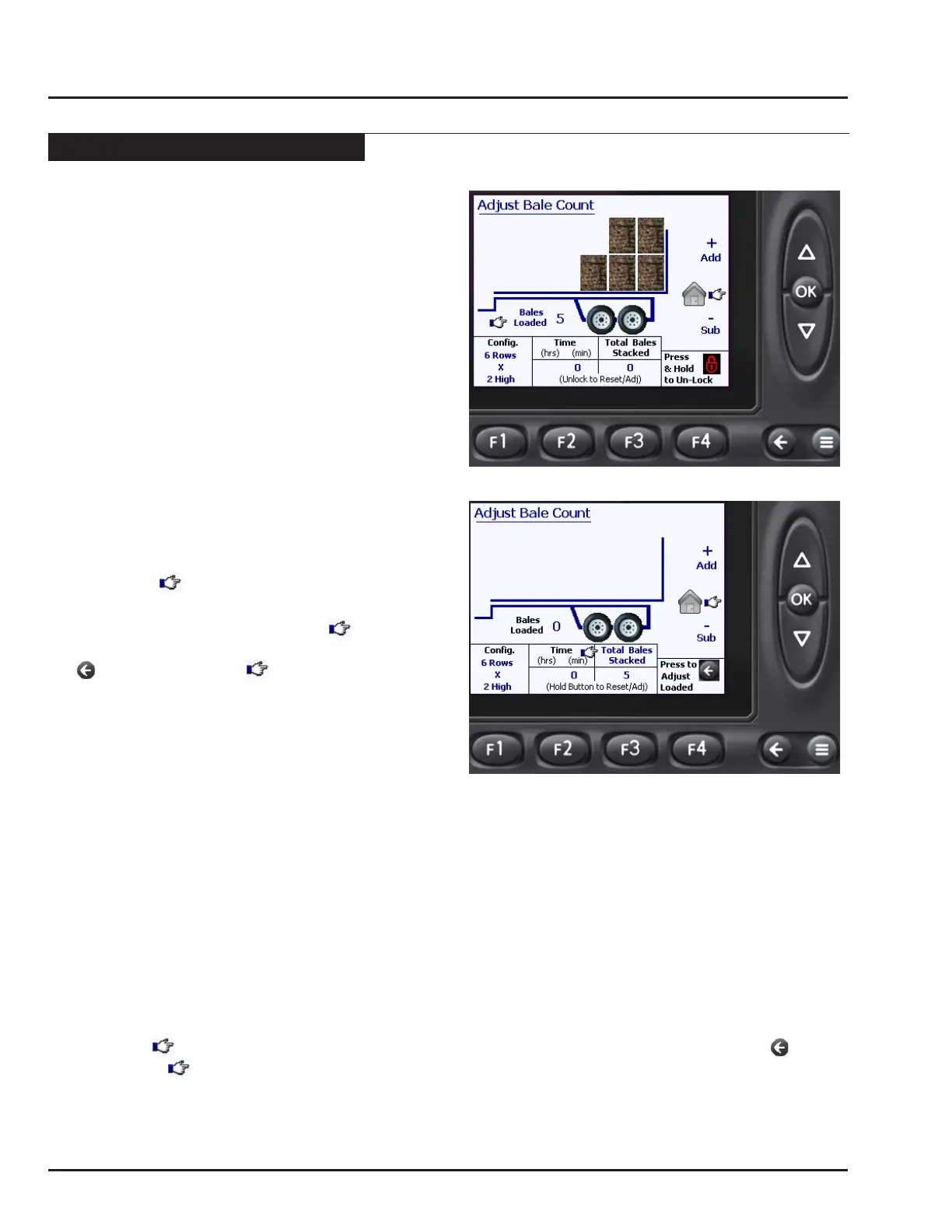
Adjusting the Bales Loaded
The Bales Loaded represents the number of bales that
are currently loaded on the 16k PLUS.
Every time the loader is raised with a bale on in the Auto
Load screen, the monitor assumes either 2 or 3 bales
were loaded. (depending on the Bale Conguration)
At times, it is necessary to correct the Bales Loaded.
Common reasons to do so include:
• When building the backstop for a stack, only one
bale was picked in the last row.
• Bales were loaded using the Manual Load screen,
and therefore not counted by the monitor.
Upon entry of the Adjust Bale Count screen, the number
of bales loaded can be adjusted using the UP and
DOWN arrow buttons
• The Bales Loaded can be adjusted regardless if the
page is locked or unlocked.
• Notice the symbol points towards the Bales
Loaded when the screen is locked
• If the screen is unlocked and the symbol is
pointing towards the Total Bales Stacked, press the
button to toggle the symbol back to Bales
Loaded
• All changes will be saved when the monitor is
returned to the Auto Load screen by pressing the
OK button.
Adjusting the Bales Stacked
The Bales Loaded represents the number of bales that the 16k PLUS has stacked.
Every time the bed is fully raised with bales loaded, the monitor adds the number of Bales Loaded to the Bales
Stacked and resets the Bales Loaded to zero.
At times, it is necessary to adjust the Bales Stacked. Common reasons to do so include:
• The Bales Loaded was incorrect when the bales were stacked.
• A new stack is being started and the operator wants the Bales Stacked reset to zero.
Upon entry of the Adjust Bale Count screen, the page must rst be unlocked before the number of Bales Stacked
can be adjusted.
• Unlock the page by holding the F4 button for 2 seconds
• Notice the symbol points towards the Bales Loaded when the screen is rst unlocked. Press the button
to toggle the symbol to Bales Stacked.
• Use the UP and DOWN arrows to adjust the number of Bales Stacked, -OR- Press and hold the F3 button to
reset the Bales Stacked to zero.
• All changes will be saved when the monitor is returned to the Auto Load screen by pressing the OK button.



 To Next Page