MTC-98
TROUBLE DIAGNOSIS
Revision: January 2005 2004 Quest
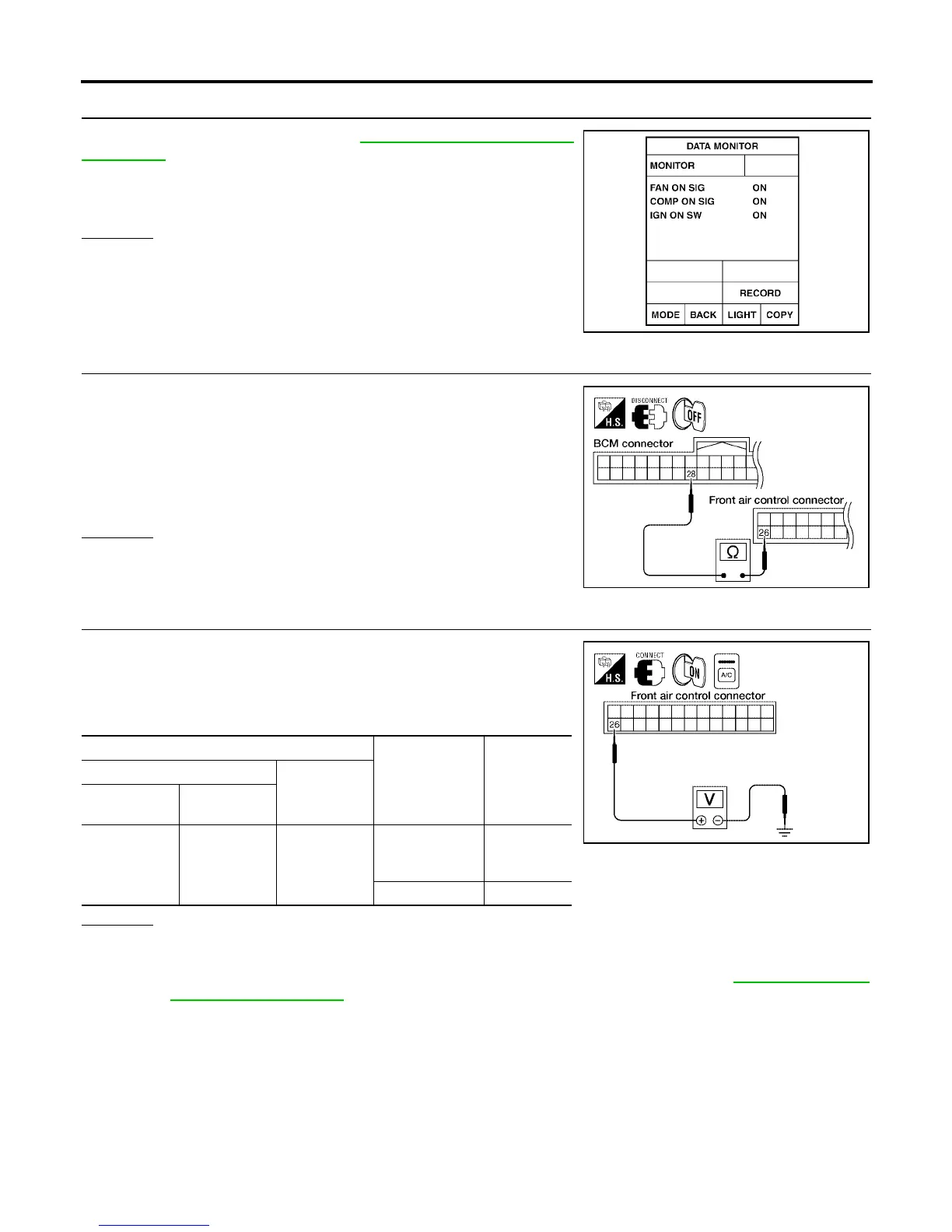
9. CHECK BCM INPUT (FAN ON) SIGNAL
Check FAN ON/OFF signal. Refer to MTC-31, "
CONSULT-II Func-
tion (BCM)" .
OK or NG
OK >> GO TO 12.
NG >> GO TO 10.
10. CHECK CIRCUIT CONTINUITY BETWEEN BCM AND FRONT AIR CONTROL
1. Turn ignition switch OFF.
2. Disconnect BCM connector and front air control connector.
3. Check continuity between BCM harness connector M18 terminal
28 (L/Y) and front air control harness connector M49 terminal 26
(G/B).
OK or NG
OK >> GO TO 11.
NG >> Repair harness or connector.
11. CHECK VOLTAGE FOR FRONT AIR CONTROL (FAN ON SIGNAL)
1. Reconnect BCM connector and front air control connector.
2. Turn ignition switch ON.
3. Check voltage between front air control harness connector M49
terminal 26 (G/B) and ground.
OK or NG
OK >> GO TO 12.
NG-1 >> If the voltage is approx. 5V when blower motor is ON, replace front air control.
NG-2 >> If the voltage is approx. 0V when blower motor is OFF, replace BCM. Refer to BCS-19, "
Removal
and Installation of BCM" .
FAN CONTROL SWITCH ON : FAN ON SIG ON
FAN CONTROL SWITCH OFF : FAN ON SIG OFF
WJIA0469E
Continuity should exist.
WJIA0975E
Terminals
Condition
Voltage
(Approx.)
(+)
(-)
Front air con-
trol connector
Terminal No.
(Wire color)
M49 26 (G/B) Ground
A/C switch: ON
Blower motor
operates
0V
A/C switch: OFF 5V
WJIA0976E



 To Next Page