Replace the filter of the light-weight media module
NOTE
Only trained operators are allowed to perform maintenance tasks.
Action
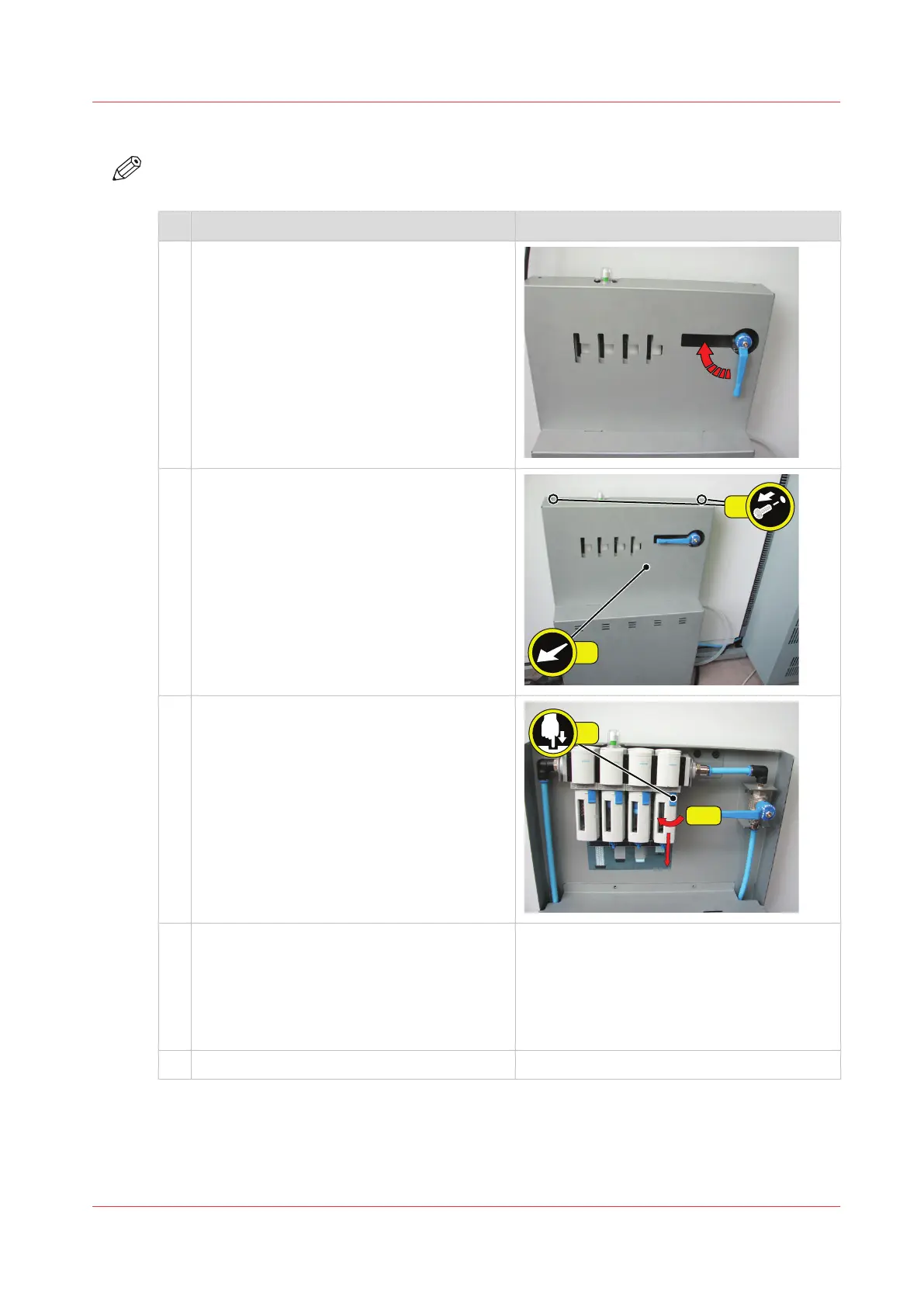
1 Move the handle up to shut off the incoming
air.
2 Remove the upper cover of the filter unit.
1. Remove the two screws.
2. Remove the upper cover.
3 Remove all 4 filters.
1. Push the blue locking down.
2. Rotate the cover clockwise about 30°.
You must use force.
3. Pull the cover downwards.
4. Remove the filter.
4 Install 4 new filters.
1. Install the new filter.
2. Install the cover upwards.
3. Rotate the cover anticlockwise about 30°.
You must use force.
4. Push the blue locking up.
5 Install the upper cover of the filter unit.
4
Troubleshooting for light-weight media
Chapter 14 - Troubleshooting
283
Océ VarioPrint 6000 line













 To Next Page